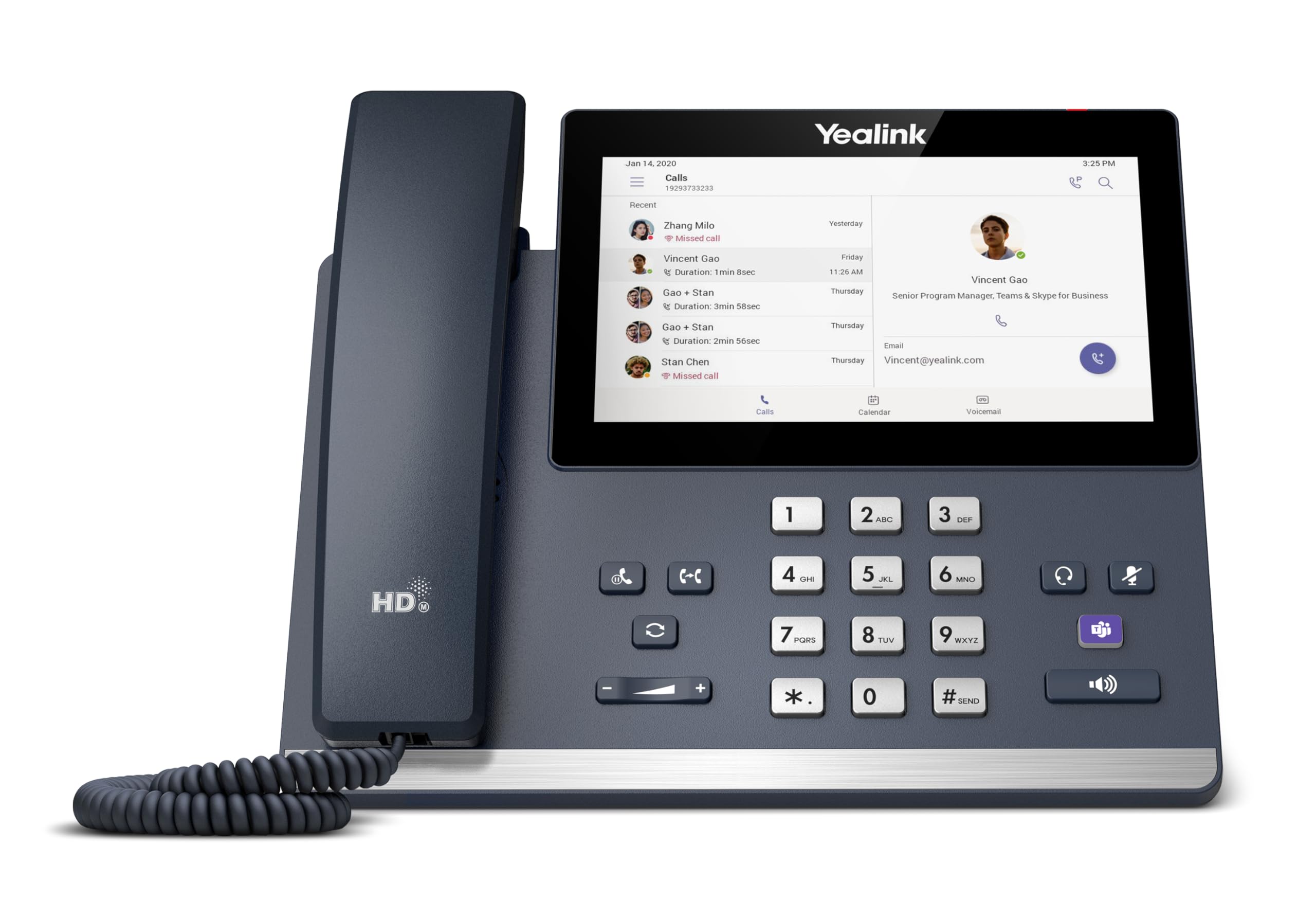
Based On Android 13 Os, The Mp56 E2 Is A Teams-Tailored Ip Phone With A 7-Inch Capacitive Touch Screen, Which Offers A Faster Response Speed. It Facilitates High-Quality Collaboration With Flexibility Thanks To The Yealink Optima Hd Voice And Magnet Handset, Dedicated Teams Button, And Bluetooth Connectivity To Bluetooth Headsets. This Easy-To-Use And Reliable Option Is Ideal For Office Workers.
⚠️ WARNING (California Proposition 65): This product may contain chemicals known to the State of California to cause cancer, birth defects, or other reproductive harm. For more information, please visit www.P65Warnings.ca.gov.
Frequently Asked Questions
Q: What are the dimensions of the Yealink MP56-TEAMS-E2?A: The dimensions are twelve inches in length, ten inches in width, and five inches in height. This size makes it suitable for any office desk.
Q: What operating system does the Yealink MP56-TEAMS-E2 use?A: The Yealink MP56-TEAMS-E2 operates on Android thirteen. This ensures compatibility with various applications and features.
Q: What type of screen does the Yealink MP56-TEAMS-E2 have?A: It features a seven-inch capacitive touch screen. The screen resolution is one thousand twenty-four by eight hundred sixty.
Q: What materials are used in the Yealink MP56-TEAMS-E2?A: The main material is plastic. This provides durability while keeping the phone lightweight.
Q: Does the Yealink MP56-TEAMS-E2 have any special audio technology?A: Yes, it includes Yealink Noise Proof Technology for optimal audio quality. This helps minimize background noise during calls.
Q: How do I connect the Yealink MP56-TEAMS-E2 to the internet?A: You can connect it via dual-band Wi-Fi or Ethernet. It supports both two point four gigahertz and five gigahertz connections.
Q: Can I use Bluetooth headsets with the Yealink MP56-TEAMS-E2?A: Yes, it has built-in Bluetooth five point two support. This allows for easy pairing with compatible Bluetooth headsets.
Q: What is the main purpose of the dedicated Microsoft Teams button?A: The dedicated Teams button provides quick access to Microsoft Teams functions. This enhances productivity during calls and meetings.
Q: How do I power the Yealink MP56-TEAMS-E2?A: It requires Power over Ethernet (PoE) for operation. Note that a power adapter is not included with the purchase.
Q: Is the Yealink MP56-TEAMS-E2 suitable for office environments?A: Yes, it is designed specifically for office workers. Its features promote efficient communication and collaboration.
Q: What type of warranty comes with the Yealink MP56-TEAMS-E2?A: The product typically comes with a standard manufacturer warranty. Check with the retailer for specific warranty details.
Q: How do I clean the Yealink MP56-TEAMS-E2?A: Use a soft, dry cloth to clean the surface. Avoid using harsh chemicals to prevent damage to the screen and casing.
Q: What should I do if the Yealink MP56-TEAMS-E2 arrives damaged?A: Contact the retailer immediately for assistance. Most retailers have return policies for damaged goods.
Q: Can the Yealink MP56-TEAMS-E2 support USB headsets?A: Yes, it features one USB Type A port that supports USB headsets. This allows for additional audio options.
Q: Is the Yealink MP56-TEAMS-E2 easy to set up?A: Yes, it is designed for easy installation. Simply connect it to the network and follow the on-screen setup instructions.