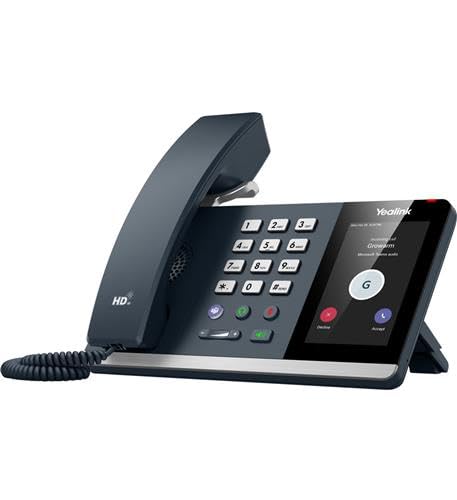
Yealink Mp54 E2 Android 13-Based Phone Has A Faster Response Speed And A Dedicated Teams Button, Which Is Ideal For Office Workers, Front Desks, And Common Areas. Presenting A Standalone Voice Solution And Unparalleled Audio Clarity, The Mp54 E2 Is Armed With Yealinks Optima Hd Voice And Yealink Noise Proof Technology. Moreover, Mp54 E2 Makes Collaboration Easier Than Ever Thanks To Its Support For Sip&Teams Hybrid Mode, And Its Support For Wifi, Bluetooth, And A Usb Headset.
⚠️ WARNING (California Proposition 65): This product may contain chemicals known to the State of California to cause cancer, birth defects, or other reproductive harm. For more information, please visit www.P65Warnings.ca.gov.
Frequently Asked Questions
Q: What are the dimensions of the Yealink MP54-TEAMS-E2?A: The dimensions are ten inches in length, eight inches in width, and five inches in height. This compact size makes it suitable for various office settings.
Q: What material is the Yealink MP54-TEAMS-E2 made of?A: The device is constructed from plastic. This material ensures durability while remaining lightweight for easy handling.
Q: What type of screen does the Yealink MP54-TEAMS-E2 have?A: It features a four-inch capacitive touch screen with a resolution of four hundred eighty by eight hundred pixels. This allows for responsive and intuitive navigation.
Q: How do I set up the Yealink MP54-TEAMS-E2?A: To set it up, connect it to a power source and your network via Ethernet or Wi-Fi. Follow the on-screen prompts to configure your Microsoft Teams account.
Q: Is the Yealink MP54-TEAMS-E2 suitable for home use?A: Yes, it is suitable for home use, especially for remote work and communication. Its dedicated Teams button enhances productivity for home office setups.
Q: Can I use the Yealink MP54-TEAMS-E2 with a headset?A: Yes, it supports a USB headset via its one USB Type A port. This feature enables private conversations and a better audio experience.
Q: How should I clean the Yealink MP54-TEAMS-E2?A: To clean it, use a soft, damp cloth with mild soap. Avoid using abrasive cleaners to maintain the screen and casing.
Q: Is the Yealink MP54-TEAMS-E2 safe for use in offices?A: Yes, it is designed for office use and includes features like Yealink Noise Proof Technology for clear audio. It meets standard safety regulations for electronic devices.
Q: What should I do if my Yealink MP54-TEAMS-E2 arrives damaged?A: If it arrives damaged, contact customer support immediately for assistance. Ensure you have your order details ready for a quicker resolution.
Q: How does the Yealink MP54-TEAMS-E2 compare to other VoIP phones?A: It offers advanced features like a dedicated Teams button and Noise Proof Technology, making it superior for Teams users compared to standard VoIP phones.
Q: What is the warranty period for the Yealink MP54-TEAMS-E2?A: The Yealink MP54-TEAMS-E2 typically comes with a one-year warranty against manufacturing defects. Check your purchase details for specific warranty information.
Q: Does the Yealink MP54-TEAMS-E2 support Bluetooth?A: Yes, it supports Bluetooth version five point two. This allows for wireless connections with headsets and other devices.
Q: Can I use the Yealink MP54-TEAMS-E2 without a power adapter?A: No, it requires Power over Ethernet (PoE) for operation, and the power adapter is not included. Ensure your network supports PoE.
Q: What audio technology does the Yealink MP54-TEAMS-E2 use?A: It uses Yealink's Optima HD Voice technology for high-quality audio. This feature enhances clarity during calls and meetings.
Q: Is there a dedicated button for Microsoft Teams on the Yealink MP54-TEAMS-E2?A: Yes, it has a dedicated Microsoft Teams button for quick access to the app. This feature streamlines the user experience for Teams users.