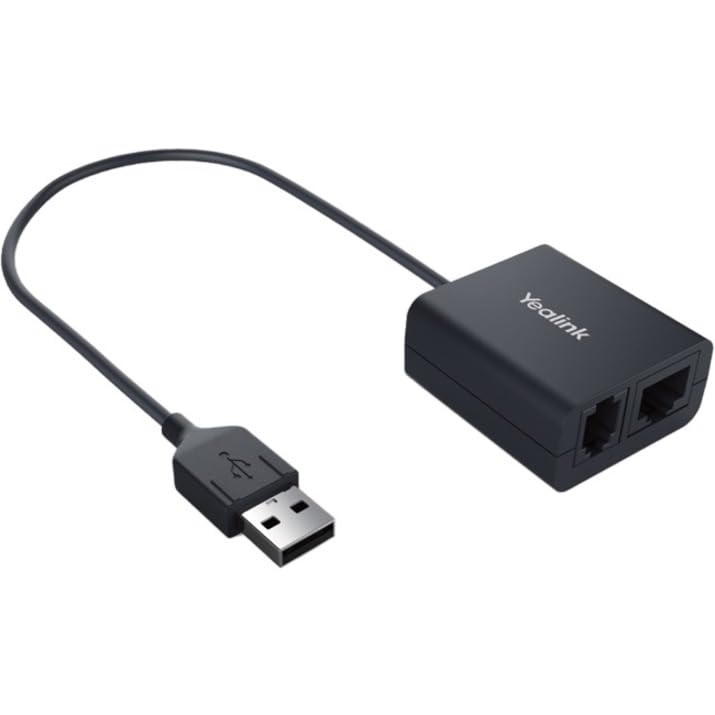
The New And Advanced Yealink Headset Adapter Ehs40 Provides A Technical Interface Between Your Yealink Ip Phones?T58A/T57W/T54W/T53W/T53/T48S/T46S/T42S/T41S?And A Compatible Wireless Headset, Including Jabra, Plantronics And Sennheiser Wireless Models. The Unit Is Easy To Install , Simply Link Ehs40 To The Usb Port Of The Phone And, Its Plug-And-Play Effectively Gives You The Control Of Your Yealink Phone And The Ability To Answer And Hang Up Calls Remotely.It Has Been Especially Designed To Ensure Maximum Productivity In Business Applications Such As Receptions And Call Centers, And Is Ideal For The Corporate, Financial, Health, Government, Educational, Industrial, And Sme/Soho Market Sectors.
⚠️ WARNING (California Proposition 65): This product may contain chemicals known to the State of California to cause cancer, birth defects, or other reproductive harm. For more information, please visit www.P65Warnings.ca.gov.
Frequently Asked Questions
Q: What are the dimensions of the Yealink EHS40 Wireless Headset Adapter?A: The dimensions are five point seven inches long, four point two inches wide, and one point nine inches high. This compact size makes it easy to integrate into any workspace.
Q: What is the model number of the Yealink EHS40?A: The model number is EHS40. This specific model is designed to work seamlessly with various Yealink IP phones.
Q: What wireless headsets are compatible with the Yealink EHS40?A: The Yealink EHS40 is compatible with Jabra, Plantronics, and Sennheiser wireless headsets. This versatility allows you to choose from several high-quality options.
Q: How do I install the Yealink EHS40?A: Installation is straightforward; simply link the EHS40 to the USB port of your Yealink IP phone. It is plug-and-play, so no additional software is needed.
Q: Is the Yealink EHS40 easy to use?A: Yes, the Yealink EHS40 is designed for ease of use. You can control calls directly through your wireless headset, making it ideal for busy environments.
Q: Can I use the Yealink EHS40 with any Yealink IP phone?A: No, it is specifically designed for certain models including T58A, T57W, T54W, T53W, T53, T48S, T46S, T42S, and T41S. Ensure compatibility with your phone model.
Q: What should I do to maintain the Yealink EHS40?A: To maintain the Yealink EHS40, keep it clean and avoid exposure to moisture. Store it in a dry place when not in use.
Q: Is the Yealink EHS40 safe to use in a corporate environment?A: Yes, the Yealink EHS40 is designed for maximum productivity in business applications like receptions and call centers. It enhances communication efficiency.
Q: How can I improve the lifespan of my Yealink EHS40?A: To improve its lifespan, avoid physical damage and ensure it is not subjected to extreme temperatures. Regularly check connections for wear.
Q: What should I do if the Yealink EHS40 does not connect to my headset?A: First, ensure your headset is fully charged and within range. If issues persist, try disconnecting and reconnecting the EHS40 to the phone.
Q: What is the warranty policy for the Yealink EHS40?A: The warranty policy typically covers defects in materials and workmanship for a period defined by the manufacturer. Check specific details with your retailer.
Q: Is the Yealink EHS40 suitable for home office use?A: Yes, it is suitable for home office use. Its plug-and-play functionality and ease of use make it ideal for remote work settings.
Q: What type of material is the Yealink EHS40 made from?A: The specific material details are not provided, but it is designed to be durable and reliable for long-term use in business environments.
Q: How does the Yealink EHS40 improve call handling?A: The Yealink EHS40 allows you to answer and hang up calls remotely, which enhances call handling efficiency, especially in busy work settings.
Q: Does the Yealink EHS40 require any special software?A: No, the Yealink EHS40 is a plug-and-play device that does not require any special software for installation. Simply connect it to the USB port.
I bought the Yealink EHS40 for my office setup, and it's been a lifesaver. The wireless functionality is super handy, letting me move around while on calls. The sound quality is clear, and it connected easily to my headset. Definitely makes my workday smoother!
L
Liam O'Shea
Disappointed with the range
I was excited to use the Yealink EHS40, but the wireless range isn’t what I expected. It cuts out if I move too far from my desk. I hope they can improve that in future versions!
E
Emily Johnson
Perfect for the home office
I’m really happy with my Yealink EHS40 adapter! It’s allowed me to take calls while I’m up and about in my home office. The wireless range is impressive, and I love how it simplifies my setup.
M
Marcus Lee
Not as expected
I had high hopes for the Yealink EHS40, but it didn’t connect properly with my headset. I had to fiddle with it quite a bit. I might be in the minority, but I just wasn’t impressed this time.
A
Aisha Khan
Great adapter for remote work
Using the Yealink EHS40 has been fantastic for my remote work routine. No wires getting in the way, and the audio is crisp. Installation was a bit tricky, hence not a full five stars, but overall a solid purchase!