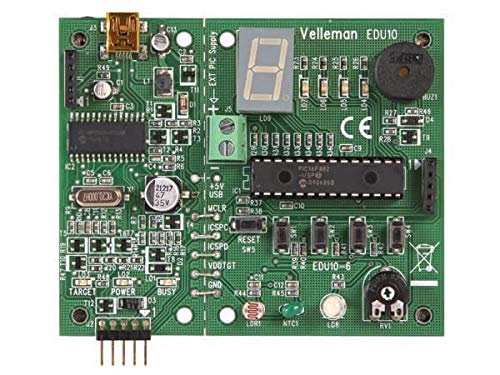
Want To Set The First Steps Into Microchip Pic Programming This Board Is All You Need! The Tutor Can Help To Get You Started Into The Magic World Of Pic Programming. Later It Can Also Be Used For More Advanced Programming. Use The Free Tools From Microchip, The Pickit2 Programmer Tool And The Mplap Ide Environment.
⚠️ WARNING (California Proposition 65): This product may contain chemicals known to the State of California to cause cancer, birth defects, or other reproductive harm. For more information, please visit www.P65Warnings.ca.gov.
Frequently Asked Questions
Q: What is the model number of the Velleman EDU10?A: The model number is EDU10. This identifier helps in locating specific documentation and support for the product.
Q: What materials are used in the Velleman EDU10?A: The Velleman EDU10 is made from copper. This material is known for its excellent conductivity, making it ideal for electronic components.
Q: What are the dimensions of the Velleman EDU10?A: The dimensions of the Velleman EDU10 are not specified. However, it is designed to be compact for easy use and storage.
Q: How do I use the Velleman EDU10 for programming?A: To use the Velleman EDU10, connect it to your computer via USB and install the necessary software. Follow the tutorial provided to start programming microcontrollers.
Q: Is the Velleman EDU10 suitable for beginners?A: Yes, the Velleman EDU10 is suitable for beginners. It comes with a tutor feature that guides new users through the basics of PIC programming.
Q: Can I use the Velleman EDU10 for advanced programming?A: Yes, the Velleman EDU10 can be used for advanced programming. After mastering the basics, users can explore more complex projects and features.
Q: How do I care for the Velleman EDU10?A: To care for the Velleman EDU10, keep it dry and store it in a safe, dust-free environment. Avoid exposing it to extreme temperatures or moisture.
Q: Is the Velleman EDU10 safe for children?A: Yes, the Velleman EDU10 is generally safe for children under adult supervision. It is designed for educational purposes, making it suitable for school projects.
Q: Does the Velleman EDU10 require any special batteries?A: No, the Velleman EDU10 does not require special batteries. It is powered via USB, making it convenient to use with a computer.
Q: What if my Velleman EDU10 arrives damaged?A: If your Velleman EDU10 arrives damaged, contact the manufacturer for support. They will guide you through the return or replacement process.
Q: What programming tools are compatible with the Velleman EDU10?A: The Velleman EDU10 is compatible with the Pickit2 programmer tool. It also works with the MPLAB IDE environment for programming.
Q: Can the Velleman EDU10 be used with other microcontrollers?A: Yes, the Velleman EDU10 can be used with various microcontrollers that are compatible with PIC programming. Ensure you select the correct settings in the software.
Q: Are there any indicator lights on the Velleman EDU10?A: Yes, there are indicator LEDs on the Velleman EDU10. These lights show the power supply status and the programming mode.
Q: What is the target voltage output of the Velleman EDU10?A: The target voltage output of the Velleman EDU10 is supported but not specified in the documentation. It typically aligns with standard microcontroller requirements.
Q: Is there any warranty on the Velleman EDU10?A: Yes, the Velleman EDU10 typically comes with a manufacturer's warranty. Check the packaging or the manufacturer's website for specific warranty terms.