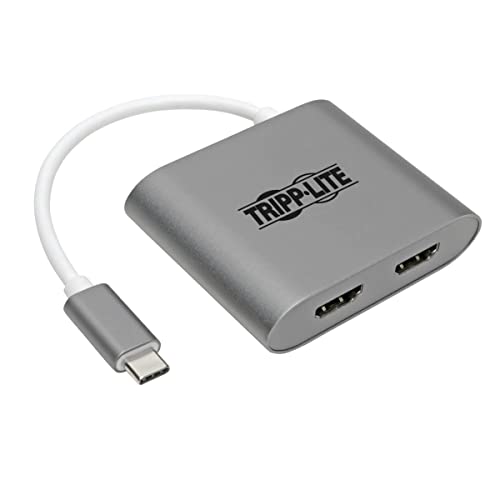
Usb-C To Hdmi Cable Connects Two 4K Hdmi Displays To Your Usb-C Or Thunderbolt 3 Device This Usb Type-C To Hdmi Adapter Connects Two Independent Hdmi Monitors, Projectors And/Or Televisions To The Usb-C Or Thunderbolt 3 Port On Your Desktop Computer, Tablet, Laptop, Notebook, Macbook, Chromebook Or Smartphone. Its An Ideal Connector For Creating Video Walls, Giving Video Presentations In Conference Rooms And Classrooms, Editing Multiple Documents On A Larger Screen, Or Streaming Video For Digital Signage In Crystal-Clear 4K X 2K. Supports Usb-C Displayport Alternate Mode For Converting Audio/Video Signals By Connecting The Built-In Usb-C Cable To A Source Device That Supports Usb Displayport Alt Mode, You Can Output 4K Video And Digital Audio To Hdmi Monitors, Televisions Or Projectors Without Installing Special Software Drivers. Multi-Stream Transport (Mst) Allows Connection Of Multiple Displays By Connecting The Usb-C Cable To A Source That Supports Mst, You May Connect Two Displays Simultaneously, Great For Multitasking And Increasing Efficiency. You Can Display The Same Image On Both Monitors, Extend Your Desktop Across Both With Different Windows Open On Each, Or Combine Both Into One Large Monitor To Create A Video Wall. Enjoy The Clarity Of True 4K Video With 7. 1-Channel Audio This 4K Hdmi Cable Supports Ultra Hd Video Resolutions Up To 3840 X 2160 (4K X 2K) At 30 Hz For Crystal-Clear Picture And Sound, As Well As 36-Bit Deep Color (12 Bits Per Channel), Hdcp 1. 4 And Hdmi 1. 4 Standards, And 7. 1-Channel Surround Sound. The Cable Is Backward Compatible With Non-4K Displays, So You Can Use Your Current 1080P Monitors To Avoid A Costly Upgrade To 4K. Reversible Usb-C Connector Attaches In Either Direction Unlike Traditional Usb Cables That Connect In Only One Direction, The Reversible Usb-C Male Connector Plugs Into A Usb-C Or Thunderbolt 3 Port In Either Direction For A Fumble-Free Connection Every Time. Ready To Use Right From The Package, So You Can Plug And Play Immediately The Plug-And-Play Usb Type-C To Hdmi Cable Requires No Software Or External Power. Just Connect The Usb-C Plug To The Usb-C Or Thunderbolt 3 Port On A Source Device That Supports Usb Displayport Alternate Mode, And Connect The Hdmi Ports To Your Displays With User-Provided Cables (Such As Tripp Lite P568- And P569-Series High-Speed Cables). Slim Design Is Ideal For Travel The Usb 3. 1 Gen 1 Adapter Is About Half The Size Of A Credit Card, Making It Easy To Carry In A Pocket, Briefcase Or Laptop Bag For Connecting On The Go.
⚠️ WARNING (California Proposition 65): This product may contain chemicals known to the State of California to cause cancer, birth defects, or other reproductive harm. For more information, please visit www.P65Warnings.ca.gov.
Frequently Asked Questions
Q: What are the dimensions of the Tripp Lite USB C to HDMI Cable Adapter?A: The dimensions are ten point one inches long, four point seventy-two inches wide, and four point six inches high. This compact size makes it easy to carry.
Q: What is the length of the HDMI cable adapter?A: The adapter is six feet long. This length allows for flexible positioning of your devices.
Q: What video resolutions does this adapter support?A: This adapter supports Ultra HD video resolutions up to three thousand eight hundred forty by two thousand one hundred sixty. It delivers crystal-clear picture quality.
Q: How do I connect the adapter to my devices?A: Simply connect the USB-C male connector to your USB-C or Thunderbolt 3 port, then connect your HDMI displays using HDMI cables. It's a plug-and-play device.
Q: Is this adapter compatible with MacBook and Chromebook?A: Yes, this adapter is compatible with MacBook, Chromebook, and other USB-C devices. It provides seamless connectivity for video output.
Q: Can I use this adapter for multiple displays?A: Yes, it supports Multi-Stream Transport (MST), allowing you to connect two HDMI displays simultaneously. This feature is great for multitasking.
Q: How do I keep the adapter in good condition?A: To maintain the adapter, store it in a dry place and avoid exposing it to extreme temperatures. Clean it with a soft, dry cloth as needed.
Q: Is the Tripp Lite USB C to HDMI Adapter suitable for travel?A: Yes, its slim design makes it ideal for travel. It's about half the size of a credit card, fitting easily into pockets or bags.
Q: How do I troubleshoot if the adapter isn't working?A: Ensure that your source device supports USB DisplayPort Alternate Mode. If issues persist, check the HDMI connections and try using different HDMI cables.
Q: What should I do if the adapter arrives damaged?A: If the adapter arrives damaged, contact the seller for a replacement or refund. Most retailers offer a return policy for defective items.
Q: Does the adapter require external power?A: No, this adapter does not require external power. It operates using the power from the connected USB-C port.
Q: What audio features does this adapter provide?A: This adapter supports seven point one channel surround sound. It ensures high-quality audio in addition to video output.
Q: Can I use this adapter with non-4K displays?A: Yes, the adapter is backward compatible with non-four K displays, allowing you to use your existing one thousand eighty P monitors.
Q: Is there a warranty for the Tripp Lite USB C to HDMI Adapter?A: Yes, it comes with a three-year limited warranty. Additionally, you can access free technical support for assistance.
Q: What type of connector does the adapter use?A: The adapter uses a reversible USB-C male connector. This design allows for easy connection in either direction.