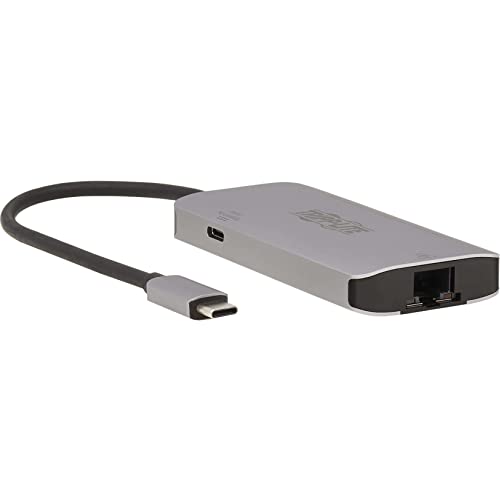
Usb 3.2 Hub Connects 3 Usb-A Peripherals To Your Usb-C Port: This Usb-C Hub Allows You To Connect Up To Three Usb Peripherals To Your Macbook Pro, Windows Laptop Or Other Tablet, Smartphone Or Computer With A Usb-C Or Thunderbolt 3 Port. You Can Expand The Capability Of Your Device By Connecting Usb Peripherals That Can Help You Do Your Job Faster, Easier And Better, Such As An External Hard Drive, Keyboard/Mouse And Printer. Transfers Data At Fast Usb 3.2 Gen 1 Speeds: Three Usb-A Ports Transfer Data At Speeds Up To 5 Gbps, And One Also Supports Device Charging Up To 5V 1.5A (7.5W). The Usb Ports Are Backward Compatible With Previous Usb Generations, So You Can Continue Using Older Peripherals While Getting High-Speed Performance From New Devices. Note, Host Device Must Support Usb Otg (On-The-Go). Pd Charging Port Charges Host Device Via Ac Wall Charger: The Usb-C Power Delivery Port Supports Power Output Up To 20V 5A (100W), Which Is More Than Sufficient For Charging And Powering The Connected Source Device, Such As A Macbook Pro, Windows Laptop Or Chromebook. Just Connect The Devices Wall Charger To Both The Usb-C Pd Port And An Ac Outlet. Pd 3.0 Fast Role Swap Technology Ensures The Connection Remains Stable If The Wall Charger Becomes Dislodged. Connects To A Wired Gigabit Ethernet Network: The Rj45 Port Offers Access To A Gigabit Ethernet Network When Wi-Fi Is Unavailable Or When A Wired Connection Offers Faster Speeds. Connect Using A Utp Cable (Such As Tripp Lites N201-Series Cat6 Cables, Sold Separately), And Enjoy True 10/100/1000 Mbps Ethernet Speeds For Downloads And Web Browsing. Leds Indicate At A Glance A Successful Network Connection. Ready To Use Right From The Package: The Plug-And-Play Usb-C Hub Is Specifically Designed For Use With The Macbook Pro, Google Chromebook Pixel And Other Laptops, Tablets And Devices Equipped With A Usb-C Or Thunderbolt 3 Port. It Requires No Drivers Or External Power. The Lightweight Aluminum Case Fits Easily Into A Pocket, Briefcase Or Laptop Bag For Connecting On The Go.
⚠️ WARNING (California Proposition 65): This product may contain chemicals known to the State of California to cause cancer, birth defects, or other reproductive harm. For more information, please visit www.P65Warnings.ca.gov.
Frequently Asked Questions
Q: What are the dimensions of the Tripp Lite USB-C Hub?A: The Tripp Lite USB-C Hub measures five point five one inches in length, three point nine four inches in width, and zero point nine one inches in height.
Q: What materials is the USB-C Hub made of?A: The USB-C Hub is constructed from aluminum, providing a sturdy yet lightweight design for portability.
Q: What is the power output of the USB-C Power Delivery Port?A: The USB-C Power Delivery port supports a power output of twenty volts at five amps, delivering up to one hundred watts.
Q: How do I connect devices to the Tripp Lite USB-C Hub?A: To connect devices, simply plug the hub into your USB-C or Thunderbolt 3 port and attach your USB peripherals to the three USB-A ports.
Q: Can I use the hub with my MacBook Pro?A: Yes, the hub is specifically designed for compatibility with MacBook Pro, as well as other USB-C devices like tablets and smartphones.
Q: Is the USB-C Hub easy to set up?A: Yes, the USB-C Hub is plug-and-play, requiring no additional drivers or external power for operation.
Q: How do I care for the USB-C Hub?A: To maintain the hub, keep it clean and avoid exposure to liquids. Store it in a cool, dry place when not in use.
Q: What is the warranty period for the Tripp Lite USB-C Hub?A: The USB-C Hub is backed by a three-year limited warranty from the manufacturer, ensuring reliable performance.
Q: Is the USB-C Hub compatible with older USB devices?A: Yes, the USB-A ports are backward compatible with previous USB generations, allowing you to use older peripherals.
Q: What if my USB-C Hub arrives damaged?A: If your hub arrives damaged, contact Tripp Lite's support team for assistance with returns or exchanges.
Q: Can I use the Gigabit Ethernet port for internet access?A: Yes, the RJ45 port allows for a wired Gigabit Ethernet connection, providing reliable internet access when Wi-Fi is unavailable.
Q: Does the hub support fast data transfer?A: Yes, the USB-A ports support data transfer speeds up to five gigabits per second, ensuring quick file transfers.
Q: What types of devices can I charge using this hub?A: You can charge devices such as MacBook Pro, Windows laptops, and Chromebooks using the USB-C Power Delivery port.
Q: Is the USB-C Hub portable?A: Yes, the lightweight aluminum design makes the hub easy to carry in a pocket or laptop bag for on-the-go use.
Q: Are there LED indicators for network connection?A: Yes, the hub features LED indicators that show a successful network connection when using the Gigabit Ethernet port.