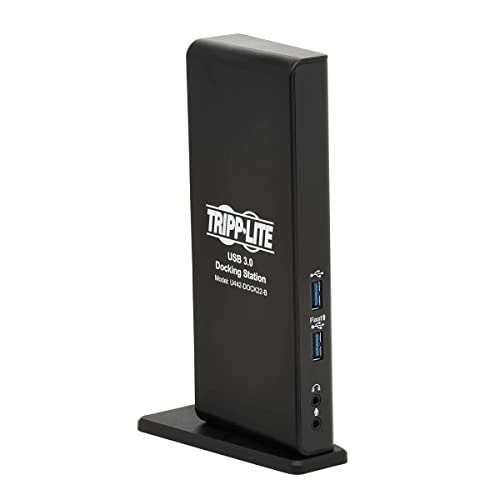
Docking Station Turns Your Devices Usb Port Into A Workstation: This Multiport Usb Dock Expands The Potential Of Your Macbook Pro, Windows Laptop, Chromebook, Tablet Or Pcs Usb Port. Its Ideal For Transmitting 1080P Video And Digital Audio To Two Large Displays, Adding A Thumb Drive And Other Usb Peripherals, Listening To Music And Podcasts, And Connecting To A Wired Gigabit Ethernet Network, All At The Same Time. Transmits High-Definition Video With Digital Audio To 2 Hdmi Displays Simultaneously: Two Hdmi Outputs Each Support Hi-Def Video Up To 2560 X 1440 At 60 Hz With Multi-Channel Sound. By Downloading And Installing The Proper Displaylink Drivers To Your Host Device, You May Connect Two External Displays Simultaneously. You Can Display The Image From The Host Computer On Both Monitors, Extend Your Host Desktop Across Both With Different Windows Open On Each, Or Combine Both Into One Large Display As A Video Wall. When Two Hdmi Monitors Are Connected At The Same Time, Maximum Resolution Is 1920 X 1080 (1080P) At 60 Hz. Usb Hub Ports Connect Keyboards, Thumb Drives And Other Peripherals: Two Usb 3.2 Gen 1 And Four Usb 2.0 Ports Accept Usb Peripherals, Such As Flash Drives, Mice, Keyboards And Printers. The Usb 3.2 Gen 1 Ports Support Data Transfer Rates Up To 5 Gbps And Are Backward Compatible With Earlier Usb Generations, So You Can Use Legacy Equipment With All Six Ports. One Dedicated Port Also Supports Bc 1.2 Charging With 5V 1.5A (7.5W) Of Power Dedicated To Fast-Charging Your Mobile Device. Accesses A Wired Gigabit Ethernet Network: The Rj45 Port Offers Access To A Gigabit Ethernet Network When Wi-Fi Is Unavailable Or When A Wired Connection Offers Faster Speeds. Connect Using A Utp Cable (Sold Separately), And Enjoy True 10/100/1000 Mbps Ethernet Speeds For Fast Uploads And Downloads. Connects Speakers, Microphone And Other Audio Equipment: Two 3.5 Mm Mini Stereo Jacks Are Convenient For Connecting Speakers, Headphones And/Or A Microphone To Your Workstation. You Can Listen To Music Or Record The Latest Episode Of Your Podcast.
⚠️ WARNING (California Proposition 65): This product may contain chemicals known to the State of California to cause cancer, birth defects, or other reproductive harm. For more information, please visit www.P65Warnings.ca.gov.
Frequently Asked Questions
Q: What are the dimensions of the Tripp Lite Docking Station?A: The Tripp Lite Docking Station measures eight point three inches in length, five point one inches in width, and one point four inches in height.
Q: What type of ports does the Tripp Lite Docking Station have?A: The docking station features two HDMI ports, six USB-A three point two ports, and a gigabit Ethernet port.
Q: What is the maximum video resolution supported by the HDMI ports?A: The HDMI ports support a maximum resolution of twenty five sixty by fourteen forty at sixty hertz.
Q: How do I connect my laptop to the Tripp Lite Docking Station?A: You can connect your laptop to the docking station using either a USB-A or USB-C cable, depending on your device's compatibility.
Q: Can I use two monitors with the Tripp Lite Docking Station?A: Yes, you can connect two HDMI monitors simultaneously for an extended or mirrored display setup.
Q: Is the Tripp Lite Docking Station compatible with Windows and Mac?A: Yes, the docking station is compatible with both Windows laptops and MacBook Pro devices.
Q: How do I charge my device using the docking station?A: You can charge your mobile device using the dedicated USB three point two port that supports BC one point two charging.
Q: What is the warranty period for the Tripp Lite Docking Station?A: The docking station comes with a one-year limited warranty from the manufacturer.
Q: How do I connect to the Ethernet network using this docking station?A: To connect to a wired gigabit Ethernet network, plug an RJ45 Ethernet cable into the docking station's Ethernet port.
Q: Can I connect audio devices to the Tripp Lite Docking Station?A: Yes, the docking station includes two three point five millimeter mini stereo jacks for connecting speakers or a microphone.
Q: What is the data transfer speed of the USB ports?A: The USB three point two ports support data transfer speeds up to five gigabits per second.
Q: Is the Tripp Lite Docking Station easy to install?A: Yes, the docking station is designed for easy installation—simply connect it to your laptop and install any necessary drivers.
Q: How do I ensure my devices are compatible with the docking station?A: Check that your laptop has a USB-A or USB-C port and install the necessary DisplayLink drivers for dual-monitor support.
Q: What types of devices can I connect to this docking station?A: You can connect laptops, Chromebooks, tablets, and PCs, along with various USB peripherals like keyboards and mice.
Q: What if my docking station arrives damaged?A: If your docking station arrives damaged, contact Tripp Lite's customer service for assistance with returns or exchanges.
Q: Does this docking station require additional software to function?A: Yes, for dual monitor functionality, you will need to download and install the appropriate DisplayLink drivers.