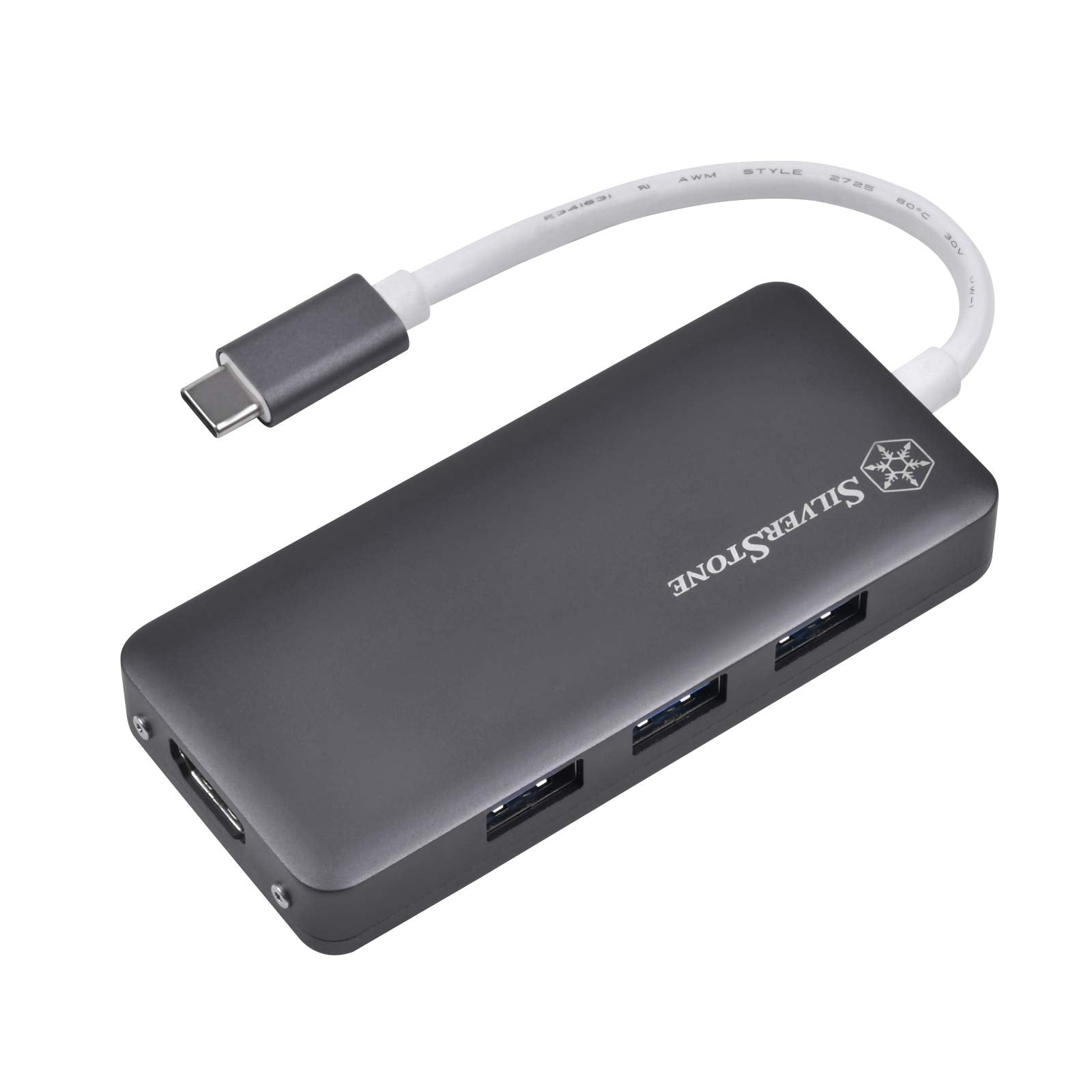
To Fulfill The Need For Expanding Connectivity On Modern Laptops While Staying Charged, Silverstone Created Ep14, A Usb 3.1 Type-C Hub That Adds Three Usb Type-A, Hdmi Connector And An Additional Type-C Port With Usb Power Delivery (Pd) Capability. This Adapters Hdmi Output (Displayport Alt Mode) Provides High Throughput Using The Latest Usb 3.1 Bus And Can Support Monitors Up To Ultra Hd Resolutions Of 4096 X 2160 At 30 Hz. It Also Has Usb Type-C With Usb Power Delivery (Pd 2.0) Function To Support Powering Or Charging Connected Laptop Or Device Up To 100W. Finally, There Are Three Usb 3.1 Gen 1 Type-A Connectors To Ensure Compatibility With The Majority Of Usb Flash Drives And External Usb Devices. For Those Looking To Get A High Quality Usb Hub To Connect Their Laptop To Almost Anything At Out Or Home, The Ep14 Is Another Great Choice.
⚠️ WARNING (California Proposition 65): This product may contain chemicals known to the State of California to cause cancer, birth defects, or other reproductive harm. For more information, please visit www.P65Warnings.ca.gov.
Frequently Asked Questions
Q: What materials are used in the SilverStone Technology EP14 hub?A: The SilverStone Technology EP14 hub is made of high-quality aluminum. This material ensures durability while maintaining a lightweight and portable design.
Q: What are the dimensions of the SilverStone EP14 hub?A: The dimensions of the SilverStone EP14 hub are three point eighty-three inches in length, one point seventy-three inches in width, and zero point fifty-nine inches in height. This compact size makes it easy to carry.
Q: How many USB ports does the SilverStone EP14 hub have?A: The SilverStone EP14 hub comes with three USB three point one Gen one Type-A ports. These ports support data transfer speeds of up to five gigabits per second.
Q: How do I use the SilverStone EP14 hub?A: To use the SilverStone EP14 hub, simply connect it to a compatible USB three point one Type-C port on your laptop. Then, plug in your devices into the available USB Type-A or HDMI ports.
Q: Is the SilverStone EP14 hub compatible with Mac computers?A: Yes, the SilverStone EP14 hub is compatible with Mac OS ten point five or above. It also works seamlessly with various versions of Windows operating systems.
Q: Can I use the SilverStone EP14 hub to charge my laptop?A: Yes, the SilverStone EP14 hub supports USB power Delivery two point zero, allowing it to charge connected devices up to one hundred watts. This feature enhances usability during work or travel.
Q: How should I care for the SilverStone EP14 hub?A: To care for the SilverStone EP14 hub, avoid exposing it to extreme temperatures or moisture. Clean it with a soft, dry cloth to maintain its aluminum finish.
Q: What precautions should I take when using the hub?A: Ensure that the hub is connected to a power source that meets the USB power Delivery specifications. Avoid overloading the hub by connecting too many high-power devices.
Q: Does the SilverStone EP14 hub require any drivers to operate?A: No, the SilverStone EP14 hub does not require any drivers for operation. It is plug-and-play compatible with both Windows and Mac operating systems.
Q: How can I store the SilverStone EP14 hub when not in use?A: Store the SilverStone EP14 hub in a cool, dry place away from direct sunlight. Keeping it in a protective case can also help prevent damage.
Q: Is the SilverStone EP14 hub suitable for gaming?A: Yes, the SilverStone EP14 hub can be used for gaming. Its HDMI output supports high resolutions up to four thousand ninety-six by two thousand one hundred sixty at thirty hertz.
Q: What should I do if the hub does not work with my device?A: If the hub does not work, first check the connections to ensure they are secure. If issues persist, try connecting to a different USB Type-C port or restarting your device.
Q: Can I connect multiple devices to the hub at once?A: Yes, you can connect multiple devices to the hub simultaneously. However, ensure that the total power consumption does not exceed the hub's power delivery capabilities.
Q: What types of devices can I connect to the SilverStone EP14 hub?A: You can connect a variety of devices, including USB flash drives, external hard drives, and HDMI displays. This versatility makes it great for both personal and professional use.
Q: What is the warranty period for the SilverStone EP14 hub?A: The warranty period for the SilverStone EP14 hub typically lasts for one year from the date of purchase. Always check with the retailer for specific warranty details.