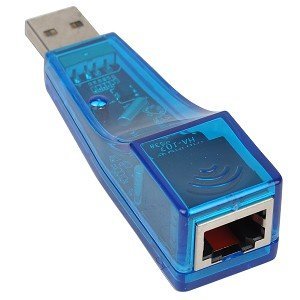
This Usb 2.0 10/100 Ethernet Adapter For Pc Computers Is The Easiest Solution For Connecting Your Laptop And/Or Desktop Computer To A Broadband Internet Modem, Or Building A 10/100 Base-T Ethernet Network. Easy To Install, The He-132R Adapter Plugs Into Any Available Usb 2.0 Port And Lets You Connect Your Pc To A Cable Or Dsl Modem. Once Installed, You Can Share Files And Peripherals With Computers That Are Connected To The Network. This Simple Solution Adds An Rj-45 Ethernet Port To Your Pc Without Opening The Computer. Get This Great He-132R Ethernet Adapter Today!
⚠️ WARNING (California Proposition 65): This product may contain chemicals known to the State of California to cause cancer, birth defects, or other reproductive harm. For more information, please visit www.P65Warnings.ca.gov.
Frequently Asked Questions
Q: What are the dimensions of the USB 2.0 to RJ-45 Ethernet Adapter?A: The USB 2.0 to RJ-45 Ethernet Adapter measures four point five inches in length, three point four inches in width, and zero point eight inches in height.
Q: What materials is the USB 2.0 to RJ-45 Ethernet Adapter made of?A: The USB 2.0 to RJ-45 Ethernet Adapter has a transparent blue plastic casing. It features a shielded RJ-45 jack and integrated electronic components.
Q: Is the USB 2.0 to RJ-45 Ethernet Adapter compliant with industry standards?A: Yes, this adapter complies with USB 2.0 specifications and both IEEE 802.3 and 802.3u Ethernet standards. This ensures compatibility with various devices.
Q: How do I install the USB 2.0 to RJ-45 Ethernet Adapter?A: To install the adapter, simply plug it into an available USB 2.0 port on your computer. It will automatically recognize the device and enable connectivity.
Q: Can I use this adapter with a laptop?A: Yes, the USB 2.0 to RJ-45 Ethernet Adapter is compatible with both desktop and laptop computers. It provides easy access to wired internet connections.
Q: Is this Ethernet adapter suitable for gaming?A: Yes, the adapter supports half and full duplex operation at ten or one hundred megabits per second, making it suitable for online gaming.
Q: How do I keep the USB 2.0 to RJ-45 Ethernet Adapter clean?A: To clean the adapter, use a soft, dry cloth to wipe the exterior. Avoid using water or cleaning solutions that could damage the device.
Q: What should I do if the adapter stops working?A: If the adapter stops working, try unplugging it and plugging it back in. If issues persist, check for driver updates or consult the manufacturer.
Q: Does the USB 2.0 to RJ-45 Ethernet Adapter require additional software?A: No, the adapter does not require additional software. It is plug-and-play compatible with most operating systems.
Q: Is this adapter compatible with Windows and Mac systems?A: Yes, the USB 2.0 to RJ-45 Ethernet Adapter is compatible with both Windows and Mac operating systems. It offers broad compatibility for users.
Q: Can I use this adapter for connecting to a DSL modem?A: Yes, you can use the USB 2.0 to RJ-45 Ethernet Adapter to connect to a DSL modem. It enables wired internet access for your computer.
Q: How long is the warranty for the USB 2.0 to RJ-45 Ethernet Adapter?A: The warranty period for the USB 2.0 to RJ-45 Ethernet Adapter varies by retailer, but it typically ranges from one to two years.
Q: Is the adapter suitable for fast internet connections?A: Yes, the adapter supports high-speed internet connections up to one hundred megabits per second. It is ideal for broadband environments.
Q: What type of devices can I connect using the RJ-45 port?A: You can connect any device that has an RJ-45 Ethernet port, including computers, routers, and network switches. This enhances network connectivity.
Q: What if the adapter arrives damaged?A: If the adapter arrives damaged, contact the retailer for a return or exchange. Ensure you have the original packaging and receipt for the process.