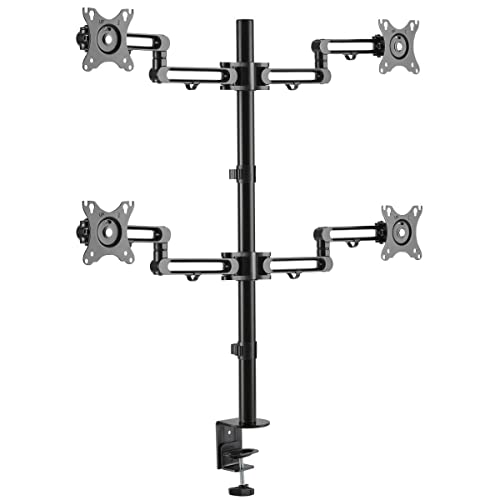
Rugged Steel Desk Clamp Lifts Your Monitors Above Your Work Areas Surface: This Vesa-Compliant Desktop Clamp Mounts Four Flat-Screen Displays Above Your Desk, Table Or Workstation, Allowing You To Free Up Valuable Surface Space. Recommended For Home Or Office Use, The Ddr1327Sqfc-1 Fits Most Flat-Panel Monitors From 13 To 27 Inches. The Clamp Fits Desktops Ranging In Thickness From 0.4 To 3.3 Inches (10 To 85 Millimeters). All Hardware Is Included. Cable Management Brackets Along The Arms Prevent Excess Cord Clutter. Swivel, Tilt And Rotate The Screens To Find The Most Comfortable Viewing Angles: The Durable Steel Frame Stands Up To Frequent Adjustments, And The Flex Arms Support Up To 17.6 Pounds (8 Kilograms) Apiece. The Flex Arms Adjust Independently To Optimize Viewing Angles, Minimize Glare And Improve Ergonomics. To Minimize Screen Glare, Reduce Eye Fatigue And Increase Viewing Comfort, The Ddr1327Sqfc-1 Features -30 Degrees To +30 Degrees Tilt, -90 Degrees To +90 Degrees Swivel And 360 Degrees Rotation For Positioning Your Screens. Vesa-Compliant Mounting Ensures Display Compatibility: Vesa (Video Electronics Standards Association) Promotes Uniformity In The Video Electronics Industry By Developing Standards For Tvs And Monitors. For Hassle-Free Display Compatibility, This Monitor Stand Supports The Following Vesa Mounting Hole Patterns: 75 X 75 And 100 X 100.
⚠️ WARNING (California Proposition 65): This product may contain chemicals known to the State of California to cause cancer, birth defects, or other reproductive harm. For more information, please visit www.P65Warnings.ca.gov.
Frequently Asked Questions
Q: What is the weight capacity of the Tripp Lite Quad Monitor Mount?A: Each arm can support up to seventeen point six pounds. This allows for stable and secure mounting of your monitors.
Q: What sizes of monitors does this mount accommodate?A: It accommodates monitors from thirteen to twenty-seven inches. This makes it versatile for various display sizes.
Q: What materials are used in the construction of the monitor mount?A: The mount is made of rugged alloy steel. This ensures durability and stability for your monitors.
Q: What are the dimensions of the Tripp Lite Quad Monitor Mount?A: The mount measures thirty-four point zero two inches in length, nine point five inches in width, and five inches in height. These dimensions provide ample space for multiple monitors.
Q: How do I install the Tripp Lite Quad Monitor Mount?A: Installation involves using the included hardware to attach the desk clamp to your desktop. Follow the instructions to securely mount your monitors.
Q: Is the mount suitable for curved monitors?A: Yes, it can be used with curved monitors as long as they fit within the size range. Ensure they meet the weight capacity requirements.
Q: Can I adjust the viewing angles of the monitors?A: Yes, the mount allows for tilt, swivel, and rotation adjustments. You can tilt from negative thirty degrees to positive thirty degrees and swivel from negative ninety degrees to positive ninety degrees.
Q: What VESA mounting patterns are supported?A: It supports VESA mounting patterns of seventy-five by seventy-five millimeters and one hundred by one hundred millimeters. This ensures compatibility with a wide range of monitors.
Q: How do I manage cables with this monitor mount?A: The mount includes cable management brackets. These help keep your cords organized and reduce clutter.
Q: What is the warranty period for this product?A: It comes with a five-year limited warranty. This provides assurance of quality and durability.
Q: Is the mount easy to adjust after installation?A: Yes, the durable steel frame allows for frequent adjustments. The flex arms can be independently adjusted for optimal viewing angles.
Q: Is this mount suitable for home office use?A: Yes, it is ideal for both home and office environments. It frees up surface space and enhances ergonomics.
Q: Can this mount be used with laptops?A: No, it is specifically designed for flat-screen monitors only. Laptops require different mounting solutions.
Q: What should I do if the mount arrives damaged?A: Contact customer support for assistance. They can guide you through the return or replacement process.
Q: How should I clean the monitor mount?A: Use a soft, damp cloth to clean the frame. Avoid harsh chemicals that could damage the finish.