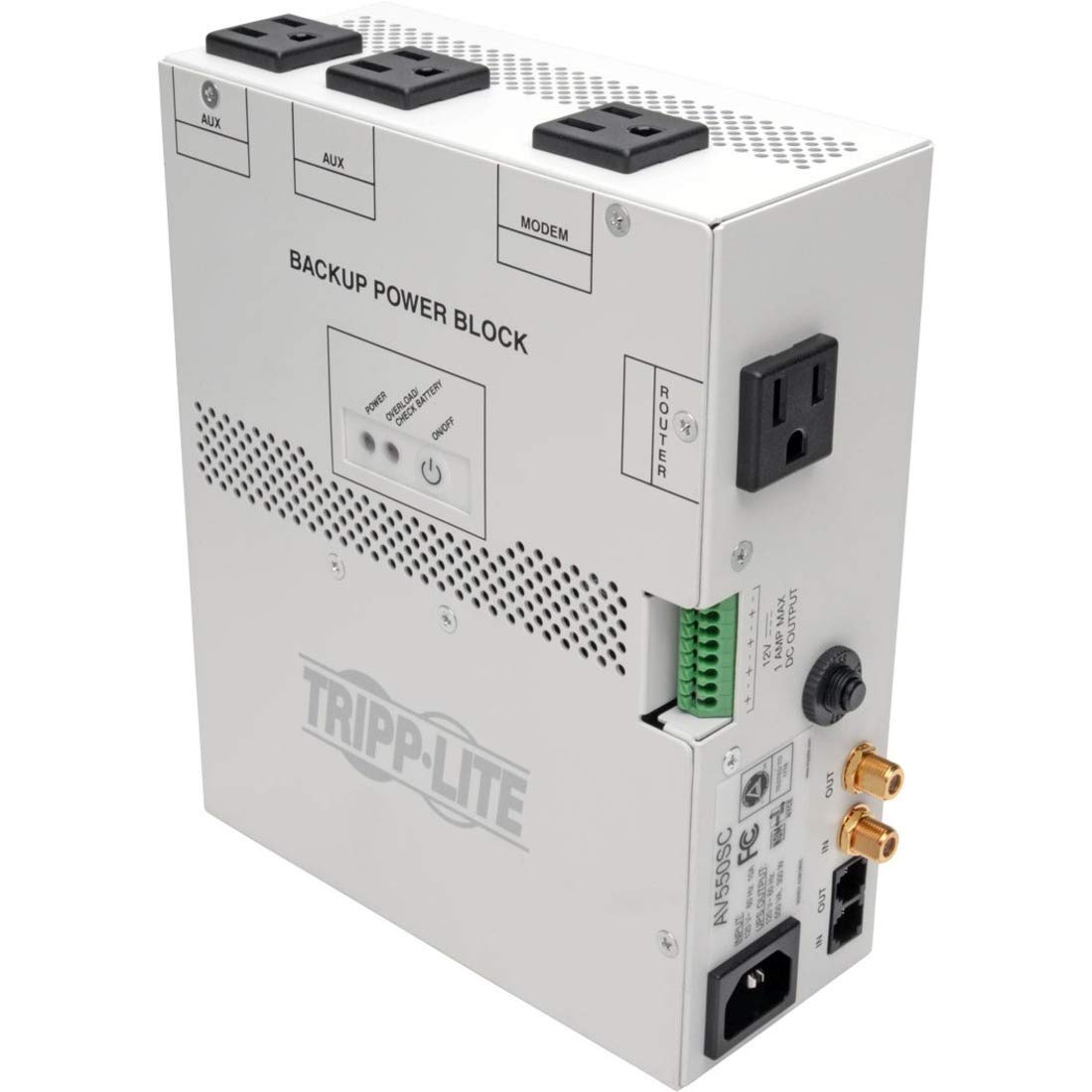
Open A Support Ticket Fill In An Online Form Describing Your Issue. We'Ll Respond By Email In One Business Day. Create A Support Ticket Support Chat Knowledgeable Product Specialists Are Available Now. Start Chatting Call Us When You Need Immediate Help, Call Us! Our Average Wait Time Is Under 1 Minute. +1 (773) 869-1234 (7 Am - 6 Pm Cst) Warranty & Insurance Product Registration Warranty Coverage Extended Warranties Warranty Lookup Insurance Coverage Insurance Claims Product Returns How To Return A Product Request A Return Authorization (Rma) Support Knowledge Base & Downloads Poweralert Software Drivers Firmware Owner'S Manuals Knowledge Base Support Resources Software Knowledge Base Replacement Parts How To Find A Product Serial Number Reseller Support Adding Or Replacing Ups Batteriesmultiple Brands Available Ups Battery Finder Extended Warranties & On-Site Services See Your Options Ups & Battery Recycling Learn More Visio Stencilsbim Objects Visio Stencils | Bim Objects | All Design Resources The Cisco Compatible Logo Signifies That Tripp Lite'S Product Has Undergone Interoperability Testing By Tripp Lite Together With Cisco And A Third-Party Test House Based On Testing Criteria Set By Cisco. Tripp Lite Is Solely Responsible For The Support And Warranty Of Its Product. Cisco Makes No Warranties, Express Or Implied, With Respect To Tripp Lite'S Product Or Its Interoperation With The Listed Cisco Product(S) And Disclaims Any Implied Warranties Of Merchantability, Fitness For A Particular Use, Or Against Infringement. Cisco, The Cisco Logo, And Cisco Systems Are Trademarks Or Registered Trademarks Of Cisco Systems, Inc. And/Or Its Affiliates In The United States And Certain Other Countries. 4 Ac Outlets (Including 1 Delay-On Outlet For Router) Automatic Recycle/Reset Button; Auto-Restart Capability Regulated 12V Dc Output For 4 Devices; Complete Surge Suppression Convenient Installation Fits Structured Wiring Enclosures Without Using Mounting Screws Or Brackets Hd-Compatible 2.2Ghz Coaxial And Telephone/Modem/Dsl Line Surge Protection; 550Va Ups Capacity Overview The Av550Sc Backup Power Block Provides The Highest Level Of Protection For Structured Cabling Installations (Ie. Telephone, Internet And Coax Connections). With Reliable Battery Backup, Surge Protection And Emi/Rfi Line Noise Filtering, The Av550Sc Provides A Complete Protection Solution For Audio/Video Distribution Systems By Supporting Modems, Routers, Rf Amplifiers, Network Interfaces, Cameras, Modulators And Other Equipment Through All Power Problems. In The Event Of A Power Failure, The Av550Sc Includes An Auto-Restart Feature That Eliminates The Need To Perform An On-Site Restart. In Addition, When A Modem Or Router Freeze-Up Occurs, The Av550Sc Features A Recycle/Reset Button With Sequential Outlet Startup For Proper Modem And Router Rebooting. Features 3 Widely-Spaced Ac Outlets (2 Auxiliary, 1 Modem) Power, Reset Or Start Up Connected Equipment During A Blackout Or System Freeze-Up (Provide Battery Backup, Surge Protection And Emi/Rfi Filtering) - 4 Outlets Total Convenient Installation Designed To Fit In The Bottom Left Corner Of Structured Wiring Enclosures Without The Need For Mounting Screws Or Brackets 60-Second Delay-On Ac Outlet (Router) Powers And Resets The Router During A Blackout Or System Freeze-Up And Delays Router Start-Up For Proper System Rebooting (Provides Battery Backup, Surge Protection And Emi/Rfi Filtering) 12V Dc (1-Amp) Output Connector Provides An Additional Output Power Source For 12V Dc Devices As Well As Battery Backup Protection For 4 Devices Recycle/Reset Button Resets Connected Equipment During System Freeze-Ups With Sequential Outlet Startup Hd-Compatible 2.2Ghz Coax Jacks Protect Connected Coax Lines Against Surge Damage And Filter Disruptive Emi/Rfi Line Noise. Tel/Modem/Dsl Jacks Protect Connected Telephone,Modem Or Dsl Lines Against Surge Damage And Filter Disruptive Emi/Rfi Line Noise Iec Power Input Connector Accepts I
⚠️ WARNING (California Proposition 65): This product may contain chemicals known to the State of California to cause cancer, birth defects, or other reproductive harm. For more information, please visit www.P65Warnings.ca.gov.
Frequently Asked Questions
Q: What are the dimensions of the Tripp Lite AV550SC?A: The dimensions are two point ninety-five inches in length, six point seventy-seven inches in width, and eight point thirty-five inches in height.
Q: What material is the Tripp Lite AV550SC made of?A: The AV550SC is made of metal, which provides durability and protection for the internal components.
Q: What type of power input does the Tripp Lite AV550SC use?A: It uses a rated input of one hundred twenty volts AC with a detachable five-15P power cord.
Q: How do I install the Tripp Lite AV550SC?A: You can install it conveniently without mounting screws by placing it in the bottom left corner of your structured wiring enclosure.
Q: How do I connect devices to the Tripp Lite AV550SC?A: Connect your devices to the four AC outlets, including one delay-on outlet specifically for your router.
Q: Can I use the Tripp Lite AV550SC for audio/video equipment?A: Yes, it is designed to support modems, routers, RF amplifiers, network interfaces, and cameras, ensuring optimal power protection.
Q: How do I maintain the Tripp Lite AV550SC?A: To maintain it, ensure the vents are clear and check the diagnostic LEDs for any alerts regarding power problems.
Q: What safety features does the Tripp Lite AV550SC have?A: It includes complete surge protection, a resettable circuit breaker, and an automatic recycle/reset button for safety during power failures.
Q: How should I store the Tripp Lite AV550SC?A: Store it in a dry, cool place away from direct sunlight and ensure that it is unplugged when not in use.
Q: Is the Tripp Lite AV550SC suitable for home use?A: Yes, it is ideal for home use, especially for protecting structured wiring installations and sensitive electronic devices.
Q: What is the warranty for the Tripp Lite AV550SC?A: The AV550SC comes with a two-year limited warranty, providing coverage against defects in materials and workmanship.
Q: What do I do if the Tripp Lite AV550SC arrives damaged?A: If it arrives damaged, contact customer support immediately to initiate a return and replacement process.
Q: What if my devices are not resetting with the AV550SC?A: If your devices are not resetting, check the connections and ensure the recycle/reset button is functioning properly.
Q: Can I use the Tripp Lite AV550SC with multiple devices?A: Yes, you can connect up to four devices simultaneously using the available AC outlets.
Q: Does the Tripp Lite AV550SC have a battery backup feature?A: Yes, it provides a battery backup of five hundred fifty VA, ensuring your devices remain powered during outages.
Q: Is there a way to check the power status of the AV550SC?A: Yes, it features diagnostic LEDs that alert you to potential power problems before they affect your connected equipment.