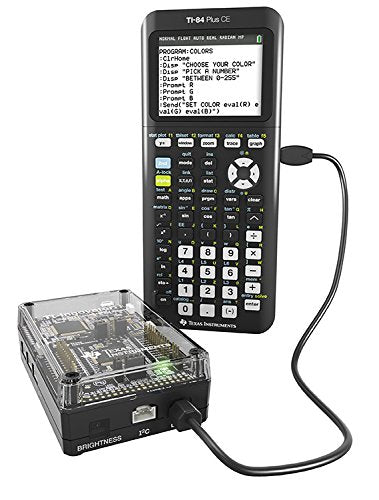
Plug-And-Play And Ready-To-Use With Ti Graphing Calculators, The Ti-Innovator Hub With Ti Launchpad Board Enables Students To Learn Basic Coding And Design, Use Those Skills To Program And Build Working Solutions, And Connect Science, Technology, Engineering And Math (Stem) Concepts.Key Features: Plug-And-Play With Ti-Nspire Cx Technology And Ti-84 Plus Ce Graphing Calculators Durable, Made For The Classroom I/O Ports Support Additional Components To Expand Ti-Innovator System Functionality Built-In Led, Rgb, Light Sensor And Speaker For Quick Coding Projects Supports An External Breadboard To Create And Build Projects Ti Launchpad Board Inside Is The Same Technology Used By Real Engineers To Design Productsthe Ti-Innovator Hub Kit Contains The Following: Ti-Innovator Hub Ti Wall Charger Usb Cable - Mini-A To Mini-B Usb Cable - Standard-A To Mini-B Usb Cable - Standard-A To Micro-B
⚠️ WARNING (California Proposition 65): This product may contain chemicals known to the State of California to cause cancer, birth defects, or other reproductive harm. For more information, please visit www.P65Warnings.ca.gov.
Frequently Asked Questions
Q: What are the dimensions of the Texas Instruments TI-Innovator Hub?A: The Texas Instruments TI-Innovator Hub measures eight point eight inches long, six point two inches wide, and two inches high. These dimensions make it compact and suitable for classroom use.
Q: What material is the TI-Innovator Hub made of?A: The TI-Innovator Hub is made of metal. This durable material ensures it can withstand classroom environments and frequent handling.
Q: What additional components come with the TI-Innovator Hub?A: The TI-Innovator Hub kit includes the TI-Innovator Hub, a TI Wall Charger, and three USB cables in different formats. These accessories enhance its functionality and ease of use.
Q: How do I connect the TI-Innovator Hub to my calculator?A: You connect the TI-Innovator Hub to your TI graphing calculator using the included USB cables. It is designed to be plug-and-play, making setup easy.
Q: Is the TI-Innovator Hub suitable for beginners?A: Yes, the TI-Innovator Hub is suitable for beginners. It provides an easy entry point for students to learn coding and design concepts.
Q: Can I use this product for advanced projects?A: Yes, the TI-Innovator Hub supports advanced projects as well. Its multiple input and output ports allow users to expand functionality for more complex creations.
Q: How do I maintain the TI-Innovator Hub?A: To maintain the TI-Innovator Hub, keep it clean and store it in a dry place when not in use. Avoid exposing it to extreme temperatures or moisture.
Q: Is the TI-Innovator Hub safe for classroom use?A: Yes, the TI-Innovator Hub is designed for safe classroom use. It features built-in components like LEDs and sensors that are child-friendly.
Q: How do I store the TI-Innovator Hub?A: Store the TI-Innovator Hub in a cool, dry area and use the original packaging if possible to protect it from damage. This helps prolong its lifespan.
Q: What if my TI-Innovator Hub arrives damaged?A: If your TI-Innovator Hub arrives damaged, contact customer support immediately for assistance. Most manufacturers offer a warranty for defective products.
Q: What types of projects can I create with the TI-Innovator Hub?A: You can create various projects such as controlling LEDs, using a light sensor, or programming sounds through the built-in speaker. It encourages creativity in coding.
Q: Is there a warranty on the TI-Innovator Hub?A: Yes, the TI-Innovator Hub typically comes with a manufacturer warranty. Check the product packaging or the manufacturer's website for specific details.
Q: Can the TI-Innovator Hub be used outside of the classroom?A: Yes, the TI-Innovator Hub can be used outside of the classroom. It is ideal for home projects, STEM clubs, and coding workshops.
Q: What calculators are compatible with the TI-Innovator Hub?A: The TI-Innovator Hub is compatible with TI-Nspire CX technology and TI-84 Plus CE graphing calculators. This compatibility enhances its functionality.
Q: How long does it take to set up the TI-Innovator Hub?A: Setting up the TI-Innovator Hub takes just a few minutes. Simply connect it to your calculator using the provided cables, and it’s ready to use.