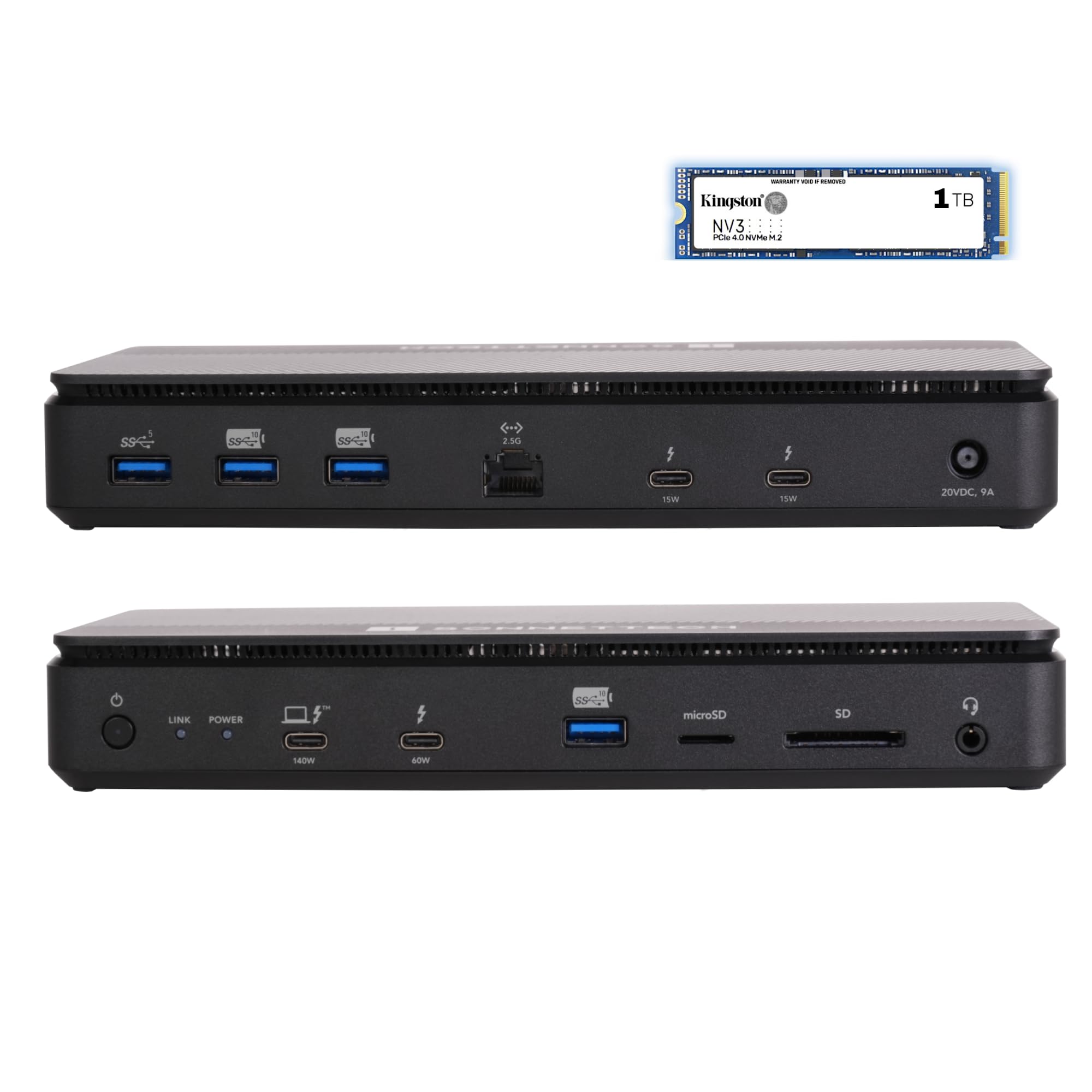
Built-In Kingston Pcie 4.0 Nvme Ssd - Experience Ultra-Fast Storage Speeds Up To 6000 Mb/S With Thunderbolt 5 And 3400 Mb/S With Thunderbolt 4 Or 3, Ideal For Creative Professionals And High-Performance Workflows. | 12 High-Speed Ports For Maximum Connectivity - Features Four Thunderbolt 5 Ports, Three Usb 3.2 Gen 2 (10Gbps) Type-A Charging Ports, One Usb 3.2 Gen 1 (5Gbps) Type-A Port, One Rj45 2.5Gb Ethernet Port, A 3.5Mm Combo Audio Jack, Sd Card Slot, And Microsd Card Slot. | Connect Three Thunderbolt 5 Peripherals - Expand Your Setup With Three Thunderbolt 5, 4, Or 3 Devices. Also Supports Usb4 V2, Usb4, And Usb3 Devices, Ensuring Wide Compatibility For Your Workstation. | Charge Your Laptop: Provides Up To 140W Through The Included Thunderbolt 5 Cable To Power And Charge Your Laptop. | Support For 1080P, 1440P, 4K, 5K, 6K, And 8K Displays @ Up To 240Hz. Depending On Your Computer, Supports Up To Three 4K, Two 6K Or 8K, Or A Single 4K, 5K, 6K, Or 8K Display.
⚠️ WARNING (California Proposition 65): This product may contain chemicals known to the State of California to cause cancer, birth defects, or other reproductive harm. For more information, please visit www.P65Warnings.ca.gov.
Frequently Asked Questions
Q: What are the dimensions of the Sonnet Echo 13 Thunderbolt 5 SSD Dock?A: The dimensions are three point nine four inches in length, eleven point zero two inches in width, and five point nine one inches in height.
Q: What type of SSD is integrated into the Sonnet Echo 13 Dock?A: The dock features a built-in Kingston PCIe four point zero NVMe SSD.
Q: How fast is the storage speed of the Sonnet Echo 13 Dock?A: The dock provides ultra-fast storage speeds up to six thousand megabytes per second with Thunderbolt five.
Q: How do I connect devices to the Sonnet Echo 13 Dock?A: You can connect devices using four Thunderbolt five ports and various USB ports, including USB three point two Gen two Type-A.
Q: Can I charge my laptop with the Sonnet Echo 13 Dock?A: Yes, it can provide up to one hundred forty watts of power to charge your laptop through the included Thunderbolt five cable.
Q: Is the Sonnet Echo 13 Dock compatible with multiple displays?A: Yes, it supports up to three four K displays or two six K or eight K displays, depending on your computer's capabilities.
Q: How should I clean the Sonnet Echo 13 Dock?A: To clean the dock, use a soft, lint-free cloth dampened with water or a mild cleaner, avoiding any abrasive materials.
Q: Is there a warranty for the Sonnet Echo 13 Dock?A: Yes, the dock typically comes with a manufacturer's warranty, which may vary based on the retailer.
Q: What if my Sonnet Echo 13 Dock arrives damaged?A: If your dock arrives damaged, contact the retailer for return instructions or a replacement.
Q: Can I use the Sonnet Echo 13 Dock with a Chromebook?A: Yes, the dock is compatible with Mac, Windows, Chromebook, and iPad Pro systems.
Q: What types of ports does the Sonnet Echo 13 Dock have?A: It includes four Thunderbolt five ports, three USB three point two Gen two Type-A ports, an RJ45 two point five gigabit Ethernet port, and more.
Q: Is the Sonnet Echo 13 Dock suitable for creative professionals?A: Yes, it's designed for creative professionals and high-performance workflows due to its ultra-fast storage and multiple connectivity options.
Q: How do I set up the Sonnet Echo 13 Dock?A: To set it up, connect the dock to your computer using the Thunderbolt five cable, then connect your peripherals as needed.
Q: What colors are available for the Sonnet Echo 13 Dock?A: The Sonnet Echo 13 Dock is available in black.
Q: Does the Sonnet Echo 13 Dock support USB4 devices?A: Yes, the dock supports USB4 v2, USB4, and USB3 devices, ensuring wide compatibility.