

Cart
0


Tensky Smart Watch for Men Women, 1.7" Touch Screen, Alexa, Fitness Tracker, 60 Sports Modes, 5ATM Waterproof, Black
Free Standard Shipping Across USA
Vendor: Tensky
Type: Fitness Smartwatches
Sku: WBEEAB0BFQ36XPW
Availability: Sold Out
Couldn't load pickup availability
Guarantee safe checkout

Sold by Electroeshop, an authorized reseller.
Returns accepted within 30 days | support@electroeshop.com
Shipping Information
- Free Standard Shipping — United States only
- Processing Time: 3–5 business days
- Estimated Delivery: 6–10 business days after dispatch
- Double-boxed, fully insured & discreetly packaged
- Tracking number sent via email once dispatched
Returns & Refund
Returns accepted within 30 days of delivery.
Damaged or Defective Item
Free return shipping + replacement or full refund
Wrong Item Received
Free return shipping + replacement or full refund
Change of Mind
Return shipping at customer's expense · 25% restocking fee applies
All returns require a Return Authorization (RA) number before sending.
View Full Return & Refund Policy
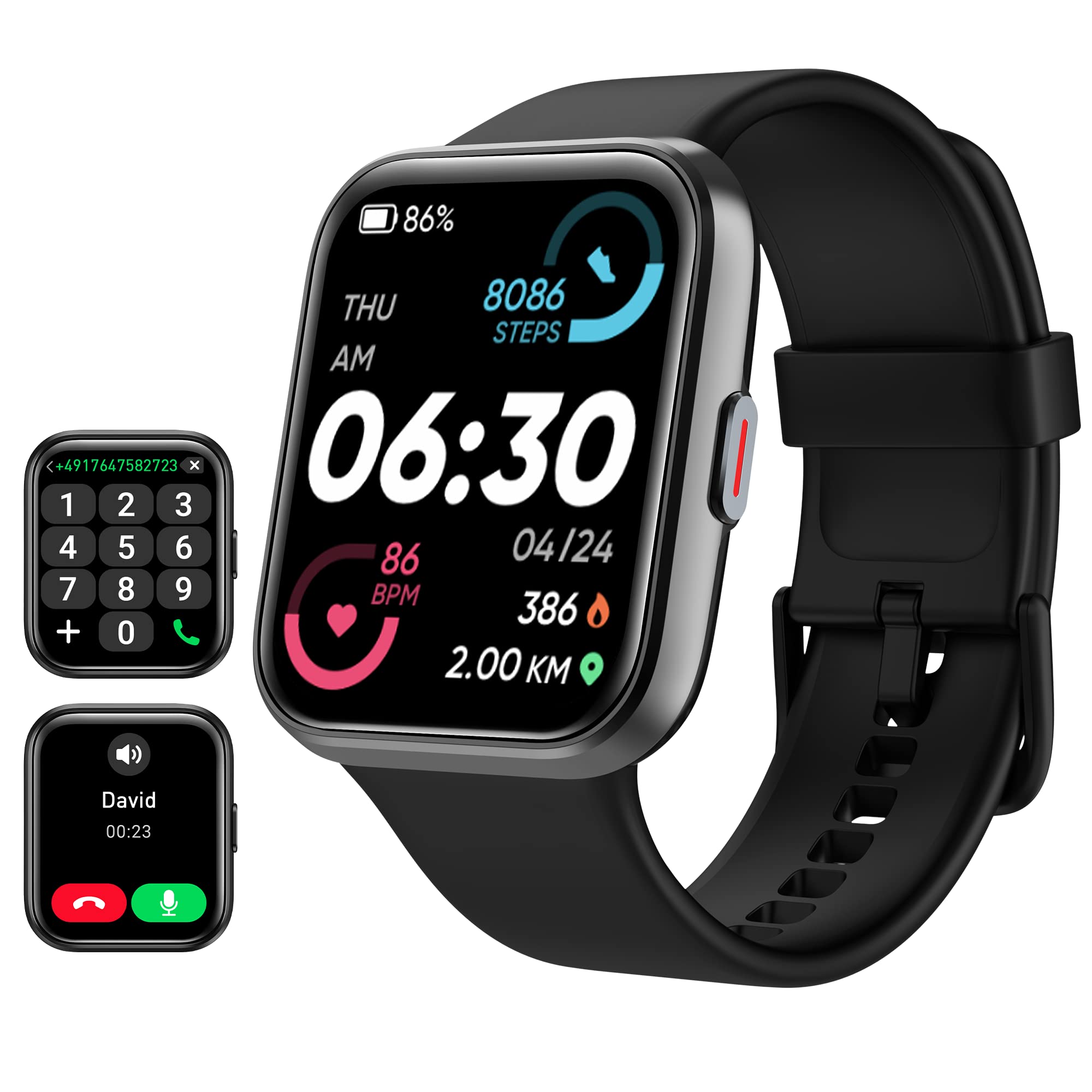
Tensky Smart Watch for Men Women, 1.7" Touch Screen, Alexa, Fitness Tracker, 60 Sports Modes, 5ATM Waterproof, Black
$78.28

Frequently Asked Questions
- Q: What size is the display on the Smart Watch? A: The display is one point seven inches. It features a TFT-LCD full-color touchscreen, providing excellent image quality.
- Q: What material is the Smart Watch made of? A: The Smart Watch is primarily composed of durable materials suitable for daily wear. Specific material details are not provided.
- Q: What is the battery capacity of the Smart Watch? A: The battery capacity is three hundred milliamp hours. It can be charged in two hours and lasts for five to seven days.
- Q: How do I make calls with the Smart Watch? A: You can make and answer calls directly from the Smart Watch. Simply connect it to your smartphone via Bluetooth.
- Q: Is the Smart Watch compatible with my phone? A: Yes, it is compatible with Android six point zero or above and iOS nine point zero or above. Ensure your phone supports Bluetooth five point zero.
- Q: How can I track my fitness with the Smart Watch? A: The Smart Watch tracks your heart rate, sleep, steps, calories burned, and more. It supports sixty different sports modes.
- Q: How do I keep my Smart Watch clean? A: To clean your Smart Watch, use a soft, damp cloth. Avoid using harsh chemicals or submerging it in water.
- Q: Is the Smart Watch waterproof? A: Yes, it has a five ATM waterproof rating. This means you can wear it while swimming or in the rain, but not in hot water.
- Q: How do I store the Smart Watch when not in use? A: Store the Smart Watch in a cool, dry place. Avoid exposing it to extreme temperatures or direct sunlight.
- Q: Is there a warranty for the Smart Watch? A: Yes, it comes with a twelve-month warranty. The manufacturer also provides lifetime support for any issues.
- Q: Can I use the Smart Watch for tracking swimming? A: Yes, it supports tracking both pool and open water swimming. It can monitor your performance in various swim modes.
- Q: What should I do if the Smart Watch doesn't charge? A: If the Smart Watch doesn’t charge, ensure the charging cable is properly connected and the power source is functioning. If issues persist, contact support.
- Q: How do I download the app for the Smart Watch? A: You can download the app by scanning the code provided in the manual or by searching for 'Veryfit' in your app store.
- Q: Are there any hazardous materials in the Smart Watch? A: Yes, it contains lithium-ion batteries. Handle with care and follow disposal regulations for electronic devices.
- Q: What features can I customize on the Smart Watch? A: You can customize the watch face and adjust settings like notifications, brightness, and activity tracking preferences.