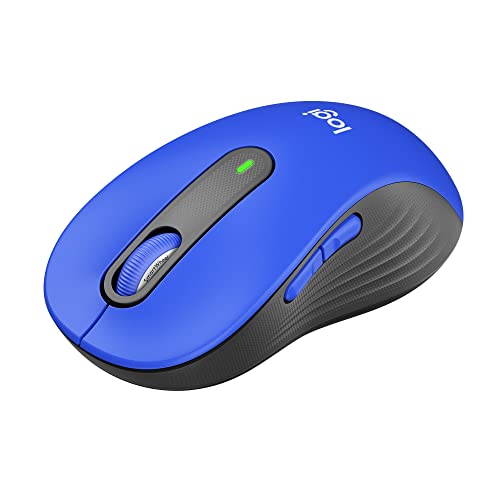
Upgrade To Smarter Scrolling, Better Comfort, And More Productivity With The Signature M650 L. The Versatile Mouse Features An Adaptive Scroll Smartwheel That Delivers Line-By-Line Precision, And Auto-Switches To Super Fast Free Spin Mode With The Flick Of A Finger. A Choice Of Sizes For Smaller, Larger And Left Hands Means Theres A Perfect Fit For Anyone. Seamless Wireless Connectivity, Customizable Side Buttons, And A Comfort Shape Keep You Comfortably And Productive Hour After Hour. Logitechs Silenttouch Technology Delivers Silent Clicks To Keep You Focused While 24-Month Battery Life** And Universal Operating System Compatibility Ensure Hassle-Free Performance. **Battery Life May Vary Based On User And Computing Conditions
⚠️ WARNING (California Proposition 65): This product may contain chemicals known to the State of California to cause cancer, birth defects, or other reproductive harm. For more information, please visit www.P65Warnings.ca.gov.
Frequently Asked Questions
Q: What are the dimensions of the Logitech Signature M650 L Wireless Mouse?A: The Logitech Signature M650 L measures four point seven inches by two point six inches by one point six inches.
Q: What is the battery life of the Logitech Signature M650 L?A: The battery life lasts up to twenty-four months on a single AA battery.
Q: What materials are used in the Logitech Signature M650 L?A: The mouse contains certified post-consumer recycled plastic, with a minimum of fifty-seven percent recycled content for the Classic Blue version.
Q: What operating systems is the Logitech Signature M650 L compatible with?A: The mouse is compatible with Windows, macOS, Linux, ChromeOS, iPadOS, and Android operating systems.
Q: What color options are available for the Logitech Signature M650 L?A: The Logitech Signature M650 L is available in Classic Blue, along with other color options.
Q: How do I connect the Logitech Signature M650 L to my computer?A: You can connect the Logitech Signature M650 L via Bluetooth Low Energy or using the Logi Bolt USB receiver included with the mouse.
Q: Is the Logitech Signature M650 L suitable for large hands?A: Yes, the Logitech Signature M650 L is designed for large sized hands.
Q: How do I customize the side buttons on the Logitech Signature M650 L?A: You can customize the side buttons using Logitech Options+, available for Windows and macOS.
Q: Can I use the Logitech Signature M650 L with multiple devices?A: Yes, this mouse supports multi-device connectivity, allowing seamless switching between devices.
Q: How do I clean the Logitech Signature M650 L Wireless Mouse?A: To clean the mouse, gently wipe it with a soft, damp cloth, avoiding harsh chemicals.
Q: Is the Logitech Signature M650 L a quiet mouse?A: Yes, it features SilentTouch technology that reduces click noise by ninety percent.
Q: What should I do if my Logitech Signature M650 L doesn't connect?A: If it doesn't connect, try resetting the Bluetooth connection or using the USB receiver to connect.
Q: What warranty does the Logitech Signature M650 L come with?A: The Logitech Signature M650 L typically comes with a limited hardware warranty, details of which can be found on Logitech's website.
Q: Is the Logitech Signature M650 L environmentally friendly?A: Yes, it is made from post-consumer recycled plastic, contributing to sustainability efforts.
Q: What if my Logitech Signature M650 L arrives damaged?A: If your mouse arrives damaged, contact the retailer for a return or exchange as per their policy.