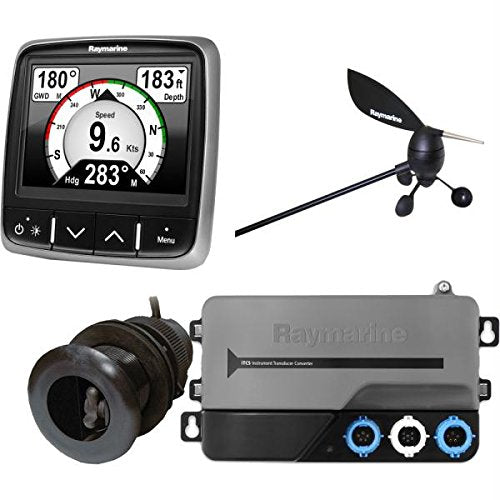
The I70S Multifunction Gives You The Flexibility To Display Instrument And Navigation Data That Is Most Important To You. Equipped With A Bold And Bright 4.1 Display The I70S Is Easy-To-Customize With Digital, Analog And Graphical Displays Of Depth, Speed, Wind And More. Add The I70S To Your Existing Raymarine Instrument System Or Create A Network Of I70S Displays And Sensors, The Choice Is Yours.
⚠️ WARNING (California Proposition 65): This product may contain chemicals known to the State of California to cause cancer, birth defects, or other reproductive harm. For more information, please visit www.P65Warnings.ca.gov.
Frequently Asked Questions
Q: What are the dimensions of the Raymarine i70 System Pack?A: The Raymarine i70 System Pack measures ten inches in length, one hundredth of an inch in width, and ten inches in height. These compact dimensions make it suitable for a variety of marine installations.
Q: What display size does the Raymarine i70 have?A: The Raymarine i70 features a four point one inch display. This size provides clarity and visibility for navigation and instrument data.
Q: What type of display technology is used in the i70?A: The i70 utilizes a large four inch LCD screen. This technology ensures superb visibility at both distance and acute angles.
Q: How do I install the Raymarine i70 System Pack?A: To install the Raymarine i70, connect it to your existing Raymarine instrument system or network it with other i70s displays and sensors. Follow the user manual for detailed installation instructions.
Q: Can I customize the display on the i70?A: Yes, the i70 is easy to customize. Users can choose digital, analog, and graphical displays for depth, speed, wind, and more.
Q: Is the Raymarine i70 suitable for beginners?A: Yes, the i70 is user-friendly and great for beginners. Its Lighthouse user interface provides an easy-to-use navigation experience.
Q: How do I keep the Raymarine i70 in good condition?A: To maintain the Raymarine i70, clean the screen with a soft, lint-free cloth. Avoid using harsh chemicals that could damage the display.
Q: What should I do if the i70 does not turn on?A: If the i70 does not turn on, check the power connection and ensure it is properly wired. Consult the user manual for troubleshooting steps.
Q: Does the i70 support NMEA2000 marine networks?A: Yes, the Raymarine i70 integrates with NMEA2000 marine networks. This allows it to connect with various marine sensors and devices.
Q: What data views are supported by the Raymarine i70?A: The i70 supports multiple data views, including wind, speed, depth-hull, tridata, engine, environmental, fuel, and navigation. This flexibility enhances your marine experience.
Q: Is the Raymarine i70 compatible with other Raymarine products?A: Yes, the i70 can be added to existing Raymarine systems or used as part of a network with other i70s displays. This compatibility expands your options.
Q: What is the warranty period for the Raymarine i70?A: The standard warranty period for the Raymarine i70 is typically one year from the date of purchase. Check with the retailer for specific warranty details.
Q: Can the i70 display multiple types of data simultaneously?A: Yes, the i70 can display multiple types of data simultaneously. Users can view essential information such as speed, depth, and wind at a glance.
Q: Is the Raymarine i70 waterproof?A: Yes, the Raymarine i70 is designed for marine environments and is waterproof. This makes it suitable for use in various weather conditions.
Q: What should I do if my i70 display is damaged during shipping?A: If the i70 display arrives damaged, contact the retailer immediately for return or exchange options. Keep all packaging materials for the return process.
Q: How do I update the software on the Raymarine i70?A: To update the software on the Raymarine i70, download the latest firmware from the Raymarine website and follow the provided instructions for installation.