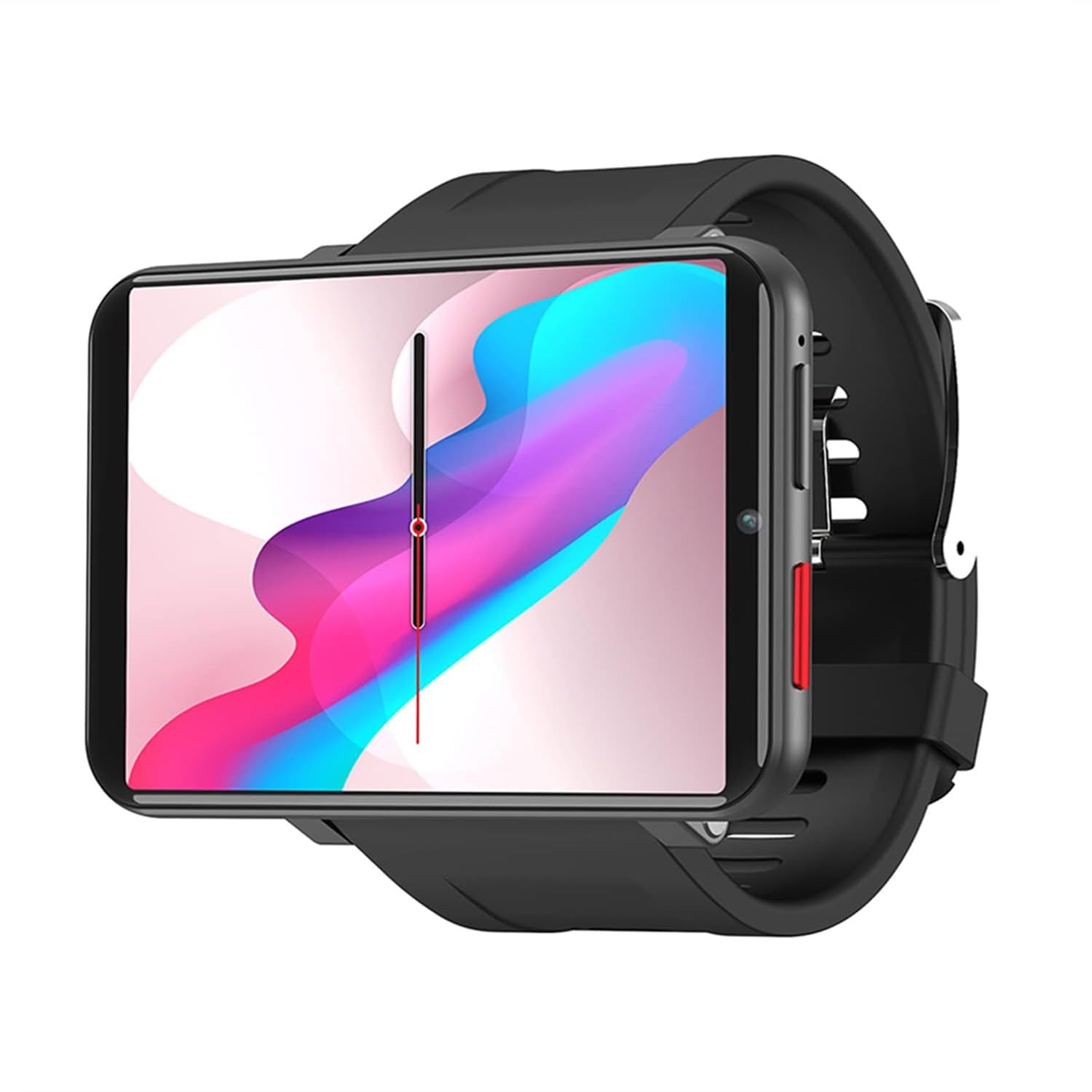
Rainbuvvy 4G Smart Watch 2.86 Inch Screen Android 7.1 1Gb+16Gb 5Mp Camera 2700Mah Battery Smartwatch For Men (Black, 1Gb 16Gb)
No reviews
$186.40
Regular price
$266.29
-30%
Vendor: Rainbuvvy
Type: Fitness Smartwatches
Sku: WBEEAB0DDT7D115
Availability: In Stock
Couldn't load pickup availability
Guarantee safe checkout
Processing time : 1-3 days
US Orders Ships in : 3-5 days
International Orders Ships in : 8-12 days
15-days return on defective items
Shipping information
Our Shipping Promise
At Electroeshop, we understand that your pet supplies are important. That's why we take extra care with every package we send. All orders are shipped in double-boxes with full insurance for additional protection, ensuring your items arrive safely.
Processing & Shipping Timeline
Processing Time: Orders are processed within 1-3 business days
Domestic Delivery: Typically 3-5 business days
Please note that delivery times are estimates and may vary based on your location, weather conditions, or other unforeseen circumstances.
Shipping Destinations
Electroeshop currently only ships to the United States.
Shipping Costs
We are pleased to offer free standard shipping on all orders within the United States.
Discreet Packaging
We respect your privacy. All Electroeshop packages are shipped with complete discreet packaging. The product name, description, sender's name, and any information that hints about the contents are encrypted. Your package will arrive without any indication of what's inside, ensuring your purchase remains confidential.
Signature Requirements
Important Note: All orders valued above $250 will require a signature upon delivery for your protection.
Order Tracking
Once your order ships, you'll receive a tracking number via email so you can monitor your shipment's progress every step of the way.
Lost or Delayed Shipments
If your package is lost or significantly delayed, please contact our support team immediately, and we will assist you in resolving the issue.
Additional Security Measures
For your protection, we may contact you for additional order verification of the payment method on certain orders.
Questions or Concerns?
For details on returns and refunds, please refer to our Return Policy page. For any questions about shipping or delivery, please contact our customer service team at support@Electroeshop.com.
Chip: Mt6739 Memory Combination:Ram: 1G/3G Rom: 16Gb/32Gb Camera: 5Mp Support Band: 2G: Gsm:B2 B3 B5 B8 3G: Wcdma :B1 B2 B5 B8; Td-Scdma:B34/39 4G: Lte-Fdd:B1 B2 B3 B5 B7 B8 B12 B20; Lte-Tdd:B38 B39 B40 B41(100Mhz) Wifi: Support 2.4G 5G Bluetooth: 4.0 Display: 2.86 Inch Lcd 480*640 Resolution Capacitive Touch Screen Please Note: 1. If There'Re Any Questions During Using, Please Contact Us First Before Returning. We Will Definitely Help You Solve It. 2. About Sim Card A. If Your Watch Is Unable To Recognize The Sim Card, Please Make Sure That The Card Has Been Inserted Correctly. You Will Hear A Clicking Sound When Sim Card Was Inserted Correctly. B. All Network Frequency Bands In The North America: Tdd: Band 41(Us)/42(Ca); Fdd: Band 2/4/5/7/12/13/17/25/26 Network Frequency Band Supported By Our Smart Watch: Fdd: Band 2/5/7 Support Operators: Iconnect (Choice Phone), At&Amp;T, Ntelos, T-Mobile, U.S. Cellular. (Note: Because The Network Signal Of Each Region Is Different,Please Confirm With Your Local Operator Before Purchasing.) 3. About Connection Find The ''Assistant'' App On Your Watch --- Click ''Connect Phone'' --- Enter The ''Wiiwatch2'' App On Your Phone --- Click On ''Connect Device'' --- ''Scan Qr Code''&Nbsp; (You Could Also Refer To Page 9 Of The Manual.) Ps: If The Connection Is Unsuccessful, Please Uninstall The ''Wiiwatch2'' App And Clear The Bluetooth Pairing Record. Then Reset The Watch And Try Again. (Clear Pairing Record: 1.Click ''Small Trash Can Icon'' At The Bottom Left Corner Of The Qr Code Page On The Watch;&Nbsp; 2. Clear The Pairing Record In The Bluetooth List On The Mobile Phone.)
⚠️ WARNING (California Proposition 65): This product may contain chemicals known to the State of California to cause cancer, birth defects, or other reproductive harm. For more information, please visit www.P65Warnings.ca.gov.
Frequently Asked Questions
Q: What are the dimensions of the Rainbuvvy 4G Smart Watch?A: The Rainbuvvy 4G Smart Watch features a two point eight six inch screen. It provides a large display for enhanced visibility.
Q: What operating system does the Rainbuvvy Smart Watch use?A: The smart watch operates on Android seven point one. This ensures compatibility with various apps and functionalities.
Q: What is the battery capacity of the Rainbuvvy Smart Watch?A: The smart watch is equipped with a two thousand seven hundred milliampere hour battery. This allows for longer usage without frequent charging.
Q: How do I connect my phone to the Rainbuvvy Smart Watch?A: To connect your phone, find the 'Assistant' app on the watch and follow the instructions to scan the QR code.
Q: What features does the Rainbuvvy Smart Watch provide for health monitoring?A: The watch includes a heart rate sensor for monitoring your heart rate throughout the day. It tracks resting, walking, and workout rates.
Q: What is the camera specification of the Rainbuvvy Smart Watch?A: The Rainbuvvy Smart Watch features a five megapixel camera. This allows for clear video calls and selfies.
Q: Is the Rainbuvvy Smart Watch water-resistant?A: The product details do not specify water resistance. It's advisable to keep it away from water to avoid damage.
Q: How do I charge the Rainbuvvy Smart Watch?A: Simply connect the watch to a compatible charger using the provided charging cable. Ensure it's plugged into a power source.
Q: What network bands are supported by the Rainbuvvy Smart Watch?A: The smart watch supports multiple network bands including FDD Band two, five, and seven for better connectivity.
Q: Can I use my existing SIM card in the Rainbuvvy Smart Watch?A: Yes, you can use a compatible SIM card in the smart watch. Ensure it is inserted correctly for recognition.
Q: What should I do if my Rainbuvvy Smart Watch won't connect to my phone?A: If the watch fails to connect, uninstall the 'wiiwatch2' app, clear Bluetooth records, and reset the watch.
Q: How do I clean the Rainbuvvy Smart Watch?A: To clean the watch, use a soft, dry cloth to wipe the surface. Avoid using harsh chemicals that could damage it.
Q: What is the warranty period for the Rainbuvvy Smart Watch?A: The warranty details are not specified. It's best to check with the manufacturer for warranty information.
Q: Is the Rainbuvvy Smart Watch suitable for outdoor activities?A: The watch is designed for everyday use, but outdoor durability is not specifically mentioned. Caution is recommended.
Q: How do I reset the Rainbuvvy Smart Watch?A: To reset the watch, navigate to the settings menu and look for the reset option. Follow the on-screen instructions.
<div class="dynamic-checkout__content" id="dynamic-checkout-cart" data-shopify="dynamic-checkout-cart"> <shopify-accelerated-checkout-cart wallet-configs="[{"supports_subs":true,"supports_def_opts":false,"name":"shop_pay","wallet_params":{"shopId":71498399780,"merchantName":"Electroeshop","personalized":true}},{"supports_subs":false,"supports_def_opts":false,"name":"amazon_pay","wallet_params":{"checkoutLanguage":"en_US","ledgerCurrency":"USD","placement":"Cart","sandbox":false,"merchantId":"A1D97EELABIYRS","productType":"PayAndShip","design":"C0002"}},{"supports_subs":true,"supports_def_opts":false,"name":"paypal","wallet_params":{"shopId":71498399780,"countryCode":"US","merchantName":"Electroeshop","phoneRequired":true,"companyRequired":false,"shippingType":"shipping","shopifyPaymentsEnabled":true,"hasManagedSellingPlanState":false,"requiresBillingAgreement":false,"merchantId":"CTDG3UHVZNL4L","sdkUrl":"https://www.paypal.com/sdk/js?components=buttons\u0026commit=false\u0026currency=USD\u0026locale=en_US\u0026client-id=AbasDhzlU0HbpiStJiN1KRJ_cNJJ7xYBip7JJoMO0GQpLi8ePNgdbLXkC7_KMeyTg8tnAKW4WKrh9qmf\u0026merchant-id=CTDG3UHVZNL4L\u0026intent=authorize"}}]" access-token="ab31e70b5cc21a1ceee088fbb76625d8" buyer-country="US" buyer-locale="en" buyer-currency="USD" shop-id="71498399780" cart-id="f38773b588143dd47227930c67b69f61" enabled-flags="["32a68cd0","a1c7ccbe","ce346acf","c0874428"]" > <div class="wallet-button-wrapper"> <ul class='wallet-cart-grid wallet-cart-grid--skeleton' role="list" data-shopify-buttoncontainer="true"> <li data-testid='grid-cell' class='wallet-cart-button-container'><div class='wallet-cart-button wallet-cart-button__skeleton' role='button' disabled aria-hidden='true'> </div></li><li data-testid='grid-cell' class='wallet-cart-button-container'><div class='wallet-cart-button wallet-cart-button__skeleton' role='button' disabled aria-hidden='true'> </div></li><li data-testid='grid-cell' class='wallet-cart-button-container'><div class='wallet-cart-button wallet-cart-button__skeleton' role='button' disabled aria-hidden='true'> </div></li> </ul> </div> </shopify-accelerated-checkout-cart> <small id="shopify-buyer-consent" class="hidden" aria-hidden="true" data-consent-type="subscription"> One or more of the items in your cart is a deferred, subscription, or recurring purchase. By continuing, I agree to the <span id="shopify-subscription-policy-button">cancellation policy</span> and authorize you to charge my payment method at the prices, frequency and dates listed on this page until my order is fulfilled or I cancel, if permitted. </small> </div>