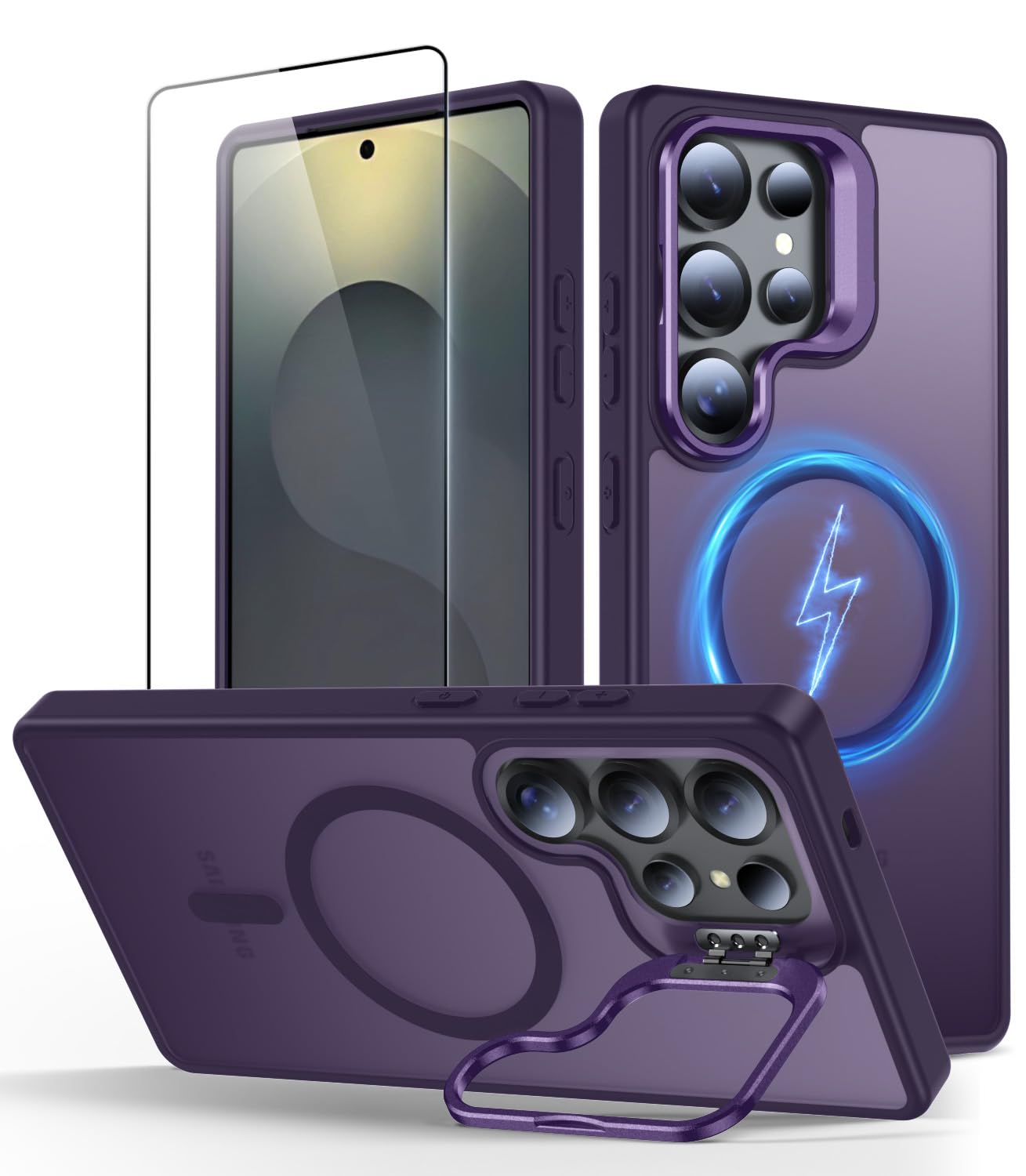
Compatible Model: Compatible With Samsung Galaxy S25 Ultra (2025 Released) 1. Quick Charging Speed, Built-In Strong 38 Pcs N52 Magnets Ring Structure Brings You The Original 20W Quick Charging Experience. 2. The Hidden Lens Holder, Screen Protector And Raised Lens Protection Frame Provide Multiple Protections For Lens And Screen. 3. Flip The Hidden Camera Stand And The Lens.Frees Your Hands To Watch Videos And Movies At Their Best Horizontal Angles. 4. The Precise Cutouts Ensure Unobstructed Operation, And Dust Is Difficult To Enter The Speaker Holes. 5. The High-Quality Pc Back Panel Material And Tpu Frame Designed With Cushioning Airbags Provide Comprehensive Protection For The Phone Against Daily Drops And Scratches.
⚠️ WARNING (California Proposition 65): This product may contain chemicals known to the State of California to cause cancer, birth defects, or other reproductive harm. For more information, please visit www.P65Warnings.ca.gov.
Frequently Asked Questions
Q: What materials is the Norllben case made of?A: The Norllben case is made from high-quality polycarbonate and thermoplastic polyurethane. These materials provide durability and shock absorption for optimal protection.
Q: What are the dimensions of the Norllben case?A: The Norllben case measures six point five seven inches in length, three point two three inches in width, and zero point five nine inches in height. This ensures a snug fit for the Samsung Galaxy S25 Ultra.
Q: Is the Norllben case compatible with wireless charging?A: Yes, the Norllben case supports fast fifteen watt wireless charging. You can charge your phone without needing to remove the case.
Q: How do I install the screen protector that comes with the case?A: To install the screen protector, first clean your screen thoroughly. Then, align the protector with the edges of your device and gently press down to attach it.
Q: Can I use the Norllben case with MagSafe accessories?A: Yes, the Norllben case is fully compatible with MagSafe accessories. It features a magnetic array for secure attachment to chargers and mounts.
Q: How do I use the kickstand feature of the case?A: To use the kickstand, simply flip it out from its hidden position. It supports both vertical and horizontal orientations for hands-free viewing.
Q: How should I clean the Norllben case?A: You can clean the Norllben case with a damp cloth and mild soap. Avoid using harsh chemicals to maintain its finish and durability.
Q: What should I do if the case gets damaged?A: If the case is damaged, check the return policy of the retailer. You may be eligible for a replacement if it's within the warranty period.
Q: Is the Norllben case suitable for everyday use?A: Yes, the Norllben case is designed for everyday use, offering military-grade protection against drops and scratches. It's ideal for active lifestyles.
Q: Does the case add bulk to the phone?A: No, the Norllben case is designed to be slim. It maintains a sleek profile while providing robust protection, so it won't significantly add to your phone's bulk.
Q: Can I access all the buttons and ports with the case on?A: Yes, the case features precise cutouts for easy access to all ports, buttons, and sensors. You won't face any obstruction while using your device.
Q: How does the case protect the camera and screen?A: The case includes raised edges and a hidden lens holder, providing protection against scratches and impacts. It comes with a tempered glass screen protector for added safety.
Q: Is the Norllben case easy to install?A: Yes, the Norllben case is easy to install. Simply align it with your device and press it into place until it fits snugly.
Q: What color options are available for the Norllben case?A: The Norllben case is available in a deep purple color. This stylish option complements the sleek design of your Samsung Galaxy S25 Ultra.
Q: Does the case resist fingerprints and smudges?A: Yes, the matte back cover of the case is designed to resist fingerprints and oil smudges. This keeps the case looking clean and stylish.
Q: What if the fingerprint sensor doesn't work after installing the screen protector?A: If the fingerprint sensor malfunctions, go to the settings, find 'Touch Sensitivity,' and re-scan your fingerprint at different angles. This should resolve the issue.