

Cart
0
![Ninjabatt Battery For Acer As10D31 As10D81 As10D51 As10D41 As10D61 As10D73 As10D75 5750 As10D71 5742 As10D56 E1 531 5250 E1 571 5733 7741 5733 5735 5755 High Performance [6 Cells/48Wh]](http://electroeshop.com/cdn/shop/files/71RoIJL2y6L.jpg?v=1759822410&width=1400)
![Ninjabatt Battery For Acer As10D31 As10D81 As10D51 As10D41 As10D61 As10D73 As10D75 5750 As10D71 5742 As10D56 E1 531 5250 E1 571 5733 7741 5733 5735 5755 High Performance [6 Cells/48Wh]](http://electroeshop.com/cdn/shop/files/71iY0_6tsTL.jpg?v=1758770491&width=1400)
![Ninjabatt Battery For Acer As10D31 As10D81 As10D51 As10D41 As10D61 As10D73 As10D75 5750 As10D71 5742 As10D56 E1 531 5250 E1 571 5733 7741 5733 5735 5755 High Performance [6 Cells/48Wh]](http://electroeshop.com/cdn/shop/files/714NHtm3fCL.jpg?v=1758770399&width=1400)
![Ninjabatt Battery For Acer As10D31 As10D81 As10D51 As10D41 As10D61 As10D73 As10D75 5750 As10D71 5742 As10D56 E1 531 5250 E1 571 5733 7741 5733 5735 5755 High Performance [6 Cells/48Wh]](http://electroeshop.com/cdn/shop/files/71Zay0CzBBL.jpg?v=1758770528&width=1400)
![Ninjabatt Battery For Acer As10D31 As10D81 As10D51 As10D41 As10D61 As10D73 As10D75 5750 As10D71 5742 As10D56 E1 531 5250 E1 571 5733 7741 5733 5735 5755 High Performance [6 Cells/48Wh]](http://electroeshop.com/cdn/shop/files/81ZvH84cGaL_abd3a2a3-4fae-483b-89bc-579a6e8bbfdc.jpg?v=1758770491&width=1400)
![Ninjabatt Battery For Acer As10D31 As10D81 As10D51 As10D41 As10D61 As10D73 As10D75 5750 As10D71 5742 As10D56 E1 531 5250 E1 571 5733 7741 5733 5735 5755 High Performance [6 Cells/48Wh]](http://electroeshop.com/cdn/shop/files/71RoIJL2y6L.jpg?v=1759822410&width=1200)
![Ninjabatt Battery For Acer As10D31 As10D81 As10D51 As10D41 As10D61 As10D73 As10D75 5750 As10D71 5742 As10D56 E1 531 5250 E1 571 5733 7741 5733 5735 5755 High Performance [6 Cells/48Wh]](http://electroeshop.com/cdn/shop/files/71iY0_6tsTL.jpg?v=1758770491&width=1200)
![Ninjabatt Battery For Acer As10D31 As10D81 As10D51 As10D41 As10D61 As10D73 As10D75 5750 As10D71 5742 As10D56 E1 531 5250 E1 571 5733 7741 5733 5735 5755 High Performance [6 Cells/48Wh]](http://electroeshop.com/cdn/shop/files/714NHtm3fCL.jpg?v=1758770399&width=1200)
![Ninjabatt Battery For Acer As10D31 As10D81 As10D51 As10D41 As10D61 As10D73 As10D75 5750 As10D71 5742 As10D56 E1 531 5250 E1 571 5733 7741 5733 5735 5755 High Performance [6 Cells/48Wh]](http://electroeshop.com/cdn/shop/files/71Zay0CzBBL.jpg?v=1758770528&width=1200)
![Ninjabatt Battery For Acer As10D31 As10D81 As10D51 As10D41 As10D61 As10D73 As10D75 5750 As10D71 5742 As10D56 E1 531 5250 E1 571 5733 7741 5733 5735 5755 High Performance [6 Cells/48Wh]](http://electroeshop.com/cdn/shop/files/81ZvH84cGaL_abd3a2a3-4fae-483b-89bc-579a6e8bbfdc.jpg?v=1758770491&width=1200)
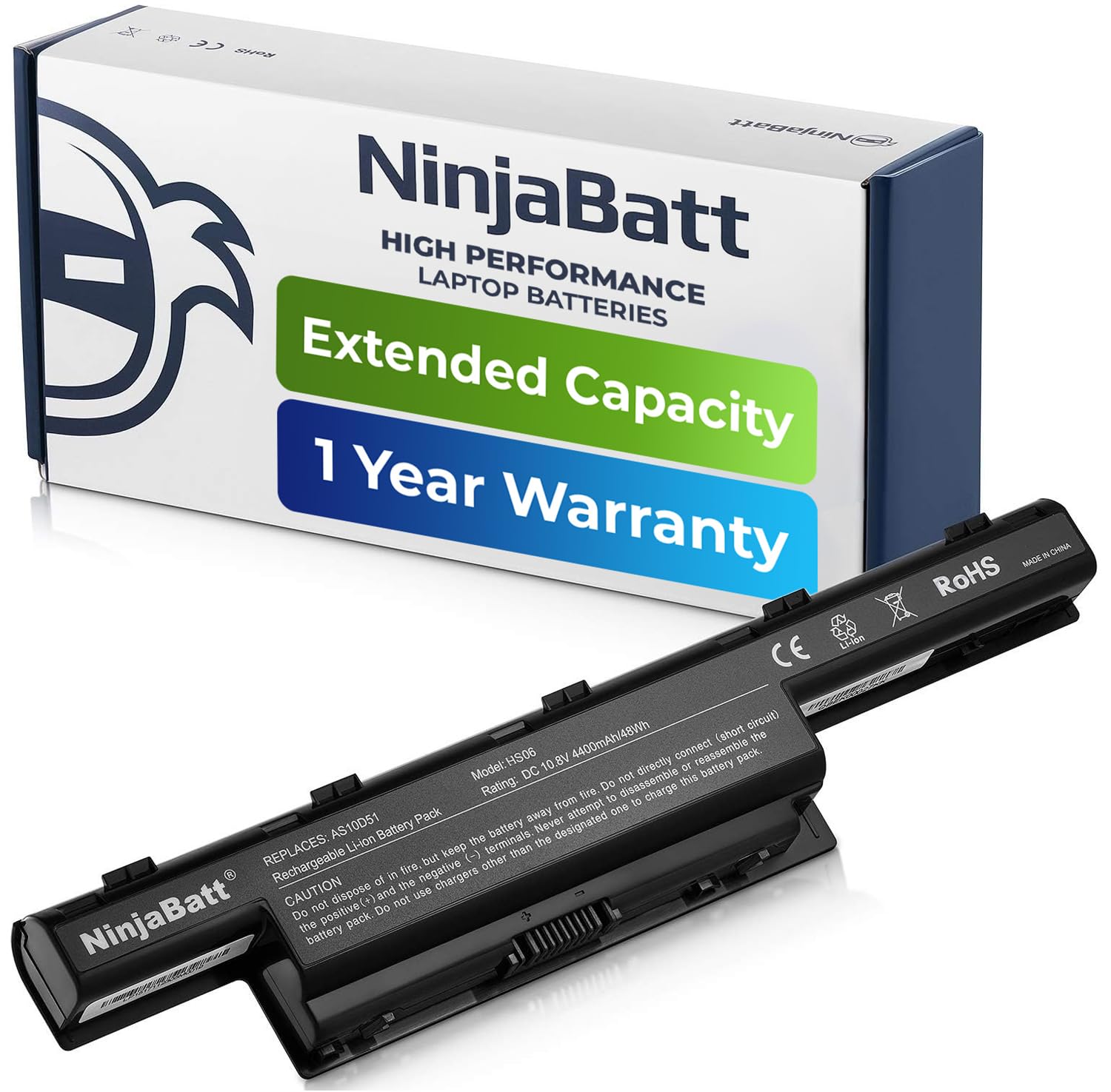
Ninjabatt Battery For Acer As10D31 As10D81 As10D51 As10D41 As10D61 As10D73 As10D75 5750 As10D71 5742 As10D56 E1 531 5250 E1 571 5733 7741 5733 5735 5755 High Performance [6 Cells/48Wh]
Vendor: Ninjabatt
Type: Rechargeable Batteries
Sku: WBEEAB00YJCJIC6
Availability: In Stock
Couldn't load pickup availability
Guarantee safe checkout

Sold by Electroeshop, an authorized reseller.
Returns accepted within 30 days | support@electroeshop.com
Shipping Information
- Free Standard Shipping — United States only
- Processing Time: 1–3 business days
- Estimated Delivery: 3–5 business days after dispatch
- Double-boxed, fully insured & discreetly packaged
- Tracking number sent via email once dispatched
- Orders over $250 require signature upon delivery. Taxes calculated at checkout.
Returns & Refund
Returns accepted within 30 days of delivery.
Damaged or Defective Item
Free return shipping + replacement or full refund
Wrong Item Received
Free return shipping + replacement or full refund
Change of Mind
Return shipping at customer's expense · 25% restocking fee applies
All returns require a Return Authorization (RA) number before sending.
View Full Return & Refund Policy
Ninjabatt Battery For Acer As10D31 As10D81 As10D51 As10D41 As10D61 As10D73 As10D75 5750 As10D71 5742 As10D56 E1 531 5250 E1 571 5733 7741 5733 5735 5755 High Performance [6 Cells/48Wh]
$40.73

Frequently Asked Questions
- Q: What is the voltage of the NinjaBatt battery? A: The voltage of the NinjaBatt battery is ten point eight volts. This is a standard voltage for high-performance laptop batteries, ensuring compatibility with various Acer models.
- Q: How many cells does the NinjaBatt battery have? A: The NinjaBatt battery has six cells. This configuration provides enhanced performance and longevity for your laptop.
- Q: What are the dimensions of the NinjaBatt battery? A: The dimensions of the NinjaBatt battery are twelve point zero one inches in length, four point zero two inches in width, and two point zero one inches in height. These measurements ensure a proper fit for compatible Acer laptops.
- Q: How do I install the NinjaBatt battery? A: To install the NinjaBatt battery, first, power off your laptop and unplug it. Remove the old battery, align the new battery with the connectors, and press down gently until it clicks into place.
- Q: Is the NinjaBatt battery suitable for my Acer laptop model? A: Yes, the NinjaBatt battery is compatible with many Acer models, including Aspire and TravelMate series. Check the list of compatible models to ensure it fits your laptop.
- Q: How do I charge the NinjaBatt battery for optimal performance? A: To charge the NinjaBatt battery optimally, use the original charger and avoid overcharging. It is recommended to charge the battery fully before first use for maximum capacity.
- Q: How do I maintain the NinjaBatt battery? A: To maintain the NinjaBatt battery, store it in a cool, dry place and avoid extreme temperatures. Regularly check for any signs of wear or damage and charge it periodically.
- Q: Are there any safety features in the NinjaBatt battery? A: Yes, the NinjaBatt battery includes multiple safety features, such as protection against short circuits, overheating, and overloads. This ensures safe operation during use.
- Q: Can I use the NinjaBatt battery in a different laptop brand? A: No, the NinjaBatt battery is specifically designed for Acer laptops. Using it in other brands may lead to compatibility issues and potential damage.
- Q: What should I do if my NinjaBatt battery arrives damaged? A: If your NinjaBatt battery arrives damaged, contact customer support immediately for assistance. They will guide you through the return or replacement process.
- Q: Is there a warranty for the NinjaBatt battery? A: Yes, the NinjaBatt battery comes with a warranty. Check the product details for specific warranty terms and conditions to understand your coverage.
- Q: What is the charging capacity of the NinjaBatt battery? A: The charging capacity of the NinjaBatt battery is forty-eight watt-hours and four thousand four hundred milliampere-hours. This provides reliable power for your laptop.
- Q: How long does the NinjaBatt battery last on a full charge? A: The NinjaBatt battery can last several hours on a full charge, depending on laptop usage. Typical usage includes web browsing, document editing, and media playback.
- Q: Can I take the NinjaBatt battery on a plane? A: Yes, you can take the NinjaBatt battery on a plane, but it must be carried in your carry-on luggage. Follow airline regulations regarding lithium-ion batteries.
- Q: What should I do if my laptop won't recognize the NinjaBatt battery? A: If your laptop won't recognize the NinjaBatt battery, ensure it is installed correctly and check for compatibility. If issues persist, contact support for troubleshooting.