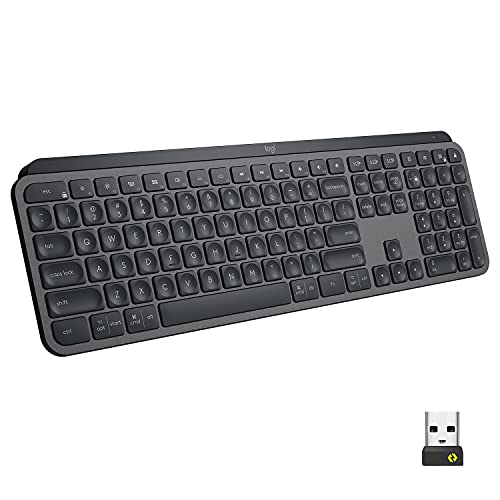
Mx Keys For Business Boosts Productivity With Perfect Stroke Precision Typing With Remarkable Comfort And Stability. Increased Key Stability Reduces Distracting Keystroke Noise. Smart Backlighting And Multi-Device And Multi-Os Capabilities Are Advanced Features Designed For Advanced Workflow. Plus Virtually No Downtime Because Mx Keys For Business Can Be Used While Recharging Its Long-Lasting Power.
⚠️ WARNING (California Proposition 65): This product may contain chemicals known to the State of California to cause cancer, birth defects, or other reproductive harm. For more information, please visit www.P65Warnings.ca.gov.
Frequently Asked Questions
Q: What are the dimensions of the Logitech MX Keys Keyboard?A: The Logitech MX Keys Keyboard measures zero point eight three inches in height, sixteen point ninety-three inches in width, and five point two inches in depth.
Q: What type of connectivity options does this keyboard offer?A: The keyboard supports both Logi Bolt USB receiver and Bluetooth Low Energy connections.
Q: Is the Logitech MX Keys Keyboard compatible with multiple operating systems?A: Yes, it is compatible with Windows, Mac, Chrome, and Linux operating systems.
Q: What is the battery life of the Logitech MX Keys Keyboard?A: The battery can last up to ten days with backlighting or up to five months with backlighting turned off.
Q: What features enhance typing comfort on this keyboard?A: It features Perfect Stroke precision typing with increased key stability to minimize distracting keystroke noise.
Q: How do I connect the Logitech MX Keys Keyboard to my devices?A: You can connect it using the Logi Bolt USB receiver or via Bluetooth, allowing you to switch between up to three devices.
Q: How do I recharge the Logitech MX Keys Keyboard?A: You can recharge the keyboard using a USB-C cable, which is included in the package.
Q: Does the keyboard have backlighting features?A: Yes, it features smart illumination that lights up the keys when your hands approach and adjusts based on ambient light.
Q: What should I do to clean my Logitech MX Keys Keyboard?A: To clean the keyboard, gently use a microfiber cloth with a non-abrasive cleaner to avoid damaging the surface.
Q: Is the Logitech MX Keys Keyboard suitable for prolonged use?A: Yes, it is designed for day-long comfort and productivity, making it suitable for extended use.
Q: What security features does the Logitech MX Keys Keyboard have?A: It uses Logi Bolt wireless technology, which provides secure, encrypted connections exceeding security needs.
Q: Can I use the Logitech MX Keys Keyboard while it is charging?A: Yes, you can continue using the keyboard while it is charging.
Q: Is the Logitech MX Keys Keyboard easy to set up?A: Yes, it is designed for ease of deployment, making setup straightforward for IT departments and users alike.
Q: Does this keyboard support mass deployment for businesses?A: Yes, it is built for scale and supports remote mass deployment for IT professionals.
Q: How does the keyboard handle different lighting conditions?A: The smart backlighting automatically adjusts to suit changing lighting conditions, ensuring visibility at all times.
Q: What is the weight of the Logitech MX Keys Keyboard?A: The weight of the keyboard is approximately two point six pounds, making it easy to transport.