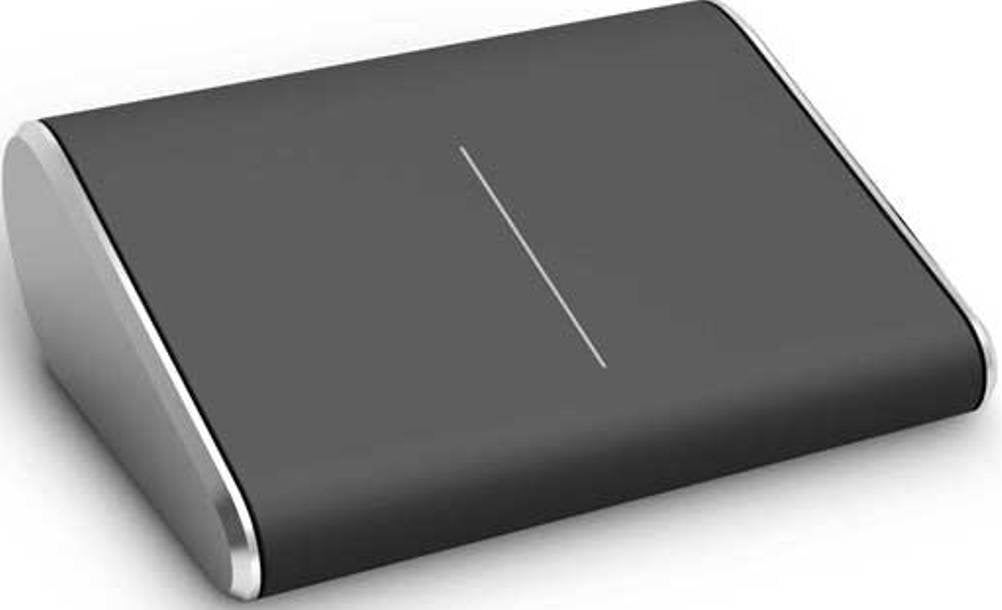
From The Manufacturermicrosoft Wedge Touch Mouse Compact For Ultimate Portability Offers Ultimate Portabilitythe Stylish, Minimalist Design Of The Wedge Touch Mouse Will Allow You To Be Productive Anytime, Anywhere In Windows 7 And Windows 8. Wedge Touch Mouse Works Great With Windows 8 And The New Horizontal Scrolling Experience On The Start Screen And In Documents.Wedge Touch Mouse Features A Touch Sensitive Surface That Responds To One Finger Touches Differently Depending On Where They Contact The Surface. Stroke With One Finger Vertically Or Horizontally To Scroll. Press Your Left Finger For ''Left Click''. Press Your Right Finger, While Slightly Lifting Your Left Finger, For ''Right Click''.Wedge Touch Mouse Is The Perfect Companion For Your Laptop Or Windows 8 Tablet When You'Re On The Go. Bluetooth Technology Means No Clutternot Only Is Wedge Touch Mouse Compact, It Doesn'T Come With Cables Or Usb Transceivers. Just Turn It On And Connect It To Your Bluetooth-Enabled Laptop Or Tablet. Additionally, Bluetrack Technology Means It Tracks On Virtually Any Surface, Whether You'Re At A Conference Or A Coffee Shop. Conserves Battery Powerwedge Touch Mouse Even Knows How To Conserve Energy. When Your Pc Or Tablet Is Shut Down Or Hibernating, The Mouse Goes Into ''Backpack Mode.'' You Can Throw It Into Your Bag And Not Worry If You Turned It Off Because It Senses That It No Longer Needs To Be On.Four-Way Touch Scrolling Scroll Vertically And Horizontally Flick Up, Down, And Side To Side To Navigate Scroll Slowly With A Gentle Swipe Scroll Quickly With A Flick Of The Finger, Then Tap To Stopproduct Details Compact Design For Ultimate Portability 4-Way Touch Scrolling For Navigating Up, Down, Left And Right Works On Virtually Any Surface With Bluetrack Technology Wireless Bluetooth Connectivity - No Transceiver Required Optimized For Windows 8 Navigation Works With Many Android Tablets*Advanced Functionality Not Available With All Devices. See Compatibility Information.*Bluetrack Technology Does Not Work On Clear Glass Or Mirrored Surfaces.System Requirements Computer/Operating Systemwindows 8, Windows Rt, Windows 7 Hard Drive150 Mb Other1 Aa Alkaline Battery (Included)Find The Right Touch Mouse For You Featurestouch Mousewedge Touch Mousearc Touch Mousesculpt Touch Mouseexplorer Touch Mouse Wirelesswireless Freedom With A Usb Dongle Or No Dongle 2.4 Ghz Bluetoothno Dongle Needed 2.4 Ghz Bluetoothno Dongle Needed 2.4 Ghz Vertical Scrollingscroll Up And Down For Smooth Navigation In Long Documents Horizontal Scrollingscroll Left To Right For Smooth Navigation Across Wide Documents Multitouchnavigation With Natural Gestures Specific Thumb, One, Two,And Three Finger Gesturesexclusively For Windows 7And Windows 8 Designed For Portabilitymice Designed For Travelproduct Descriptionoffers Ultimate Portability. The Stylish, Minimalist Design Of The Wedge Touch Mouse Will Allow You To Be Productive Anytime, Anywhere. It Is Optimized For Windows 8 Navigation, Works With Most Tablets And Laptops, Has Wireless Bluetooth Connectivity, And Blue Track Technology For Using On Virtually Any Surface.
⚠️ WARNING (California Proposition 65): This product may contain chemicals known to the State of California to cause cancer, birth defects, or other reproductive harm. For more information, please visit www.P65Warnings.ca.gov.
Frequently Asked Questions
Q: What are the dimensions of the Microsoft Wedge Touch Mouse?A: The dimensions are two point four inches in length, two point eleven inches in width, and zero point eighty-seven inches in height.
Q: What material is the Microsoft Wedge Touch Mouse made of?A: The mouse is made of plastic, providing a durable yet lightweight design.
Q: Is the Microsoft Wedge Touch Mouse wireless?A: Yes, it features wireless Bluetooth connectivity, eliminating the need for a USB transceiver.
Q: How do I connect the Microsoft Wedge Touch Mouse to my device?A: To connect, simply turn on the mouse and pair it with your Bluetooth-enabled laptop or tablet.
Q: Is the Microsoft Wedge Touch Mouse compatible with Windows 10?A: Yes, it is primarily optimized for Windows 8 but can also work with Windows 10.
Q: How do I perform scrolling with the Microsoft Wedge Touch Mouse?A: You can scroll vertically and horizontally by swiping with one finger on the touch-sensitive surface.
Q: How do I clean the Microsoft Wedge Touch Mouse?A: To clean, use a soft, damp cloth and avoid any harsh chemicals that could damage the surface.
Q: What is the battery life of the Microsoft Wedge Touch Mouse?A: The mouse uses one AA alkaline battery and goes into 'Backpack Mode' to conserve battery when not in use.
Q: Is the Microsoft Wedge Touch Mouse suitable for both left and right-handed users?A: Yes, the design is suitable for use with either hand, making it versatile for all users.
Q: Can I use the Microsoft Wedge Touch Mouse on any surface?A: Yes, it works on virtually any surface thanks to BlueTrack Technology, except for clear glass or mirrored surfaces.
Q: How do I know if the Microsoft Wedge Touch Mouse is on?A: The mouse has an on/off switch, and it enters 'Backpack Mode' when your device is shut down or in hibernation.
Q: What kind of scrolling features does the Microsoft Wedge Touch Mouse provide?A: It features four-way touch scrolling, allowing you to navigate up, down, left, and right effortlessly.
Q: Does the Microsoft Wedge Touch Mouse require special drivers?A: No, it does not require special drivers; standard Bluetooth functionality will suffice for connection.
Q: What is the weight of the Microsoft Wedge Touch Mouse?A: The weight of the mouse is approximately three ounces, making it highly portable.
Q: Where is the Microsoft Wedge Touch Mouse manufactured?A: The mouse is manufactured by Microsoft, a leading technology company.