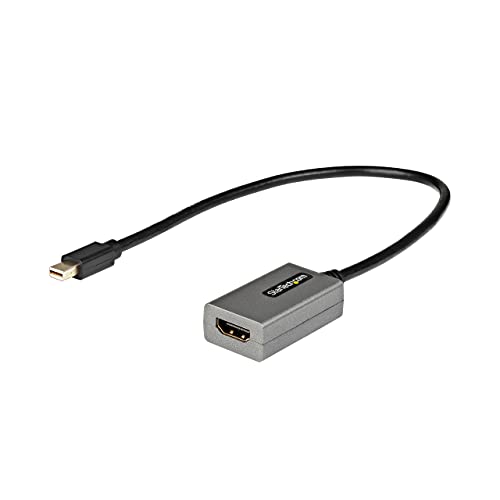
This Mini Displayport To Hdmi Adapter Lets You Connect Your Mdp Computer To An Hdmi, Television, Projector Or Monitor. Extended Cable Length This Mini Dp To Hdmi Adapter Is Equipped With An Extra-Long 12'' (30Cm) Attached Cable, Providing An Extended Reach To Reduce Port And Connector Strain On 2-In-1 Devices Or Laptops On Risers Stands. Hd Picture Quality With Support For Video Resolutions Up To 1080P, Youll Be Surprised At The Picture Spectacular Picture Quality This Adapter Provides. The Adapter Harnesses The Video Capabilities Built Into Your Mdp Connection To Deliver Every Detail In Stunning High-Definition. Ultimate Portability This Mdp Video Adapter Is Highly Portable With A Small Footprint And Lightweight Design Thats Easy To Tuck Into Your Laptop Bag While Commuting Between Your Home, Office Or Traveling For Business. The Mdp2Hdec Is Backed By A 3-Year Startech..
⚠️ WARNING (California Proposition 65): This product may contain chemicals known to the State of California to cause cancer, birth defects, or other reproductive harm. For more information, please visit www.P65Warnings.ca.gov.
Frequently Asked Questions
Q: What is the length of the attached cable?A: The attached cable is twelve inches long. This extra length helps reduce strain on ports and connectors.
Q: What materials are used in this adapter?A: The adapter is made of copper. This material ensures efficient signal transmission and durability.
Q: What are the dimensions of the adapter?A: The adapter measures fifteen point two centimeters in length, one centimeter in width, and zero point six centimeters in height. This compact size makes it easy to carry.
Q: How do I connect my devices using this adapter?A: You simply plug the Mini DisplayPort end into your mDP computer and connect the HDMI end to your display. It's a straightforward plug-and-play setup.
Q: Is this adapter compatible with MacBook Air?A: Yes, this adapter is compatible with MacBook Air models. It supports devices equipped with Mini DisplayPort.
Q: Can I use this adapter with a projector?A: Yes, you can use this adapter with a projector. It supports HDMI connections, making it versatile for various display options.
Q: How should I clean this adapter?A: To clean the adapter, use a soft, dry cloth. Avoid using any liquids or harsh chemicals that could damage the components.
Q: What warranty does this product have?A: This adapter comes with a three-year warranty from StarTech. This ensures support in case of any defects or issues.
Q: Is this adapter safe to use with all HDMI displays?A: Yes, this adapter is safe to use with various HDMI displays, including monitors and TVs. It has been tested for peak performance.
Q: What resolutions can this adapter support?A: This adapter supports video resolutions up to one thousand ninety-two by one thousand two hundred pixels. It delivers high-definition video quality.
Q: Can I use this adapter with Windows 10?A: Yes, this adapter is compatible with Windows 10. It also supports macOS, Chrome OS, and Ubuntu.
Q: What if the adapter doesn’t work when I plug it in?A: If the adapter doesn’t work, ensure it is securely connected to both devices. If issues persist, try using a different HDMI display.
Q: Is this adapter suitable for gaming?A: Yes, this adapter is suitable for gaming. It supports high-definition resolutions, enhancing your gaming experience.
Q: Does this adapter support audio transmission?A: Yes, the adapter supports seven point one channel audio. This allows for high-quality sound along with video.
Q: What if the adapter arrives damaged?A: If the adapter arrives damaged, contact customer support for assistance. They can help with returns or exchanges.
Q: Can I use this adapter with my Surface Pro?A: Yes, this adapter is compatible with all Surface Pro models. It connects seamlessly to enhance your display options.