Sold Out
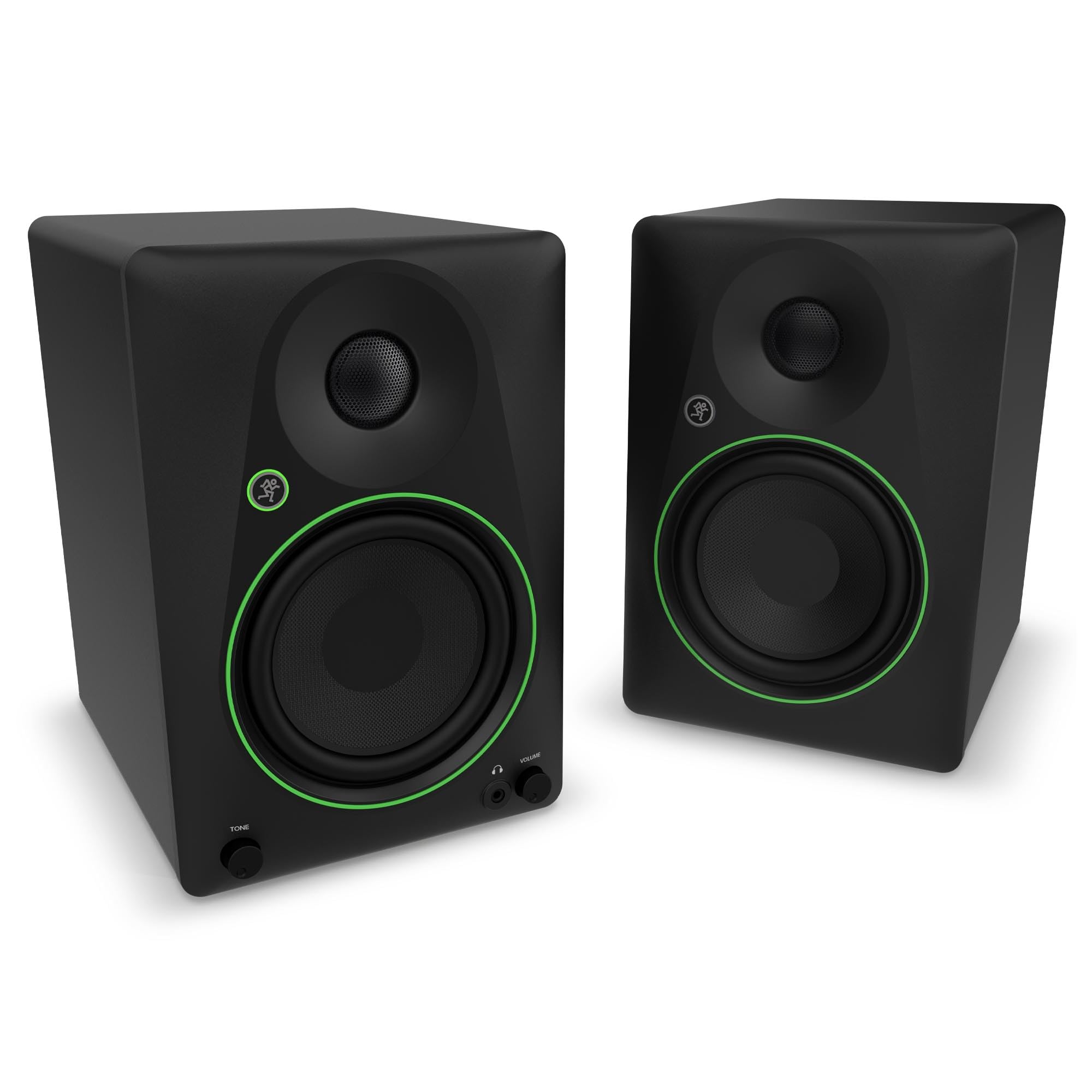
Mackie Cr5.25Bt 5.25 Inch Powered Bluetooth Studio Monitors
Free Standard Shipping Across USA
Couldn't load pickup availability
Refresh
Sold by Electroeshop, an authorized reseller.
Returns accepted within 30 days | support@electroeshop.com
Verified
Shipping Information
Free Standard Shipping — United States only
Processing Time: 3–5 business days
Estimated Delivery: 6–10 business days after dispatch
Double-boxed, fully insured & discreetly packaged
Tracking number sent via email once dispatched
Returns & Refund
Returns accepted within 30 days of delivery.
Damaged or Defective Item
Free return shipping + replacement or full refund
Wrong Item Received
Free return shipping + replacement or full refund
Change of Mind
Return shipping at customer's expense · 25% restocking fee applies
Return Authorization (RA) number before sending.
View Full Return & Refund Policy
Your Cart
Item(s):
Total: $406.38
Mackie Cr5.25Bt 5.25 Inch Powered Bluetooth Studio Monitors
$271.36
Sold Out
Mackie Cr5Bt Creative Reference Powered Studio Monitors With Bluetooth Combine Professional-Quality Sound With A Tone Shaping Knob For Moving From Studio Reference To Casual Listening To Party Mode. Featuring A Selection Of Inputs, Bluetooth And Switchable Desktop And Bookshelf Modes, These Speakers Give You Clear, Powerful Sound In Any Space. Use The Tone Control Knob To Adjust The Sound, Beginning With The Transparent Quality You Expect From Professional Studio Monitors, Then Gradually Adding More Excitement With Boom-Ier Bass And Added Sparkle. Whether Youre Using Them For Business, Pleasure Or Both, Mackie Cr5Bt May Be The Only Speakers You Ever Need.
⚠️ WARNING (California Proposition 65):www.P65Warnings.ca.gov .
Frequently Asked Questions
Q: What are the dimensions of the Mackie CR5.25BT studio monitors?
A: The dimensions are nine point twenty-five inches in length, six point nine inches in width, and ten point three inches in height.
Q: What is the power output of the Mackie CR5.25BT?
A: The Mackie CR5.25BT features a powered output, providing high-quality sound suitable for studio monitoring.
Q: What type of connectivity options does the Mackie CR5.25BT have?
A: The studio monitors have Bluetooth connectivity, a headphone output, and a three point five millimeter input for versatile connections.
Q: How do I set up the Mackie CR5.25BT studio monitors?
A: To set up, connect the monitors to your audio source via Bluetooth or the three point five millimeter input, and switch to the desired mode.
Q: Can I use the Mackie CR5.25BT for casual listening?
A: Yes, the Mackie CR5.25BT is designed for both professional monitoring and casual listening with its adjustable tone control.
Q: Is the Mackie CR5.25BT suitable for gaming?
A: Yes, the Mackie CR5.25BT is suitable for gaming, providing clear sound quality and immersive audio experience.
Q: How do I clean the Mackie CR5.25BT studio monitors?
A: To clean, use a soft, dry cloth to wipe the surfaces and avoid using any harsh chemicals or abrasive materials.
Q: Are the Mackie CR5.25BT studio monitors safe for long-term use?
A: Yes, they are designed for extended use, but take regular breaks to prevent ear fatigue during long listening sessions.
Q: How do I store the Mackie CR5.25BT when not in use?
A: Store the Mackie CR5.25BT in a cool, dry place, away from direct sunlight to ensure the longevity of the speakers.
Q: What is the difference between Mackie CR5.25BT and other models?
A: The Mackie CR5.25BT features Bluetooth connectivity and a specialized tone control knob, making it versatile for different listening environments.
Q: Can I use the Mackie CR5.25BT for professional music production?
A: Yes, the Mackie CR5.25BT is suitable for professional music production, delivering accurate sound for mixing and mastering.
Q: Is the Mackie CR5.25BT compatible with laptops?
A: Yes, the Mackie CR5.25BT can easily connect to laptops via Bluetooth or the three point five millimeter audio input.
Q: What type of warranty comes with the Mackie CR5.25BT?
A: The Mackie CR5.25BT typically comes with a one-year limited warranty, providing peace of mind against manufacturing defects.
Q: What should I do if the Mackie CR5.25BT arrives damaged?
A: If damaged, contact the retailer or Mackie's customer support immediately to initiate a return or replacement process.
Q: How can I troubleshoot sound issues with the Mackie CR5.25BT?
A: If you experience sound issues, check the volume settings, ensure proper connections, and verify that Bluetooth is connected.
<div class="dynamic-checkout__content" id="dynamic-checkout-cart" data-shopify="dynamic-checkout-cart"> <shopify-accelerated-checkout-cart wallet-configs="[{"supports_subs":true,"supports_def_opts":false,"name":"shop_pay","wallet_params":{"shopId":71498399780,"merchantName":"Electroeshop","personalized":true}},{"supports_subs":false,"supports_def_opts":false,"name":"amazon_pay","wallet_params":{"checkoutLanguage":"en_US","ledgerCurrency":"USD","placement":"Cart","sandbox":false,"merchantId":"A1D97EELABIYRS","productType":"PayAndShip","design":"C0002"}},{"supports_subs":true,"supports_def_opts":false,"name":"paypal","wallet_params":{"shopId":71498399780,"countryCode":"US","merchantName":"Electroeshop","phoneRequired":true,"companyRequired":false,"shippingType":"shipping","shopifyPaymentsEnabled":true,"hasManagedSellingPlanState":false,"requiresBillingAgreement":false,"gatewayType":"MANAGED","merchantId":"CTDG3UHVZNL4L","sdkUrl":"https://www.paypal.com/sdk/js?components=buttons\u0026commit=false\u0026currency=USD\u0026locale=en_US\u0026client-id=AbasDhzlU0HbpiStJiN1KRJ_cNJJ7xYBip7JJoMO0GQpLi8ePNgdbLXkC7_KMeyTg8tnAKW4WKrh9qmf\u0026merchant-id=CTDG3UHVZNL4L\u0026intent=authorize","serviceableCountryCodes":["AC","AD","AE","AF","AG","AI","AL","AM","AO","AR","AT","AU","AW","AX","AZ","BA","BB","BD","BE","BF","BG","BH","BI","BJ","BL","BM","BN","BO","BQ","BR","BS","BT","BW","BY","BZ","CA","CC","CD","CF","CG","CH","CI","CK","CL","CM","CN","CO","CR","CV","CW","CX","CY","CZ","DE","DJ","DK","DM","DO","DZ","EC","EE","EG","EH","ER","ES","ET","FI","FJ","FK","FO","FR","GA","GB","GD","GE","GF","GG","GH","GI","GL","GM","GN","GP","GQ","GR","GS","GT","GW","GY","HK","HN","HR","HT","HU","ID","IE","IL","IM","IN","IO","IQ","IS","IT","JE","JM","JO","JP","KE","KG","KH","KI","KM","KN","KR","KW","KY","KZ","LA","LB","LC","LI","LK","LR","LS","LT","LU","LV","LY","MA","MC","MD","ME","MF","MG","MK","ML","MM","MN","MO","MQ","MR","MS","MT","MU","MV","MW","MX","MY","MZ","NA","NC","NE","NF","NG","NI","NL","NO","NP","NR","NU","NZ","OM","PA","PE","PF","PG","PH","PK","PL","PM","PN","PS","PT","PY","QA","RE","RO","RS","RU","RW","SA","SB","SC","SD","SE","SG","SH","SI","SJ","SK","SL","SM","SN","SO","SR","SS","ST","SV","SX","SZ","TA","TC","TD","TF","TG","TH","TJ","TK","TL","TM","TN","TO","TR","TT","TV","TW","TZ","UA","UG","UM","US","UY","UZ","VA","VC","VE","VG","VN","VU","WF","WS","XK","YE","YT","ZA","ZM","ZW"]}},{"supports_subs":true,"supports_def_opts":false,"name":"google_pay","wallet_params":{"sdkUrl":"https://pay.google.com/gp/p/js/pay.js","paymentData":{"apiVersion":2,"apiVersionMinor":0,"shippingAddressParameters":{"allowedCountryCodes":["AC","AD","AE","AF","AG","AI","AL","AM","AO","AR","AT","AU","AW","AX","AZ","BA","BB","BD","BE","BF","BG","BH","BI","BJ","BL","BM","BN","BO","BQ","BR","BS","BT","BW","BY","BZ","CA","CC","CD","CF","CG","CH","CI","CK","CL","CM","CN","CO","CR","CV","CW","CX","CY","CZ","DE","DJ","DK","DM","DO","DZ","EC","EE","EG","EH","ER","ES","ET","FI","FJ","FK","FO","FR","GA","GB","GD","GE","GF","GG","GH","GI","GL","GM","GN","GP","GQ","GR","GS","GT","GW","GY","HK","HN","HR","HT","HU","ID","IE","IL","IM","IN","IO","IQ","IS","IT","JE","JM","JO","JP","KE","KG","KH","KI","KM","KN","KR","KW","KY","KZ","LA","LB","LC","LI","LK","LR","LS","LT","LU","LV","LY","MA","MC","MD","ME","MF","MG","MK","ML","MM","MN","MO","MQ","MR","MS","MT","MU","MV","MW","MX","MY","MZ","NA","NC","NE","NF","NG","NI","NL","NO","NP","NR","NU","NZ","OM","PA","PE","PF","PG","PH","PK","PL","PM","PN","PS","PT","PY","QA","RE","RO","RS","RU","RW","SA","SB","SC","SD","SE","SG","SH","SI","SJ","SK","SL","SM","SN","SO","SR","SS","ST","SV","SX","SZ","TA","TC","TD","TF","TG","TH","TJ","TK","TL","TM","TN","TO","TR","TT","TV","TW","TZ","UA","UG","UM","US","UY","UZ","VA","VC","VE","VG","VN","VU","WF","WS","XK","YE","YT","ZA","ZM","ZW"],"phoneNumberRequired":true,"format":"FULL-ISO3166"},"merchantInfo":{"merchantName":"Electroeshop","merchantId":"16708973830884969730","merchantOrigin":"electroeshop.com"},"allowedPaymentMethods":[{"type":"CARD","parameters":{"allowedCardNetworks":["VISA","MASTERCARD","AMEX","DISCOVER","JCB"],"allowedAuthMethods":["PAN_ONLY","CRYPTOGRAM_3DS"],"billingAddressRequired":true,"billingAddressParameters":{"format":"FULL-ISO3166","phoneNumberRequired":true}},"tokenizationSpecification":{"type":"PAYMENT_GATEWAY","parameters":{"gateway":"shopify","gatewayMerchantId":"71498399780"}}}],"emailRequired":true},"customerAccountEmail":null,"environment":"PRODUCTION","availablePresentmentCurrencies":["USD"],"auth":[{"jwt":"eyJ0eXAiOiJKV1QiLCJhbGciOiJFUzI1NiJ9.eyJtZXJjaGFudElkIjoiMTY3MDg5NzM4MzA4ODQ5Njk3MzAiLCJtZXJjaGFudE9yaWdpbiI6ImVsZWN0cm9lc2hvcC5jb20iLCJpYXQiOjE3OTIyNjA3ODJ9.EYlLyXY0S8BWTApVtvAYEe2dw3dXzBH1IX89Zey90ks8Pc17F4X-iNn_bNv-gCWwNPY2lRVlUCbaA_v72R1AbA","expiresAt":1792303982},{"jwt":"eyJ0eXAiOiJKV1QiLCJhbGciOiJFUzI1NiJ9.eyJtZXJjaGFudElkIjoiMTY3MDg5NzM4MzA4ODQ5Njk3MzAiLCJtZXJjaGFudE9yaWdpbiI6ImVsZWN0cm9lc2hvcC5jb20iLCJpYXQiOjE3OTIzMDM5ODJ9.1BzspkN-EJGDt_eyISU59vd7jfgG7N2KBY5jP9j8hrkIg-HTyUM5HqydHg-SNIJs2pD7mLf-swYvM3ntT6fLnw","expiresAt":1792347182}],"cardsinkUrl":"https://checkout.pci.shopifyinc.com/sessions","cardsinkCallerIdentificationJwt":"eyJraWQiOiJ2MSIsInR5cCI6IkpXVCIsImFsZyI6IkhTMjU2In0.eyJjbGllbnRfaWQiOiIxMSIsImNsaWVudF9hY2NvdW50X2lkIjoiNzE0OTgzOTk3ODAiLCJ1bmlxdWVfaWQiOiIwMU01NUdZS1JUU04wOUEzWlk5MzVFQ0U5ViIsImlhdCI6MTc5MjI2MDc4Mn0.z2LrYGmkq5l21F8oXj4x5mfPGZLhRtAdADBPdQsXVmE"}}]" access-token="ab31e70b5cc21a1ceee088fbb76625d8" buyer-country="US" buyer-locale="en" buyer-currency="USD" shop-id="71498399780" cart-id="hWNI5FFlmNr8yiaiWGOcTAxN" enabled-flags="["1172c16a","a1d1f9a1","f5afabb3","370070f3","b311f899"]" requires-shipping > <div class="wallet-button-wrapper"> <ul class='wallet-cart-grid wallet-cart-grid--skeleton' role="list" data-shopify-buttoncontainer="true"> <li data-testid='grid-cell' class='wallet-cart-button-container'><div class='wallet-cart-button wallet-cart-button__skeleton' role='button' disabled aria-hidden='true'> </div></li><li data-testid='grid-cell' class='wallet-cart-button-container'><div class='wallet-cart-button wallet-cart-button__skeleton' role='button' disabled aria-hidden='true'> </div></li><li data-testid='grid-cell' class='wallet-cart-button-container'><div class='wallet-cart-button wallet-cart-button__skeleton' role='button' disabled aria-hidden='true'> </div></li><li data-testid='grid-cell' class='wallet-cart-button-container'><div class='wallet-cart-button wallet-cart-button__skeleton' role='button' disabled aria-hidden='true'> </div></li> </ul> </div> </shopify-accelerated-checkout-cart> </div>