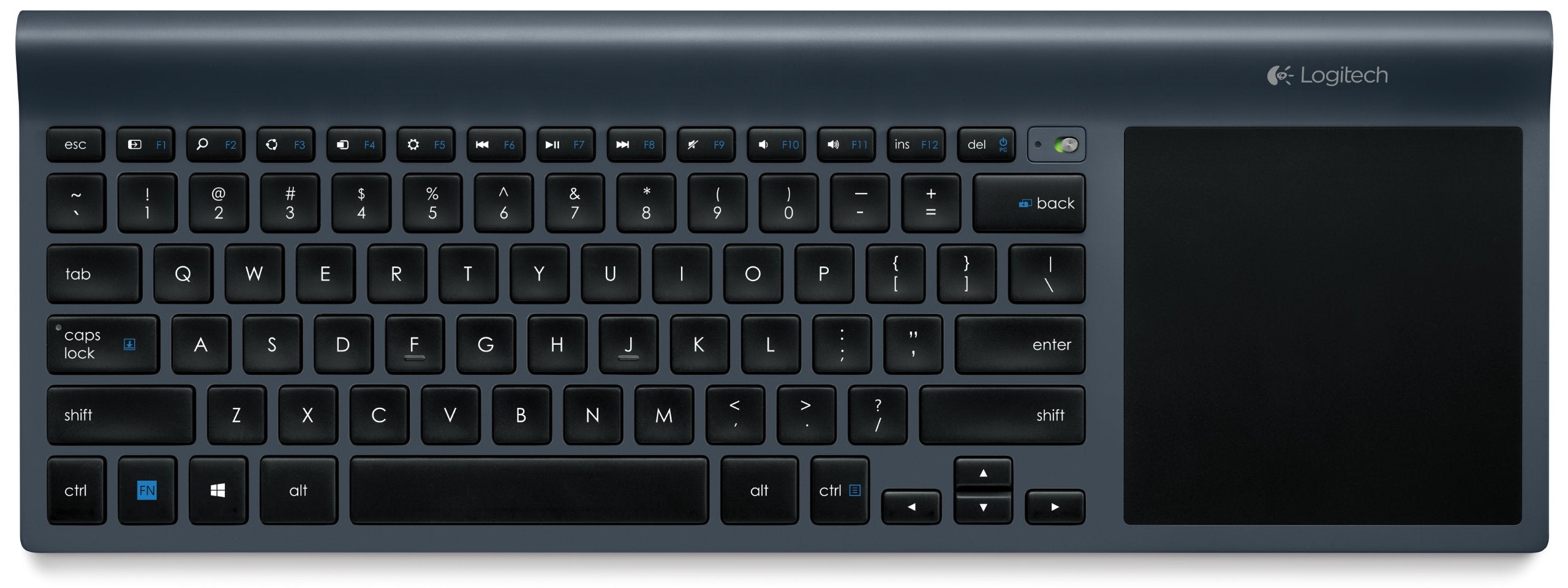
The Logitech Wireless All-in-One Keyboard TK820 is a versatile device designed for seamless typing and navigation. With its built-in touchpad, it allows users to control their computers effortlessly, making it an ideal solution for both casual and professional use.
This innovative keyboard features a sleek, ultra-slim design that complements any workspace while reducing clutter. Crafted from durable rubber materials, the TK820 ensures comfort during extended use. Its robust wireless connection, enabled by the tiny Unifying receiver, provides a reliable link without the hassle of cables. The keyboard is compatible with both Windows 8 and Windows 7, making it suitable for a wide range of users.
Key Features:
All-in-One Functionality: Combines a keyboard and built-in touchpad for effortless computer control.
Large Touch Surface: Provides ample space for pointing, zooming, and performing Windows 8 gestures smoothly.
Sleek, Space-Saving Design: Ultra-slim and cable-free construction reduces desk clutter, perfect for minimalist setups.
Perfect Stroke and Incurve Keys: Experience comfortable typing with advanced key technology that ensures a fluid feel with every keystroke.
Unifying Receiver: Fast, reliable 2.4 GHz wireless connection allows for versatile typing positions, whether on a desk or lap.
Compatibility: Works seamlessly with Windows 8 and Windows 7, requiring only a USB port for setup.
Multi-Touch Gestures: Supports up to 13 unique gestures, enhancing navigation and productivity.
The Logitech Wireless All-in-One Keyboard TK820 is ideal for users seeking a streamlined, efficient typing and navigation solution. Whether for work or leisure, this keyboard provides the functionality and comfort needed for productive computing. Its combination of advanced features and sleek design makes it a valuable addition to any workspace.
⚠️ WARNING (California Proposition 65): This product may contain chemicals known to the State of California to cause cancer, birth defects, or other reproductive harm. For more information, please visit www.P65Warnings.ca.gov.
Frequently Asked Questions
Q: What are the dimensions of the Logitech Wireless All-In-One Keyboard TK820?A: The dimensions are sixteen point nine inches in length, one point eight inches in height, and seven point nine inches in width.
Q: What material is the Logitech Wireless All-In-One Keyboard TK820 made from?A: The keyboard is primarily made from rubber, providing both comfort and durability during use.
Q: How many batteries come with the Logitech Wireless All-In-One Keyboard TK820?A: The keyboard comes with four AA batteries that are pre-installed for immediate use.
Q: How do I connect the Logitech Wireless All-In-One Keyboard TK820 to my computer?A: You can connect the keyboard using the tiny Unifying receiver that plugs into your computer's USB port.
Q: Is the Logitech Wireless All-In-One Keyboard TK820 compatible with Windows 8?A: Yes, it is fully compatible with Windows 8 and also works with Windows 7.
Q: Can I use the touchpad and keyboard simultaneously on the Logitech Wireless All-In-One Keyboard TK820?A: Yes, you can type on the keyboard and use the touchpad at the same time for seamless navigation.
Q: What is the best way to clean the Logitech Wireless All-In-One Keyboard TK820?A: To clean the keyboard, use a damp cloth to wipe the surface and avoid any liquid getting into the keys.
Q: How should I store the Logitech Wireless All-In-One Keyboard TK820 when not in use?A: Store the keyboard in a dry place, preferably in its original packaging to protect it from dust and damage.
Q: What is the battery life of the Logitech Wireless All-In-One Keyboard TK820?A: The keyboard can last for several months on a single set of batteries, depending on usage.
Q: Can I program the function keys on the Logitech Wireless All-In-One Keyboard TK820?A: Yes, you can download additional software to customize and program the function keys as per your needs.
Q: Is the Logitech Wireless All-In-One Keyboard TK820 suitable for gaming?A: Yes, while it is designed for everyday use, it can also be used for casual gaming due to its responsive keys.
Q: What should I do if my Logitech Wireless All-In-One Keyboard TK820 stops working?A: First, check the battery connections and ensure they are properly installed. If the issue persists, try connecting the receiver to a different USB port.
Q: Does the Logitech Wireless All-In-One Keyboard TK820 come with a warranty?A: Yes, it typically comes with a warranty, which may vary by retailer, so check with your purchase location for details.
Q: How can I return the Logitech Wireless All-In-One Keyboard TK820 if I am not satisfied?A: You can return the keyboard according to the retailer's return policy, which usually requires the original packaging and receipt.
Q: What if my Logitech Wireless All-In-One Keyboard TK820 arrives damaged?A: If the keyboard arrives damaged, contact the retailer immediately for instructions on returning or exchanging the product.