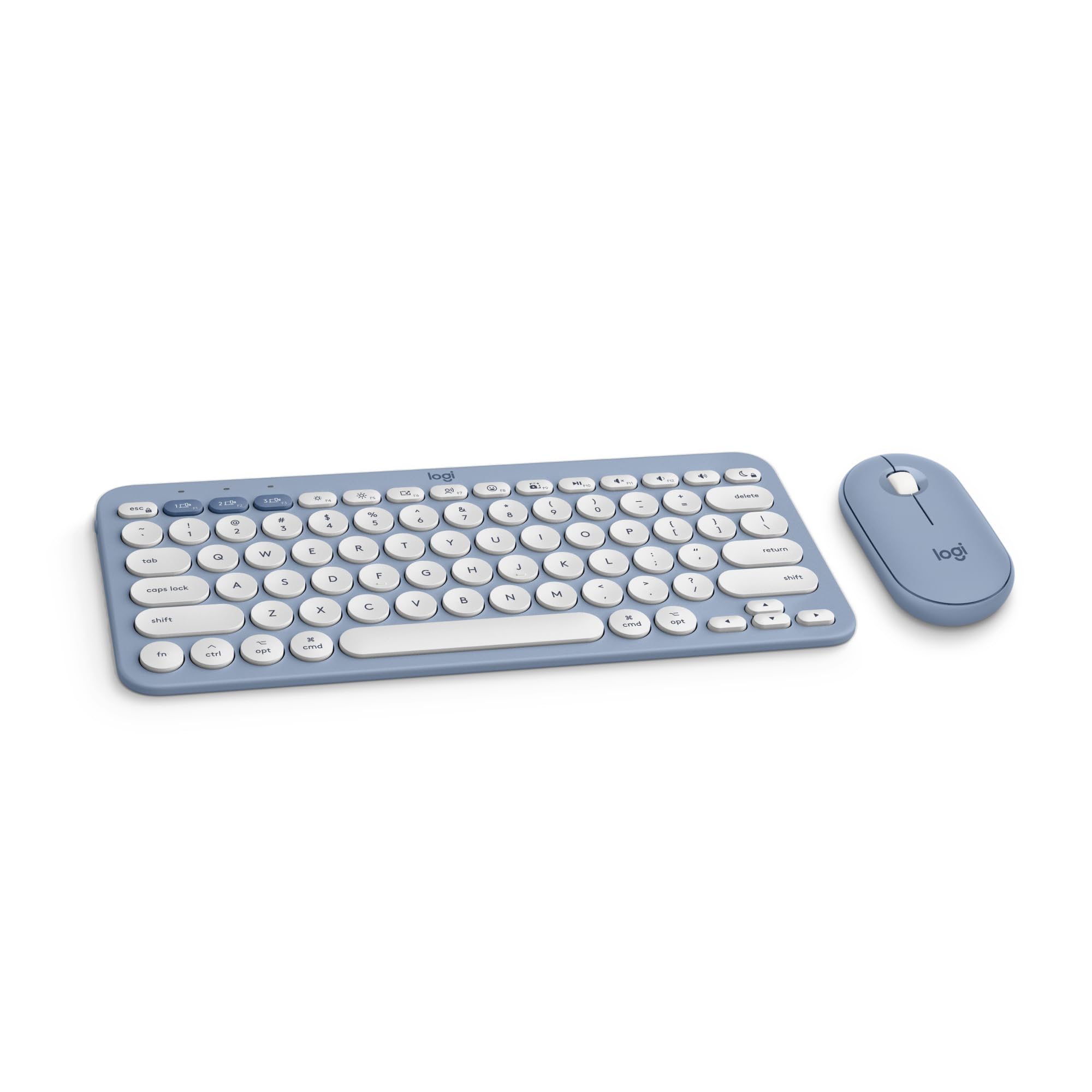
Defy Boring With The Iconic Pebble 2 Combo For Mac. The Slim Keyboard And Mouse Combo Comes In A Choice Of Fresh, Matching Colors Made With Recycled Plastic (1). Pick The One That Suits Your Vibe. The Pebble 2 Combo For Mac Has A Minimalist, Sleek And Lightweight Mouse And Keyboard Design That Makes It As Iconic As You And Super Portable To Take It Wherever You Go. Easily Switch Between Up To 3 Wireless Apple Devices (Macbook, Ipad, Iphone (2)) With A Press Of A Button. Personalize The Mouses Middle Button (3) To Assign Shortcuts For Your Favorite Apps Like Shuffling Your Spotify Playlist Or Sending Emojis On Whatsapp And Customize The 10 Keyboard Fn Shortcut Keys To Work How You Want And Save Time With Shortcuts In Logi Options+ App (3). The Wireless Keyboard For Mac Also Features Fn Shortcut Keys Such As Screen Capture, Emoji Menu, Voice Dictation And Brightness Levels To Free Up Your Time. Let Your Work Speak Louder Than Your Typing And Clicking. The Pebble Mouse 2 M350S Reduces Click Noise By 90% (4) With Silent Touch Technology. Type Quietly With The Keyboards Low-Profile Keys For Laptop-Like Typing. This Mouse And Keyboard Combo For Mac Lasts For Hours. The Bluetooth Keyboard Comes With A 3-Year Battery (5) And The Mouse Comes With A 2-Year Battery (5) For Worry-Free Usage.
⚠️ WARNING (California Proposition 65): This product may contain chemicals known to the State of California to cause cancer, birth defects, or other reproductive harm. For more information, please visit www.P65Warnings.ca.gov.
Frequently Asked Questions
Q: What materials are used in the Logitech Pebble 2 Combo?A: The Logitech Pebble 2 Combo is made of plastic, including certified post-consumer recycled plastic.
Q: What are the dimensions of the keyboard and mouse?A: Specific dimensions are not provided for the keyboard and mouse in the product details.
Q: How long does the battery last for the keyboard and mouse?A: The Bluetooth keyboard lasts for three years, while the mouse has a two-year battery life.
Q: How do I connect the Logitech Pebble 2 to my devices?A: You can connect the Pebble 2 Combo to up to three wireless Apple devices via Bluetooth with a press of a button.
Q: Is this keyboard suitable for portable use?A: Yes, the Logitech Pebble 2 Combo is designed to be slim, lightweight, and portable for easy transportation.
Q: Can I customize the function keys on the keyboard?A: Yes, you can personalize the ten function keys and the mouse's middle button using the Logi Options+ App.
Q: How do I clean the Logitech Pebble 2 Combo?A: To clean the Pebble 2 Combo, use a soft, damp cloth to wipe the surfaces, avoiding any harsh chemicals.
Q: Is the packaging of the Pebble 2 Combo environmentally friendly?A: Yes, the packaging is made from FSC-certified materials and is certified carbon neutral.
Q: What is the warranty for the Logitech Pebble 2 Combo?A: The warranty details are not specified, but Logitech typically offers standard warranties for their products.
Q: Can I switch between devices easily?A: Yes, you can easily switch between three devices with a simple press of a button on the keyboard.
Q: Is the Logitech Pebble 2 Combo quiet when in use?A: Yes, the Pebble Mouse reduces click noise by ninety percent with Silent Touch Technology, and the keyboard features low-profile keys.
Q: What are the colors available for this product?A: The Logitech Pebble 2 Combo is available in tonal blue and other fresh colors.
Q: Are there any shortcuts for macOS on this keyboard?A: Yes, the keyboard includes function keys for screen capture, emoji menu, voice dictation, and brightness adjustments.
Q: What is the weight of the Logitech Pebble 2 Combo?A: The precise weight is not specified in the product details, but it is designed to be lightweight for portability.
Q: How do I return the Logitech Pebble 2 Combo if needed?A: Return policies may vary by retailer; check the specific retailer's return policy for details.