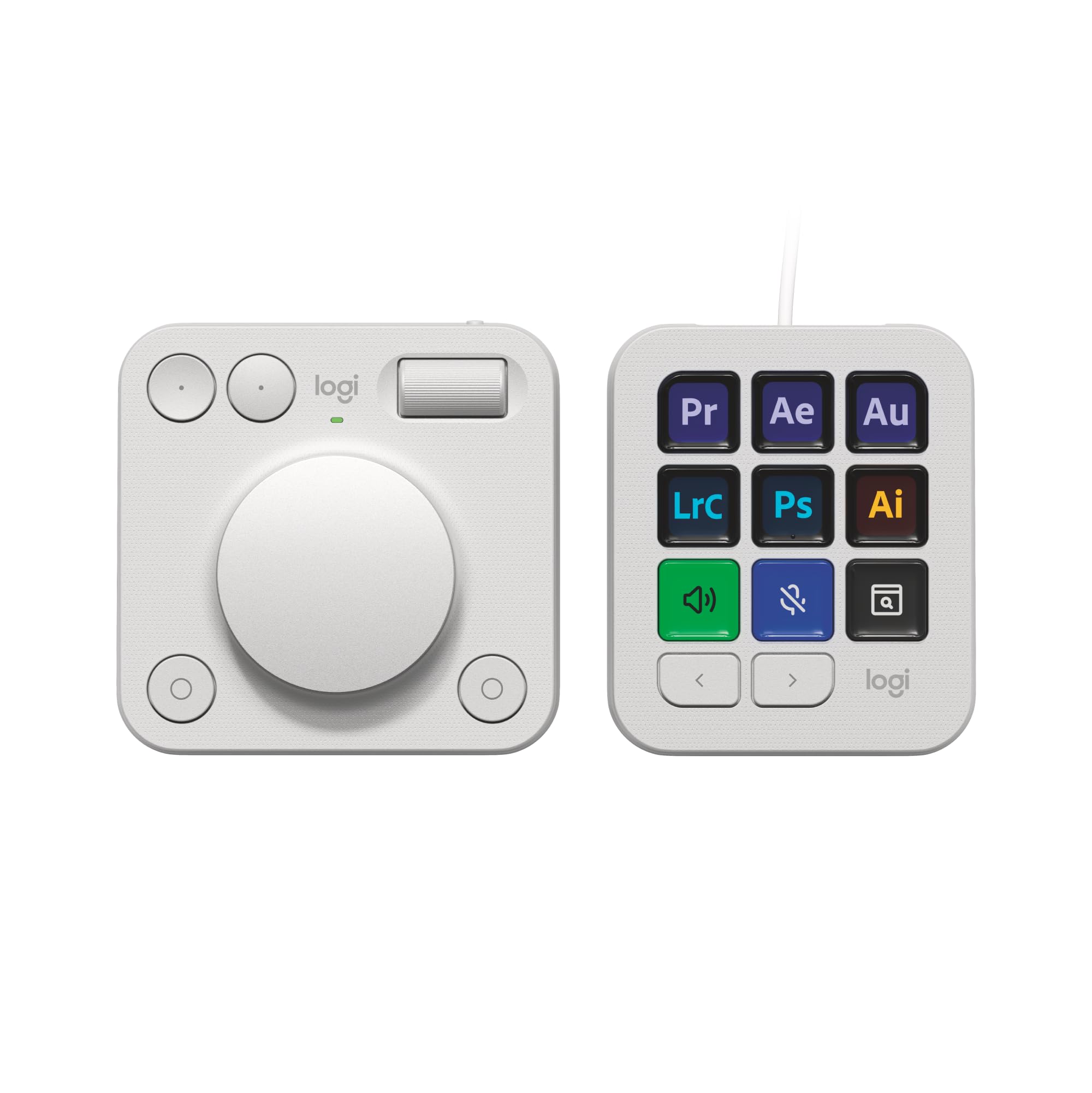
Streamline Your Creative Workflow With The Logitech Mx Creative Console, Featuring A Programmable Keypad With 9 Customizable Lcd Display Keys And A Contextual Dial With Tactile Controls For Precise Adjustments. Quickly Access All Your Favorite Tools With Visual Feedback In Full-Color Keys And Recommended Profile Configurations With The Most Relevant Actions For Each Application So That You Can Get Started Right Away. Experience Native Integration With Adobe Photoshop, Adobe Premiere Pro, Adobe Illustrator, Adobe Photoshop Lightroom Classic, Spotify, Zoom, And More (1). Assign Actions And Tools To Up To 15 Keypad Pages By Profile, Dial, And Roller. Create Shortcuts And Smart Actions, And Customize The Console To Your Style By Uploading Your Own Icons. Premium Tactile Analog Controls Let You Make Precise Adjustments With An Aluminum Low-Friction Dial, Navigate With A Smooth Roller, And Access Shortcuts With Customizable Display Keys. Find A Growing Library Of Free Actions, Plugins, Profile Templates, Icon Packs, And More Through The Marketplace In The Logi Options+ App (2). Plastic Parts In The Mx Creative Console Include Certified Post-Consumer Recycled Plastic (Graphite: 72%, Pale Grey: 55%) (4). (1)The Purchase Of An Mx Creative Console Includes 3 Months Adobe Creative Cloud All Apps Membership (2) Requires Logi Options+ App, Available For Recent Versions Of Windows And Macos (3) Battery Life May Vary Based On User And Computing Conditions (4) Excludes Printed Wiring Assembly (Pwa), Cables, Membrane, Lcd, Emi Gasket, And Packaging.
⚠️ WARNING (California Proposition 65): This product may contain chemicals known to the State of California to cause cancer, birth defects, or other reproductive harm. For more information, please visit www.P65Warnings.ca.gov.
Frequently Asked Questions
Q: What are the dimensions of the Logitech MX Creative Console?A: The Logitech MX Creative Console measures ten point fifty-nine inches in length, five point thirty-one inches in width, and two point seventy-two inches in height.
Q: What material is the Logitech MX Creative Console made of?A: The MX Creative Console includes plastic parts made from certified post-consumer recycled plastic, with fifty-five percent for Pale Grey.
Q: What is included in the purchase of the Logitech MX Creative Console?A: The purchase includes a three-month membership to Adobe Creative Cloud, valued at one hundred seventy-nine dollars.
Q: How do I customize the Logitech MX Creative Console?A: You can customize the console by assigning actions to up to fifteen keypad pages, uploading your own icons, and configuring the dial and roller.
Q: Can I use the Logitech MX Creative Console with Adobe applications?A: Yes, the console has native integration with Adobe Photoshop, Illustrator, Premiere Pro, Lightroom, and more.
Q: Is the Logitech MX Creative Console suitable for graphic design?A: Yes, it is designed specifically for graphic design and creative workflows, providing tactile controls for precise adjustments.
Q: How should I clean the Logitech MX Creative Console?A: To clean the console, use a soft, damp cloth to wipe the surface and avoid harsh cleaning agents that may damage the material.
Q: What is the battery life of the Logitech MX Creative Console?A: Battery life may vary based on user and computing conditions, but it is designed to be efficient for extended use.
Q: How do I store the Logitech MX Creative Console?A: Store the console in a cool, dry place away from direct sunlight and extreme temperatures to maintain its condition.
Q: Is the Logitech MX Creative Console compatible with multiple operating systems?A: Yes, it is compatible with recent versions of Windows and macOS.
Q: What if the Logitech MX Creative Console arrives damaged?A: If you receive a damaged console, contact the seller immediately to initiate a return or exchange process.
Q: Does the Logitech MX Creative Console require any software to function?A: Yes, it requires the Logi Options+ app for full functionality and customization.
Q: Can beginners use the Logitech MX Creative Console?A: Yes, it is suitable for beginners, offering intuitive controls and recommended profile configurations for easy setup.
Q: What kind of support is available for the Logitech MX Creative Console?A: Support includes access to a growing library of free actions, plugins, and profile templates through the Logi Options+ App.
Q: Is the Logitech MX Creative Console a good choice for audio mixing?A: Yes, it also serves as a mixer audio tool, making it a versatile accessory for audio and video production.
Q: How do I set up the Logitech MX Creative Console?A: Set up the console by installing the Logi Options+ app, connecting it to your computer, and customizing your profiles.