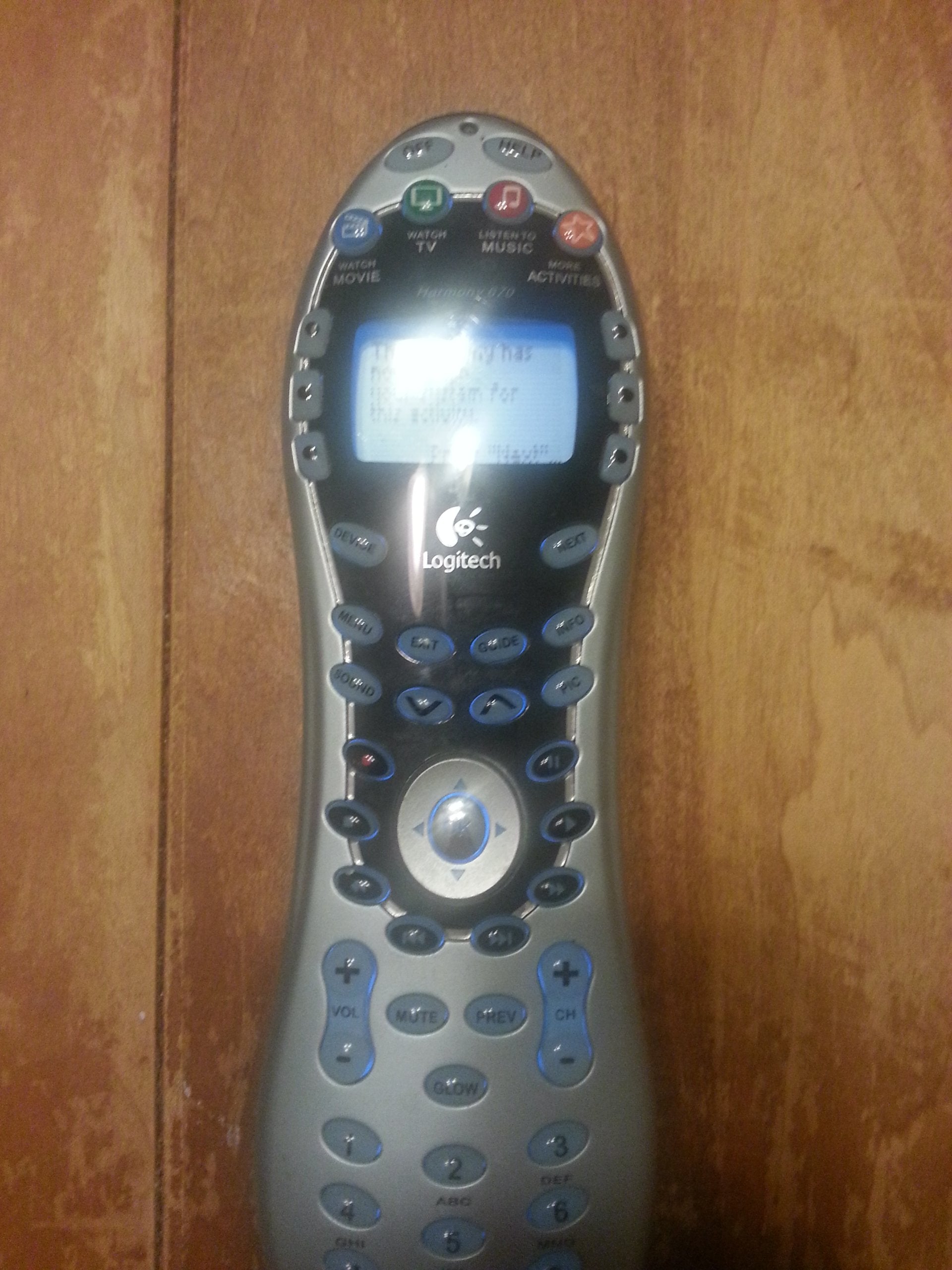
From The Manufacturerharmony 670: Designed For Your Digital Video Recorderdesigned Specifically For Digital Video Recorder (Dvr) Users, The Harmony 670 Features Convenient Controls That Make It Easy To Command Tivo. And Other Popular Dvrs. Essential Buttons Including ''Record,'' ''Play,'' ''Pause,'' ''Advance,'' ''Rewind,'' ''Skip Forward,'' ''Skip Back,'' And A Directional Pad Are Centrally Located, And Convenient ''Sound'' And ''Picture'' Buttons Help You Tame Tough Configurations Such As Switching Aspect Ratios Or Sound Modes. Harmony'S Activity-Based Control Makes It Easy To Manage Your Entire Home Entertainment System; Just Press A Conveniently Color-Coded Activity Button (Watch Movie), And The Remote Will Power On Your Tv, Dvd, Stereo Receiver, Set All The Inputs And Even Press ''Play''! There'S Also A Handy Help Button So That Anyone From The Kids To The Babysitter Can Access Programming.1. Easy To Set Up:Just Connect Your Harmony Remote To Your Computer And The Web Wizard Walks You Step-By-Step Through A Simple Set Up. Enter In Your Model Numbers For Your Components, Then Answer A Few Easy Questions About How You ''Watch Tv'' Or ''Watch A Dvd'' You'Ll Be Controlling Even The Most Complex System Without Any Of The Hassles Of Elaborate Macro-Programming.2. Easy To Use:The Harmony Remote Is The World'S Only Remote With Smart State Technology Activity Control. Just Press One Of The Activity Buttons, Such As ''Watch Tv'' Or ''Listen To Music,'' And Your Harmony Remote Automatically Sets Up Your Entertainment System, Without You Ever Having To Program A ''Macro.''3. Easy To Get Help:With The Harmony Remote, You Don'T Have To Know Anything About Your Entertainment System To Operate It. No Sound? No Picture? No Problem! There'S Even A Handy ''Help'' Button To Guide You Through Simple Troubleshooting And Get You Back In Control.4. Never Out Of Date:The Harmony Remote Device Database Is Constantly Updated With New Components And Fine-Tuned Settings. Simply Connect It To Your Computer Using Its Usb Interface, And Your Remote Is Updated Automatically!Features Color-Coded Activity Controlsa Single Press Configures Your Television, Stereo, Dvd Player, Or Other Device Required For The Selected Activity. Designed For Dvrsthe Most Commonly-Accessed Controls Are Located Centrally, For Easy Access At Thumb'S Reach. Backlit Keyseasy To See; Easy To Use. No More Fumbling For The Correct Button To Play, Pause, Mute Or Change Aspect Ratios.Get The Logitech Harmony Adapter For Playstation 3. Finally, Control Movies On Your Ps3 - Drama Free.Wish You Could Control All Your Movies, Music, Games And Entertainment Gear - Including Your Playstation 3 - With One Remote? Wish Granted.Add One Touch Ps3 Control To Any Harmony Remote With The New Logitech Harmony Adapter For Playstation 3. Now Your Entire Entertainment System And Every Ps3 Command Is At Your Fingertips. Want To Watch A Dvd Or Blue-Ray Disc Movie? Play A Game? Turn The Console On Or Off? Easy. Just Press One Button On The Remote To Experience Instant Entertainment Gratification.Which Harmony Is Right For You?Find Out What Other Logitech Harmony Advanced Universal Remotes Fit Your Audio & Video Set-Ups. Browse More Harmony Remotes And See Which One Is Right For You.Harmony 510Simple, One-Button Access To Your Movies, Music, And More.Harmony 670Simple Control Of Your Dvr And Tivo.Harmony 700Simple Control That'S Always Charged And Ready For Your Entertainment.Harmony Onesimple, Stylish Touch-Screen Control Of Your Entertainment.Harmony 900Complete Control Of Devices You Can'T See.Harmony 1100Personalized Control Of Your Home Theater System.Control Features Harmony 510 Harmony 670 Harmony 700 Harmony One Harmony 900 Harmony 1100 Number Of Devices Supported Up To 5 Up To 15 Up To 6 Up To 15 Up To 15 Up To 15 Lcd Display Black And White Black And White Color Screen Color Touch-Screen Color Touch-Screen 3.5'' Color Touch-Screen Activity-Based Controls Layout Optimized For Dvd/Tivo C
⚠️ WARNING (California Proposition 65): This product may contain chemicals known to the State of California to cause cancer, birth defects, or other reproductive harm. For more information, please visit www.P65Warnings.ca.gov.
Frequently Asked Questions
Q: What are the dimensions of the Logitech Harmony 670 Universal Remote?A: The dimensions are eleven point seventy-five inches long, seven point twenty-five inches wide, and two point seventy-six inches high.
Q: What color is the Logitech Harmony 670 Universal Remote?A: The remote is black in color.
Q: How many devices can the Logitech Harmony 670 control?A: It can control up to fifteen devices.
Q: How do I set up the Logitech Harmony 670 Remote?A: You set it up by connecting it to your computer, where a web wizard guides you through the process step-by-step.
Q: Is the Logitech Harmony 670 suitable for beginners?A: Yes, it is designed for easy use, making it suitable for beginners.
Q: What type of technology does the Logitech Harmony 670 use for activity control?A: It uses Smart State Technology for activity-based control.
Q: How do I clean the Logitech Harmony 670 Remote?A: To clean it, use a soft, dry cloth to wipe the surface and avoid using liquids.
Q: Is there a warranty for the Logitech Harmony 670?A: Yes, it comes with a one-year warranty.
Q: What should I do if my Logitech Harmony 670 arrives damaged?A: If it arrives damaged, you should contact customer support for assistance with returns or exchanges.
Q: Can I update the Logitech Harmony 670 Remote software?A: Yes, you can update it by connecting to your computer, where updates are automatically made.
Q: Is the Logitech Harmony 670 remote rechargeable?A: No, it is battery operated.
Q: Does the Harmony 670 work with PlayStation 3?A: Yes, it can control PlayStation 3 with the addition of the Logitech Harmony Adapter.
Q: What kind of support is available for the Logitech Harmony 670?A: Live support is available if you encounter any issues during setup.
Q: Are the buttons on the Harmony 670 backlit?A: Yes, the Harmony 670 features backlit keys for easy visibility in low light.
Q: Can I customize the Harmony 670 remote's buttons?A: Yes, the remote allows for customizable screen options for personalization.