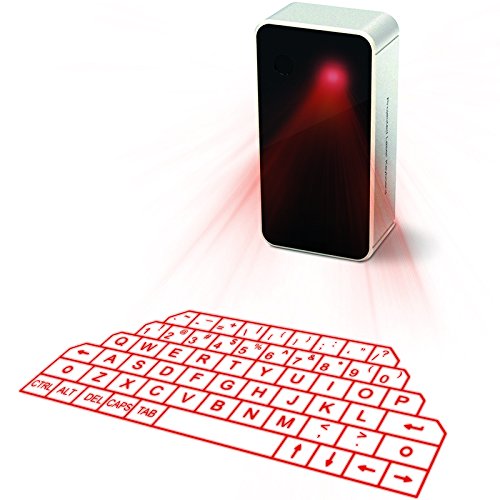
The Virtual Laser Projection Keyboard is an innovative input device that transforms any flat surface into a full-sized keyboard. Designed for those who seek convenience and functionality, this portable keyboard enables seamless typing on various wireless devices, making it an ideal accessory for tech-savvy individuals, professionals, and students alike.
Constructed from durable plastic, the Virtual Laser Projection Keyboard delivers reliable performance in a compact design. Its advanced technology allows for multi-points recognition, ensuring accurate input without the fear of interference. The keyboard's gesture function enhances usability, allowing users to navigate and input information effortlessly. This device is equipped with a long-lasting rechargeable battery, making it perfect for on-the-go use. With its English QWERTY layout, it caters to a broad audience, ensuring ease of use for anyone familiar with standard keyboard layouts.
Key Features:
Compatible with most wireless devices, providing users with the flexibility to connect with smartphones, tablets, and laptops.
Multi-points recognition technology ensures accurate typing without interference, enhancing productivity.
Gesture function allows for intuitive control, making information input more efficient.
Requires a flat, clean, opaque, non-reflective surface for optimal performance, ensuring clarity in various lighting conditions.
Upgraded virtual laser projection technology easily pairs with devices, enhancing user experience.
Long-lasting rechargeable battery included, ensuring continuous use without the hassle of frequent charging.
English QWERTY layout for familiar and comfortable typing experience.
The Virtual Laser Projection Keyboard is an excellent choice for anyone looking to enhance their typing experience with cutting-edge technology. It is particularly beneficial for professionals who travel frequently, students who need a portable solution for coursework, or anyone who seeks a modern, wireless alternative to traditional keyboards. Enjoy the freedom of wireless typing combined with the convenience of a compact design, making it a valuable addition to your tech accessories.
⚠️ WARNING (California Proposition 65): This product may contain chemicals known to the State of California to cause cancer, birth defects, or other reproductive harm. For more information, please visit www.P65Warnings.ca.gov.
Frequently Asked Questions
Q: What materials is the VirtualLaserKeyboard made of?A: The VirtualLaserKeyboard is made of plastic. It features a virtual laser projection technology, ensuring portability and ease of use.
Q: What is the model number of this keyboard?A: The model number of the keyboard is KB560S. This identification helps in finding specific features and support for the device.
Q: Does the keyboard have a rechargeable battery?A: Yes, the VirtualLaserKeyboard comes with a long-lasting rechargeable battery. This allows for extended use without the need for constant battery replacements.
Q: How do I connect the VirtualLaserKeyboard to my device?A: To connect, ensure your device's Bluetooth is enabled, then pair it with the keyboard. It is compatible with most wireless devices, providing freedom of use.
Q: Can I use this keyboard with my smartphone?A: Yes, the VirtualLaserKeyboard is compatible with smartphones. It can easily connect to various models, enhancing mobile typing experiences.
Q: Is this keyboard suitable for use on any surface?A: No, this keyboard requires a flat, clean, and opaque surface for optimal performance. Avoid reflective surfaces that may interfere with projection clarity.
Q: How do I clean the VirtualLaserKeyboard?A: To clean, use a soft, dry cloth to wipe the surface. Avoid using liquids that could damage the electronic components.
Q: What should I do if the keyboard is not projecting properly?A: Ensure there are no obstacles within five centimeters of the projection area. Also, check the brightness of the environment, as high light can affect clarity.
Q: Is the VirtualLaserKeyboard safe to use around children?A: Yes, the VirtualLaserKeyboard is generally safe, but supervision is recommended. It contains lithium-ion batteries, so keep it out of reach of very young children.
Q: How long does the battery last on a full charge?A: The battery life varies based on usage, but it is designed for long-lasting performance. Regular charging will ensure consistent functionality.
Q: Does the keyboard have a specific layout?A: Yes, the VirtualLaserKeyboard features an English QWERTY layout. This standard layout makes it easy for most users to type comfortably.
Q: Can I use this keyboard outdoors?A: While it can be used outdoors, bright sunlight may affect the projection clarity. It's best to use it in shaded areas for optimal performance.
Q: What devices are compatible with the VirtualLaserKeyboard?A: The keyboard is compatible with iPhones, iPads, smartphones, laptops, and tablets. It supports a wide range of wireless devices for versatile use.
Q: What should I do if the keyboard stops working?A: If the keyboard stops working, first check the battery charge and ensure it's connected via Bluetooth. If issues persist, consult the manufacturer's support.
Q: Is there a warranty for the VirtualLaserKeyboard?A: Yes, the keyboard typically comes with a warranty. Check the packaging or the manufacturer's website for specific warranty details.
Q: Can multiple devices connect to this keyboard at once?A: No, the VirtualLaserKeyboard can only connect to one device at a time. Users will need to disconnect from one device to connect to another.