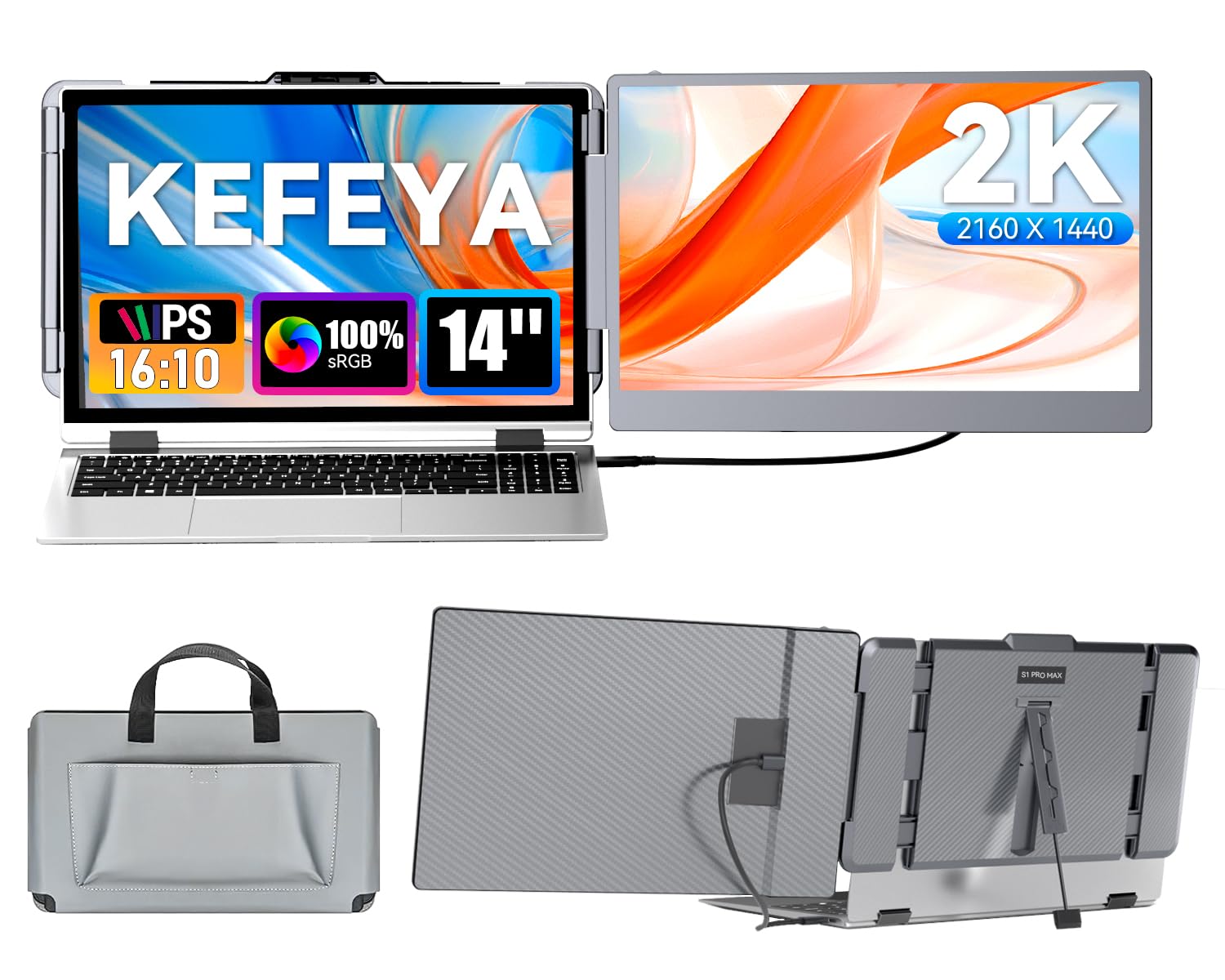
The Kefeya Portable Monitor For Laptop Screen Extender Is A Multi-Function Plug And Play Dual-Screen Laptop Monitor That Is Portable And Foldable. Great For Traveler ,Remote Worker, Video Conference,Gaming Etc. Multiple Display Mode: This Second Screen For Laptop Portable Provides Multiple Display Modes: Mirror Mode/ Extension Mode/ Second Screen Mode, Increase Your Work Efficiency Up To 200%! Clear & Wider: The 14 Inch Screen With 2160X1440P Resolution Gives You A Clear Image Display Almost Like Your Laptop. At The Same Time, The Ips Screen Ensures That You Have A Multi-Directional Viewing Angle. Even In A Multi-Person Meeting, There Is No Need To Worry About The ''Can'T See It Clearly'' Problem. Brighter:The 300Nits Brightness Is Better Than The Initial Model. Menu Buttons Allow You To Customize Your Multiple Needs For Display. Note: To Avoid An Insufficient Power Supply, Please Connect An External Power First Before You Connect Laptop Portable Monitor To Your Laptop. Colorful Display: Following The International Color Gamut Standard (72% Ntsc Or 100% Srgb), The Kefeya S1 Monitor Extension For Laptop Restores The Color Of The Picture To The Maximum Extent For You. With Hdr Color Gamut Enhancement Mode, It Can Highly Restore The Richness Of Colors. Package Includes: 1 X Laptop Screen Extender 1 X Usb-C To Usb-C Cable 1 X Hdmi To Usb-C Cable 1 X Usb-A To Usb-C Power Cable 1 X Premium Leather Bag 1 X User Manual
⚠️ WARNING (California Proposition 65): This product may contain chemicals known to the State of California to cause cancer, birth defects, or other reproductive harm. For more information, please visit www.P65Warnings.ca.gov.
Frequently Asked Questions
Q: What is the resolution of the KEFEYA Laptop Screen Extender?A: The resolution is two thousand one hundred sixty by one thousand four hundred forty pixels. This high-definition display enhances clarity and detail for various applications.
Q: What size is the KEFEYA Laptop Screen Extender?A: The monitor extender measures fourteen inches diagonally. Its compact size makes it portable and convenient for travel and remote work.
Q: What display modes does the KEFEYA monitor support?A: It supports mirror, extension, and second screen modes. These options allow users to customize their viewing experience for increased productivity.
Q: How do I connect the KEFEYA Laptop Screen Extender?A: You can connect it using a USB-C or HDMI cable. It is designed for plug-and-play functionality, requiring no additional driver installation.
Q: Is the KEFEYA monitor compatible with all laptops?A: Yes, it is compatible with most laptops that have a full-featured USB-C or HDMI port. This includes various operating systems like Windows, Mac, and Android.
Q: How do I increase brightness on the KEFEYA monitor?A: Brightness can be adjusted using the menu buttons on the device. It features a maximum brightness of three hundred nits for enhanced visibility.
Q: What is the weight of the KEFEYA Laptop Screen Extender?A: The weight is approximately one point six pounds. This lightweight design makes it easy to carry in a laptop bag.
Q: Can I use the KEFEYA monitor for gaming?A: Yes, it is suitable for gaming and supports consoles like PS5 and Xbox. The high resolution and multiple display modes enhance the gaming experience.
Q: What accessories come with the KEFEYA Laptop Screen Extender?A: The package includes a USB-C to USB-C cable, an HDMI to USB-C cable, a USB-A to USB-C power cable, and a premium leather bag. These accessories ensure easy setup.
Q: How do I clean the KEFEYA Laptop Screen Extender?A: Use a soft, dry microfiber cloth to clean the screen. Avoid using harsh chemicals that could damage the display.
Q: Is there a warranty for the KEFEYA monitor?A: Yes, it comes with a warranty covering manufacturing defects. Contact the manufacturer's support for any warranty-related inquiries.
Q: What should I do if the monitor does not turn on?A: Check the power connections and ensure the external power supply is connected. If it still doesn’t work, consult the user manual for troubleshooting.
Q: Is the KEFEYA monitor suitable for video conferencing?A: Yes, it is ideal for video conferencing. The clear display and multiple modes allow for efficient collaboration during meetings.
Q: Can I use the KEFEYA monitor with a Mac?A: Yes, it is compatible with Mac laptops. Simply connect via the appropriate USB-C or HDMI port for seamless integration.
Q: What is the contrast ratio of the KEFEYA Laptop Screen Extender?A: The contrast ratio is one thousand to one. This ratio provides vivid colors and deep blacks, enhancing the overall viewing experience.