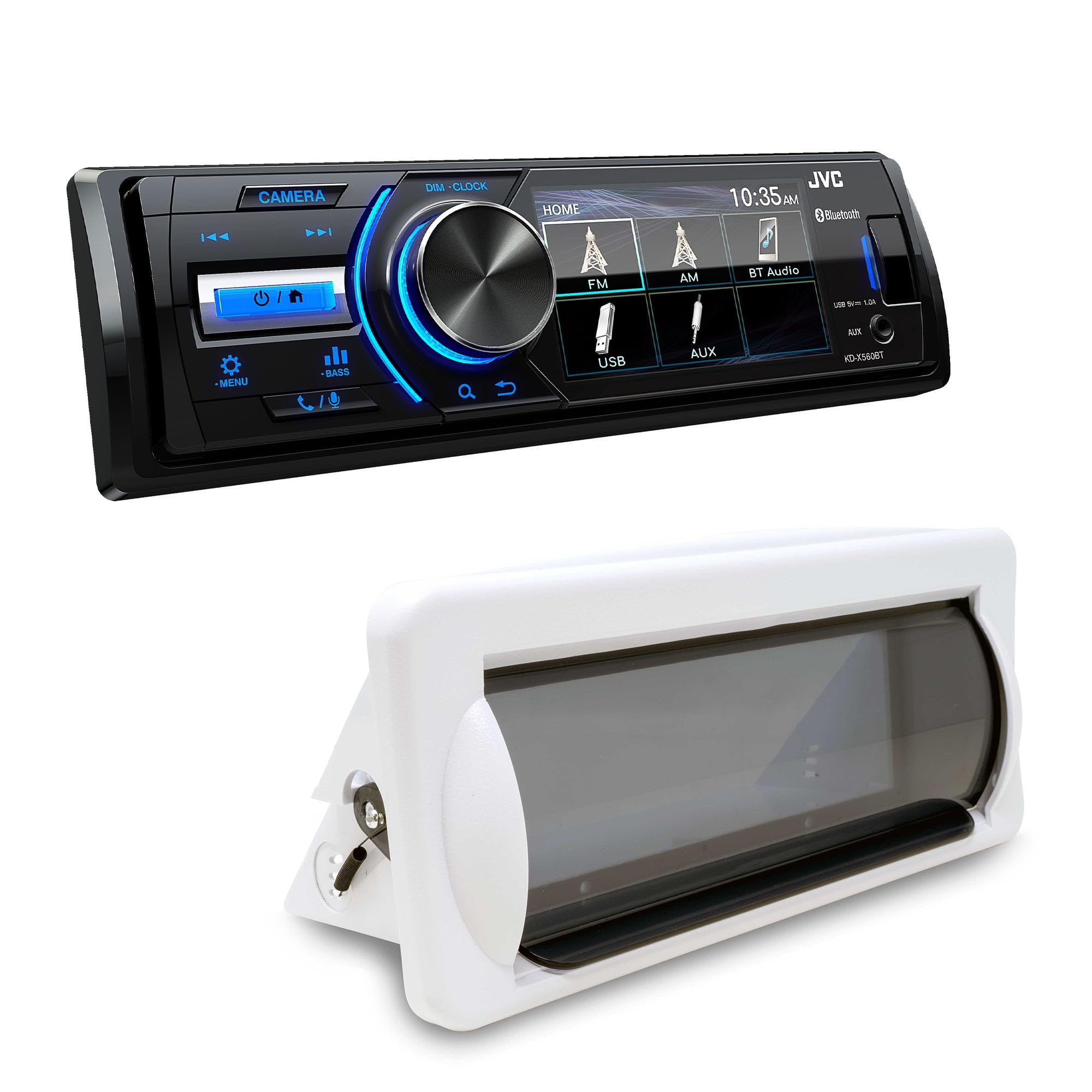
Jvc Kd-X560Bt 1-Din Digital Media Receiver With Bluetooth, Usb, 3'' Display, & Coated Pcb - Conformal Coating - A Conformal Coating Is A Protective Chemical Coating To Safeguard Electronic Circuits From Harsh Environments That May Contain Moisture Or Chemical Contaminants. Rear View Camera Input Linked With A Back Gear, The Display Automatically Switches To The View From The Rear Camera. 9-Preset Eq And 13-Band Graphic Eq With 9-Preset Eq Patterns To Choose From, It'S Easy To Create The Sound You Like, Based On Musical Genre Or Your Personal Preference. Monitor Screen Size - 3.0'' 16:9 Qvga Key Illumination Color - Blue Dimmer - Yes (1/2/Off) Multilingual Display - Yes[2] Bluetooth Control Built-In Bluetooth - Yes (Wired-Mic Included) Hands Free Call - Yes (Hfp1.5 Wideband Speech) Audio Streaming & Control (A2Dp, Avrcp) - Yes Android Control Ipod/Iphone Control Creative Audio Camc1B Marine Single Din Radio Mounting Kit With Retractable Cover (White) - Introducing Our Creative Audio Radio/Water Resistant Single-Din Stereo Housing, The Perfect Solution To Protect Your Stereo From The Elements. Designed With Durability And Functionality In Mind, This Housing Is Perfect For Outdoor Enthusiasts, Boaters, And Anyone Who Wants To Enjoy Their Favorite Tunes In Any Weather Condition. Quick Features: Designed To Work With Standard Mounting Sleeves Included With Most All Single-Din Receivers. Protects Your Stereo From The Elements Smoke Colored Housing Window Spring Loaded Flip Up Door Support Shelf In Rear Of Housing For Radio Uv Resistant Plastic Mounting Gasket Included
⚠️ WARNING (California Proposition 65): This product may contain chemicals known to the State of California to cause cancer, birth defects, or other reproductive harm. For more information, please visit www.P65Warnings.ca.gov.
Frequently Asked Questions
Q: What are the key features of the JVC KD-X560BT?A: The JVC KD-X560BT features Bluetooth connectivity, a three-inch display, and a conformal coating for protection against moisture.
Q: What is the size of the display on the JVC KD-X560BT?A: The display size is three inches, featuring a sixteen by nine QVGA resolution for clear visuals.
Q: What audio formats does the JVC KD-X560BT support?A: The JVC KD-X560BT supports various audio formats via Bluetooth, including A2DP and AVRCP for streaming and control.
Q: How do I install the JVC KD-X560BT?A: The JVC KD-X560BT can be installed using standard mounting sleeves included with most single-DIN receivers.
Q: Is there a rear view camera input on the JVC KD-X560BT?A: Yes, the JVC KD-X560BT includes a rear view camera input that automatically switches the display when the vehicle is in reverse.
Q: Can I control my smartphone with the JVC KD-X560BT?A: Yes, the JVC KD-X560BT allows for smartphone integration through Bluetooth, supporting both Apple CarPlay and Android Auto.
Q: How should I clean the JVC KD-X560BT?A: To clean the JVC KD-X560BT, use a soft, dry cloth to wipe the surface, avoiding any harsh chemicals that may damage the finish.
Q: What is the warranty policy for the JVC KD-X560BT?A: The JVC KD-X560BT typically comes with a one-year warranty covering manufacturing defects, but it's best to check with the retailer.
Q: Is the JVC KD-X560BT suitable for marine use?A: Yes, the included Creative Audio CAMC1W Marine Single DIN Kit makes the JVC KD-X560BT suitable for marine applications.
Q: What is the total power output of the JVC KD-X560BT?A: The JVC KD-X560BT delivers a total power output of fifty watts across four channels for rich sound quality.
Q: Can I adjust the sound settings on the JVC KD-X560BT?A: Yes, the JVC KD-X560BT features a nine-preset equalizer and a thirteen-band graphic equalizer for sound customization.
Q: What color is the key illumination on the JVC KD-X560BT?A: The key illumination on the JVC KD-X560BT is blue, enhancing visibility in low-light conditions.
Q: Does the JVC KD-X560BT support hands-free calling?A: Yes, the JVC KD-X560BT supports hands-free calling with wideband speech for clear conversations.
Q: How do I connect my Bluetooth device to the JVC KD-X560BT?A: To connect a Bluetooth device, enter the Bluetooth setup mode on the JVC KD-X560BT and select the device from the available options.
Q: What materials are used in the JVC KD-X560BT's construction?A: The JVC KD-X560BT features durable materials, including a coated PCB designed to withstand harsh environmental conditions.