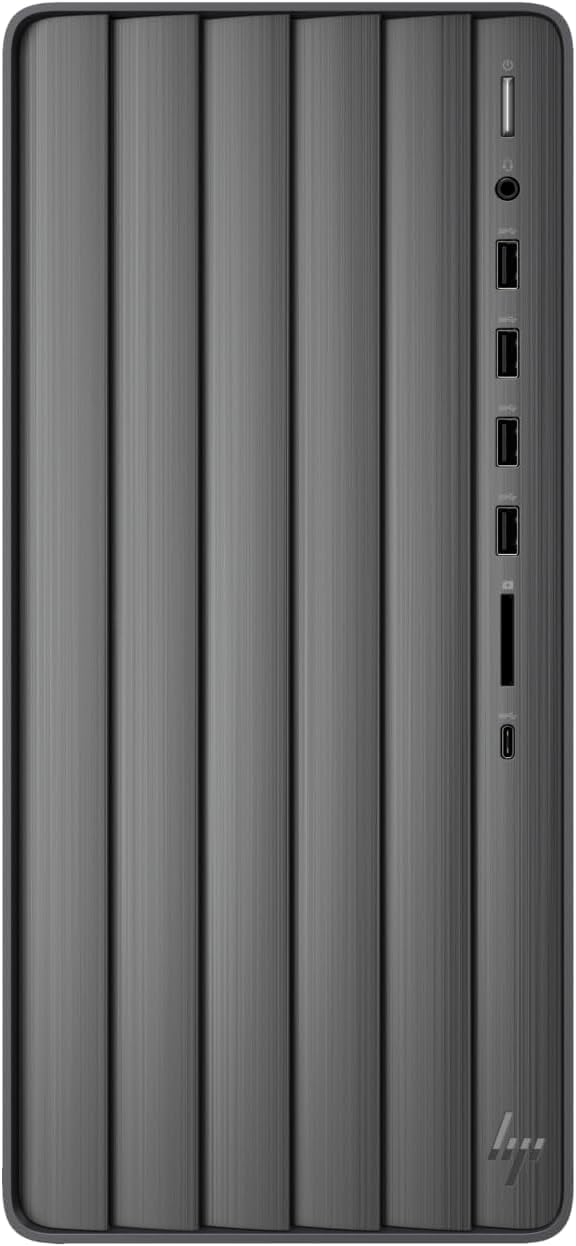
Discover The Hp Envy Desktop, A Powerhouse Like No Other, Boasting Unprecedented Performance Levels. Immerse Yourself In Awe As This Cutting-Edge Computer Effortlessly Handles All Tasks Without Compromising On Speed. Crafted With A Relentless Pursuit Of Savage Power And Unmatched Speed, The Envy Desktop Delivers Mind-Blowing Performance By Using Intel Core Processors Resulting In Blazing-Fast Frame Rates. Unleash The Full Potential Of Intel Core I9 Processor I9-13900K With Turbo Boost Up To 5.80Ghz, As This Supercharged Computing Marvel Excels Not Only In Raw Power But, More Importantly, In Speed. Backed By An Impressive 64Gb Of Ram And A Lightning-Fast 2Tb Ssd Drive, Experience Unparalleled Performance That Keeps Your System Running At Lightning Speeds. But Power And Speed Alone Cannot Be Properly Enjoyed Without Crystal Clear Graphics As Well. Nvidia Graphics - Gaming And Streaming Will Never Be The Same As The Nvidia Geforce Rtx 4060 Ti Graphics With 16 Gb Gddr6 Dedicated Memory And Up To 24 Gb Total Video Memory, Delivers Maximum Digital Resolution Of 7680X4320 With Enhanced Ray Tracing (Rt) Cores And Tensor Cores, New Streaming Multiprocessors, And High-Speed G6 Memory. This Hp Envy Desktop Will Leave You Brimming With Excitement Every Time You Turn It On. Witness Firsthand The Vivid Colors, Pop-Out Textures, And Stunningly Brilliant Contrast That This Computers Graphics Are Capable Of. It Is Also Equipped With Front Ports: 1 X Usb Type-C 5Gbps Signaling Rate, 2 X Usb Type-A 10Gbps Signaling Rate, 2 X Usb Type-A 5Gbps Signaling Rate, 1 X Headphone/Microphone Combo, 1 X Hp 3-In-1 Memory Card Reader; Rear Ports: 4 X Usb 2.0 Type A, 1 X Audio In/Out, 1 X Microphone, 1 X Vga, 2 X Hdmi, 3 X Displayport, 1 X Rj-45; Realtek Wi-Fi 6 (2X2) And Bluetooth 5.3 Combo. Keyboard/Mouse.
⚠️ WARNING (California Proposition 65): This product may contain chemicals known to the State of California to cause cancer, birth defects, or other reproductive harm. For more information, please visit www.P65Warnings.ca.gov.
Frequently Asked Questions
Q: What are the dimensions of the HP Envy Desktop PC?A: The HP Envy Desktop PC measures twelve inches in length, seven inches in width, and fourteen inches in height. This compact size makes it suitable for various setups.
Q: What is the processor speed of the HP Envy Desktop?A: The HP Envy Desktop features an Intel Core i9-13900K processor with a base speed of three gigahertz and a turbo boost capability of up to five point eight gigahertz. This ensures exceptional performance for demanding tasks.
Q: How much memory does the HP Envy Desktop have?A: The HP Envy Desktop is equipped with sixty-four gigabytes of RAM. This amount of memory supports multitasking and enhances overall system performance.
Q: What type of storage does the HP Envy Desktop use?A: The HP Envy Desktop features a two terabyte solid-state drive. This provides fast data access speeds and ample storage for files and applications.
Q: How do I set up the HP Envy Desktop?A: To set up the HP Envy Desktop, connect the power cable, plug in peripherals like the keyboard and mouse, and then turn on the computer. Follow the on-screen instructions to complete the initial setup.
Q: Is the HP Envy Desktop suitable for gaming?A: Yes, the HP Envy Desktop is suitable for gaming. It features an NVIDIA GeForce RTX 4060 Ti graphics card with sixteen gigabytes of dedicated GDDR6 memory, providing excellent graphics performance.
Q: What ports are available on the HP Envy Desktop?A: The HP Envy Desktop includes multiple ports: one USB Type-C, two USB Type-A at ten gigabits per second, two USB Type-A at five gigabits per second, and four USB Type-A at two point zero, among others. This variety supports various peripherals.
Q: How do I keep the HP Envy Desktop clean?A: To clean the HP Envy Desktop, use a soft, lint-free cloth. Avoid using abrasive cleaners and ensure the computer is powered off before cleaning to maintain its condition.
Q: Is the HP Envy Desktop compatible with Windows 11?A: Yes, the HP Envy Desktop comes with Windows 11 Pro pre-installed. This ensures compatibility with the latest software and features.
Q: Can I upgrade the RAM in the HP Envy Desktop?A: Yes, the RAM in the HP Envy Desktop can be upgraded. The system currently has sixty-four gigabytes, and additional RAM can be added if needed for enhanced performance.
Q: What kind of internet connectivity does the HP Envy Desktop support?A: The HP Envy Desktop supports Realtek Wi-Fi six and Bluetooth version five point three for wireless connectivity. It also includes an Ethernet RJ-45 port for wired connections.
Q: How do I troubleshoot if the HP Envy Desktop won't turn on?A: If the HP Envy Desktop won't turn on, check the power connection and ensure the power outlet is functioning. If issues persist, consult the troubleshooting guide or contact customer support.
Q: Does the HP Envy Desktop come with a warranty?A: Yes, the HP Envy Desktop typically comes with a one-year limited warranty. This covers defects in materials and workmanship under normal use.
Q: What is the maximum digital resolution supported by the HP Envy Desktop?A: The HP Envy Desktop supports a maximum digital resolution of seven thousand six hundred eighty by four thousand three hundred twenty. This allows for stunning visuals on compatible displays.
Q: Are there any hazardous materials in the HP Envy Desktop?A: No, the HP Envy Desktop does not contain any hazardous materials. It is designed to meet safety standards and regulations.