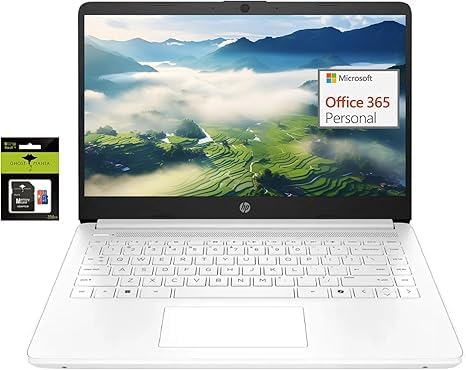
Switching Out Of S Mode In Windows 11 Windows 11 In S Mode Is Designed For Security And Performance, Exclusively Running Apps From The Microsoft Store. If You Want To Install An App That Isn'T Available In The Microsoft Store, You'Ll Need To Switch Out Of S Mode 1. On Your Pc Running Windows 11 In S Mode, Open Settings > System > Activation. 2. In The Switch To Windows 11 Pro Section, Select Go To The Store. (If You Also See An ''Upgrade Your Edition Of Windows'' Section, Be Careful Not To Click The ''Go To The Store'' Link That Appears There.) 3. On The Switch Out Of S Mode (Or Similar) Page That Appears In The Microsoft Store, Select The Get Button. After You See A Confirmation Message On The Page, You'Ll Be Able To Install Apps From Outside Of The Microsoft Store. Activate Pre-Installed Office 365: 1.Launch Any Office App > 2.Start Your Activation By Signing In With Your Microsoft Account(Create A Account If You Don'T Have One Yet) > 3.Click ''Activative Office'' > 4.Sign In Your Account And Follow The Next Prompts. > 5.Complete Step 1,2 And 3 > 6.Click On Refresh Once Office Is Ready > 7.Open A Document And Accept The License Agreement. Memory: Upgraded To 16Gb Ram Storage:64Gb Emmc Display: 14.0-Inch Diagonal, Hd (1366 X 768), Micro-Edge, Brightview Processor: Intel Celeron N4120, Up To 2.6 Ghz, 4 Cores & 4 Threads Battery Life: Up To 10 Hours Graphics: Intel Uhd Graphics 600 Webcam: Hp True Vision 720P Hd Camera With Integrated Dual Array Digital Microphones Connectivity: 802.11A/B/G/N/Ac Wi-Fi And Bluetooth Operating System: Windows 11 Home In S Mode Ghost Manta Laptop Accessories: Type-C To Use Cable, Type-C To Type-C Cable, Power Adapter, Usb C To Usb Adapter, 360 Rotation Phone Ring Holder
⚠️ WARNING (California Proposition 65): This product may contain chemicals known to the State of California to cause cancer, birth defects, or other reproductive harm. For more information, please visit www.P65Warnings.ca.gov.
Frequently Asked Questions
Q: What are the dimensions of the HP 14" Lightweight Student Laptop?A: The dimensions are twelve point seventy-six inches in length, eight point eighty-six inches in width, and zero point seventy-one inches in height. This compact size makes it portable for students.
Q: What type of processor does this laptop have?A: It features an Intel Celeron N4120 processor, which has four cores and can reach speeds up to two point six gigahertz. This ensures efficient performance for everyday tasks.
Q: How much RAM and storage does this laptop offer?A: The laptop comes with sixteen gigabytes of RAM and a combined storage of sixty-four gigabytes eMMC along with a two hundred fifty-six gigabyte Ghost Manta SD card. This configuration supports multitasking and ample file storage.
Q: How do I switch out of S mode in Windows 11?A: To switch out of S mode, open Settings, go to System, then Activation, and select 'Go to the Store.' Follow the prompts to transition to Windows 11 Home. This allows installation of apps outside the Microsoft Store.
Q: How do I activate Office 365 on this laptop?A: Activate Office 365 by launching any Office app and signing in with your Microsoft account. Follow the prompts to complete the activation process. This will enable you to create and edit documents.
Q: Is this laptop suitable for online classes?A: Yes, this laptop is suitable for online classes. Its efficient performance and long battery life of up to ten hours make it ideal for students attending virtual lectures.
Q: Can I use this laptop for gaming?A: While it can handle casual games, it is not designed for heavy gaming. The Intel UHD Graphics 600 and the processor are more suited for productivity tasks and light entertainment.
Q: How do I keep the laptop clean and maintained?A: To keep the laptop clean, use a soft, lint-free cloth to wipe the screen and keyboard. Avoid using harsh chemicals that could damage the finish. Regular cleaning ensures optimal performance.
Q: What safety precautions should I take with this laptop?A: Avoid exposing the laptop to extreme temperatures and moisture. Ensure proper ventilation during use and handle the device carefully to prevent physical damage.
Q: What should I do if the laptop arrives damaged?A: If the laptop arrives damaged, contact customer support immediately to report the issue. They will provide instructions for return and replacement options.
Q: Is there a warranty for this laptop?A: Yes, this laptop comes with a manufacturer's warranty. Check the warranty details included in the packaging for specific terms and duration.
Q: How long does the battery last on a full charge?A: The battery can last up to ten hours on a full charge. This extended battery life is suitable for all-day use without needing to recharge frequently.
Q: What type of connectivity options does this laptop have?A: This laptop supports Wi-Fi connectivity with options for 802.11a/b/g/n/ac and Bluetooth. This enables easy connection to the internet and other devices.
Q: Can I upgrade the storage on this laptop?A: The laptop provides limited upgrade options, as it comes with integrated storage. However, you can use external storage devices for additional space.
Q: What accessories are included with this laptop?A: Included accessories are a Type-C to USB cable, a Type-C to Type-C cable, a power adapter, a USB C to USB adapter, and a three hundred sixty-degree rotation phone ring holder.
Q: Does this laptop have a built-in webcam?A: Yes, it features an HP True Vision seven hundred twenty p HD camera with integrated dual array digital microphones. This is ideal for video calls and online meetings.