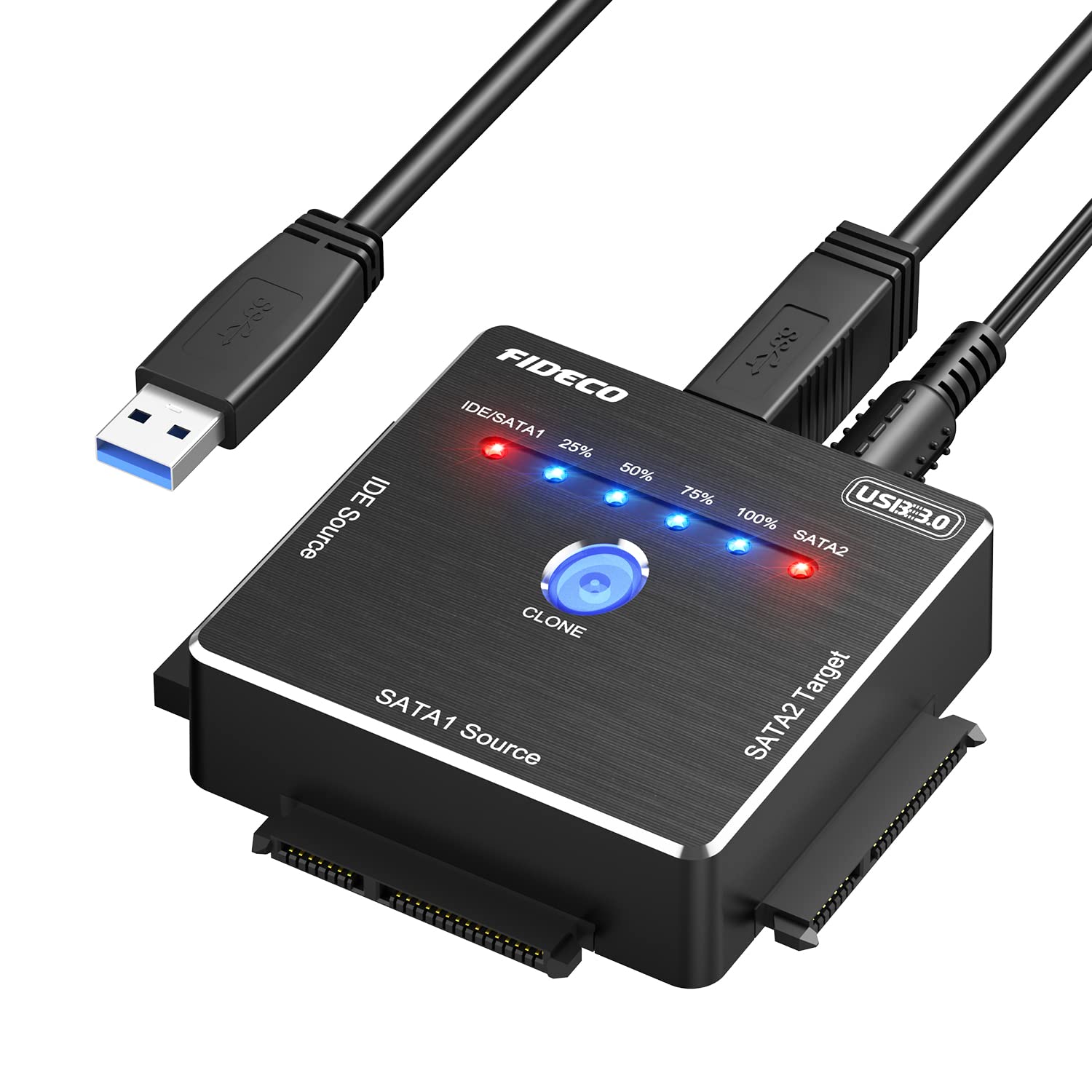
The FIDECO SATA/IDE to USB 3.0 Adapter is an essential hard drive adapter cable designed for seamless data transfer. Ideal for both professional and personal use, this versatile adapter allows users to connect 2.5 or 3.5-inch SATA or IDE external HDDs and SSDs, as well as 5.25-inch DVD-ROM/CD-ROM/CD-RW drives, directly to a USB port.
Constructed from high-quality copper and featuring an aluminum one-touch clone design, the FIDECO adapter ensures durability and reliable performance. Its USB 3.0 interface enables data transfer speeds of up to 5Gbps, making it an efficient choice for transferring large files quickly. The adapter is compatible with a wide range of operating systems, including Windows, Mac OS, and Linux, requiring no additional drivers or software installations for operation. Furthermore, the offline clone functionality allows users to clone drives without needing a computer, simplifying the process of data duplication.
Key Features:
Wide Compatibility: Supports 2.5 or 3.5-inch SATA or IDE hard drives with simultaneous connection for efficient data transfer.
Offline Clone Capability: Enables offline cloning of drives by simply pressing the "CLONE" button, eliminating the need for a computer.
High-Speed Data Transfer: USB 3.0 technology allows transfer speeds up to 5Gbps, ensuring quick file transfers.
Plug and Play: Compatible with Windows, Mac OS, and Linux with no driver installation required, making it user-friendly.
Durable Construction: Made with high-quality copper and aluminum, designed for lasting performance and reliability.
Technical Support: Access to technical support and firmware updates via Amazon, ensuring assistance when needed.
Warm Note: New HDD/SSD must be initialized in "Disk Management" for recognition, ensuring proper setup.
The FIDECO SATA/IDE to USB 3.0 Adapter is an ideal solution for tech enthusiasts, data recovery professionals, and everyday users who need to transfer data between different hard drives or clone data efficiently. With its robust features, high-speed performance, and user-friendly design, this adapter is a valuable tool for anyone looking to simplify their data management tasks.
⚠️ WARNING (California Proposition 65): This product may contain chemicals known to the State of California to cause cancer, birth defects, or other reproductive harm. For more information, please visit www.P65Warnings.ca.gov.
Frequently Asked Questions
Q: What are the dimensions of the FIDECO SATA/IDE to USB 3.0 Adapter?A: The adapter measures two point six inches in length, one point zero six inches in width, and one point five inches in height. This compact size makes it easy to store and transport.
Q: What materials are used in the construction of the FIDECO adapter?A: The FIDECO adapter is primarily made from copper and aluminum. These materials ensure durability and efficient data transfer.
Q: What is the maximum data transfer speed of this adapter?A: The adapter supports data transfer speeds of up to five gigabits per second. This high speed allows for quick file transfers.
Q: How do I use the FIDECO SATA/IDE to USB adapter for cloning?A: To clone, simply connect your source and target drives, then press the 'CLONE' button for three seconds. The cloning process will begin, allowing you to clone without a computer.
Q: Is this adapter compatible with both SATA and IDE drives?A: Yes, the FIDECO adapter supports both SATA and IDE drives, including two point five inch and three point five inch formats. This versatility allows for wide usage.
Q: Can I connect two drives at the same time using this adapter?A: Yes, you can connect two drives simultaneously for data transfer. However, you cannot connect both IDE and SATA sources at the same time.
Q: How do I initialize a new hard drive with this adapter?A: To initialize a new hard drive, go to 'Disk Management' on your computer after connecting the drive. This step is necessary for your hard drive to be recognized.
Q: What operating systems are compatible with the FIDECO adapter?A: The adapter works with Windows, Mac OS, and Linux operating systems. It's a plug-and-play device, requiring no additional drivers or software.
Q: What should I do if my hard drive is not recognized?A: If your hard drive isn't recognized, ensure it's properly initialized via 'Disk Management'. If problems persist, contact customer support for assistance.
Q: Is there a warranty on the FIDECO SATA/IDE adapter?A: Yes, FIDECO typically offers a warranty on their products. Check the specific warranty details on the product page or contact customer service.
Q: How should I store the FIDECO adapter when not in use?A: Store the adapter in a cool, dry place to avoid damage. Keeping it in its original packaging can help protect it from physical harm.
Q: Can this adapter be used with external DVD drives?A: Yes, the FIDECO adapter supports five point twenty-five inch DVD-ROM, CD-ROM, and CD-RW drives. It's versatile for various external storage devices.
Q: What type of power does this adapter require?A: The FIDECO adapter does not require external power, as it draws power from the USB connection. This makes it convenient for portable use.
Q: Is the FIDECO SATA/IDE adapter safe to use with my devices?A: Yes, the adapter is designed with safety in mind and includes features to prevent overcurrent and short circuits, ensuring safe operation.
Q: How can I get technical support for the FIDECO adapter?A: You can contact FIDECO's customer service via Amazon email for technical support or firmware updates. They are available to assist you with any issues.