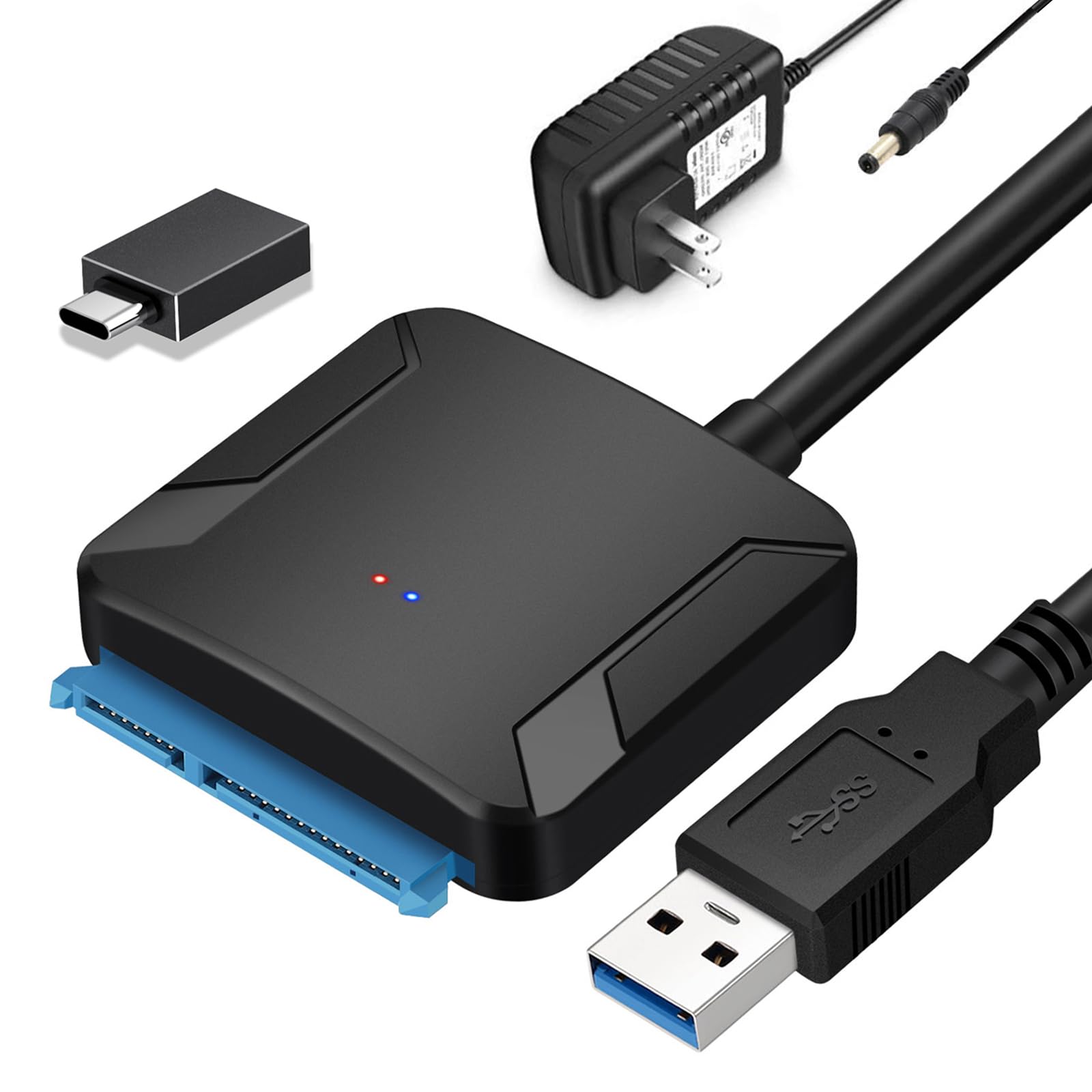
Features: Both Work With 2.5 And 3.5 Inches Hdd And Ssd This External Hard Drive Reader Works With Both Sata Hdd And Sdd. Offers An Easy Way For Booting Up Old Hard Disks, Upgrading Pc Storage, Cloning Hard Disks, Recovering & Retrieving Data, And Expanding Storage. Supports Data Transfer Up To 5 Gbps. Sata To Usb 3.0 Adapter Supports Uasp Technology, Which Is 70% Faster Than Traditional Usb 3.0 And 80% Reduction In Required Processor Resources, Which Enables You To Utilize The Full Potential Of Your Sata Iii Ssd/Hdd When Paired With A Uasp-Enabled Host Controller Simple To Use Just Plug The Electrical Cord Into The Power Port Of The Adapter On One End, And The Electrical Outlet (Like A Wall Socket) On The Other End, And Then, Connect The Sata Plug To The Sata Port On The Hard Drive On One End, And Plug The Other End Of The Cord Into The Usb Port On Your Computer, And If It Works As It Should, Then This Sata Bridge Should Start Flashing With A Blue Light And Within A Few Seconds Or Minutes, The Connected Hard Drive Will Show Up On Your Computer Desktop. Wide Compatibility Windows 10/8.1/8/7/Xp/Vista, Mac Os, Linux Or Chrome Os; Game Consoles Like Ps4, Ps4 Pro, Ps3, Xbox One, Xbox 360; Tv; Router, Etc Application Step ?For Using It: Plug The Hard Drive Into The Adapter? Connect The Adapter With Power? Connect It To Your Computer Via The Usb Interface ?For Removing It: Click The Disk Icon, Choose Eject Hard Drive To Remove The Hardware Safely? Disconnect The 12V 2A Power Adapter? Disconnect The Usb Port Important Note ?No Extra Power Is Required For 2.5'' Hdd/Sdd. ?Power Supply Required For 3.5 Inches Hard Drive Disk.
⚠️ WARNING (California Proposition 65): This product may contain chemicals known to the State of California to cause cancer, birth defects, or other reproductive harm. For more information, please visit www.P65Warnings.ca.gov.
Frequently Asked Questions
Q: What is the maximum data transfer speed of this SATA to USB adapter?A: The maximum data transfer speed is five gigabits per second. This adapter supports UASP technology, which is significantly faster than traditional USB 3.0.
Q: What sizes of hard drives are compatible with this adapter?A: This adapter is compatible with two point five inch and three point five inch hard drives. It can be used with both SSDs and HDDs.
Q: What materials is the SATA to USB adapter made of?A: The adapter is made of copper. This material ensures efficient data transfer and durability.
Q: How do I install the SATA to USB adapter?A: To install, plug the SATA connection into the drive, connect the USB to your computer, and plug the power supply into the SATA connector. It's a simple plug-and-play process.
Q: Is there a power supply included with this adapter?A: Yes, a twelve volt two amp power adapter is included. This is necessary for powering three point five inch hard drives.
Q: Can I use this adapter without a power supply?A: Yes, you can use it without a power supply for two point five inch SSDs and HDDs. The adapter does not require extra power for these smaller drives.
Q: How should I safely disconnect the hard drive from the adapter?A: To safely disconnect, eject the hard drive using the disk icon on your computer. Then, disconnect both the power adapter and the USB cable.
Q: What operating systems are compatible with this adapter?A: The adapter is compatible with Windows versions from ninety-eight to ten, as well as Mac OS X. It also works with gaming consoles like PS4.
Q: Does this adapter support hot-swapping of drives?A: Yes, the SATA to USB adapter supports hot-swapping. You can switch drives without needing to shut down your computer.
Q: What should I do if the adapter doesn't recognize my hard drive?A: If the adapter doesn't recognize your hard drive, ensure it is properly connected and powered. Check the USB port and try a different computer if necessary.
Q: What is the length of the SATA to USB cable?A: The length of the SATA to USB cable is nine point zero two inches. This provides flexibility for connecting to various devices.
Q: Can I use this adapter to clone hard drives?A: Yes, this adapter is ideal for cloning hard drives. It allows you to copy data from an internal drive to a new SSD or HDD.
Q: What does the LED indicator on the adapter signify?A: The LED indicator shows that data is being transferred or that the device is powered on. It illuminates when a drive is connected.
Q: Is there a warranty for this SATA to USB adapter?A: Warranty details may vary, but typically there is a limited warranty provided by the manufacturer. Check the product packaging for specifics.
Q: How do I clean and maintain the SATA to USB adapter?A: To clean, use a soft, dry cloth to wipe the adapter. Avoid using liquids or abrasive materials to prevent damage.