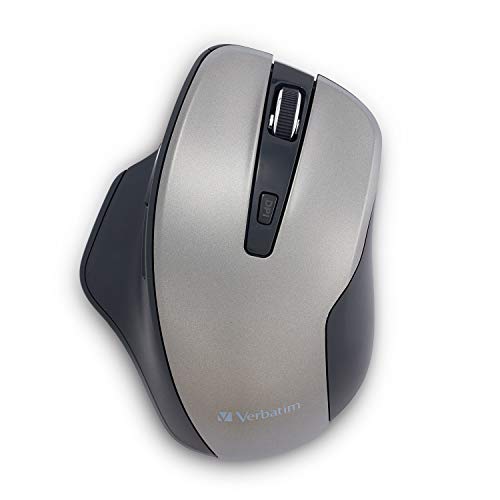
Using Silent Technology, Silent Click Switches And Rubber Covers, This Silent Ergonomic Wireless Blue Led Mouse Is Truly Silent. The Ergonomic Design With Thumb Support Makes This Mouse Easy And Comfortable To Use All Day Long. An Adjustable Dpi Button Lets You Easily Switch Between 800, 1300 And 1600 Dpi While Back And Forward Buttons Let You Easily Navigate Between Pages In Your Browser. The 2.4Ghz Wireless Performance Allows Lag-Free Cursor Movement. Blue Led Technology Allows You To Point And Click On More Surfaces Than Other Mice - From A Glass Table To The Granite Kitchen Counter. The Mouse Connects To The Computer Via A Nano Receiver, Small Enough To Plug In And Leave Connected So Its Great For Computing On-The-Go. Mouse Uses A Usb-A Interface And Is Compatible With Windows Xp, Vista And Windows 7 And Higher; Mac Os X 10.4 And Higher; Linux Kernel 2.6 And Higher.
⚠️ WARNING (California Proposition 65): This product may contain chemicals known to the State of California to cause cancer, birth defects, or other reproductive harm. For more information, please visit www.P65Warnings.ca.gov.
Frequently Asked Questions
Q: What are the dimensions of the Verbatim Silent Ergonomic Wireless Blue LED Mouse?A: The dimensions are three point ninety-five inches in length, two point ninety-five inches in width, and one point fifty-eight inches in height.
Q: What material is the Verbatim Silent Ergonomic Wireless Blue LED Mouse made of?A: The mouse is primarily made of rubber, providing a comfortable grip during use.
Q: Is the Verbatim Silent Ergonomic Wireless Blue LED Mouse compatible with Mac and Linux?A: Yes, it is compatible with Mac OS X ten point four and higher, as well as Linux Kernel two point six and higher.
Q: How do I connect the Verbatim Silent Ergonomic Wireless Blue LED Mouse to my computer?A: Simply plug the nano receiver into a USB-A port on your computer to establish a wireless connection.
Q: Can I adjust the DPI settings on the Verbatim Silent Ergonomic Wireless Blue LED Mouse?A: Yes, you can easily switch between eight hundred, thirteen hundred, and sixteen hundred DPI using an adjustable button.
Q: Is the Verbatim Silent Ergonomic Wireless Blue LED Mouse suitable for left-handed users?A: No, this mouse is designed with an ergonomic shape that is primarily suitable for right-handed users.
Q: How do I clean the Verbatim Silent Ergonomic Wireless Blue LED Mouse?A: Use a soft, damp cloth to wipe the surface of the mouse and avoid using harsh chemicals to maintain its finish.
Q: How should I store the Verbatim Silent Ergonomic Wireless Blue LED Mouse when not in use?A: Store the mouse in a cool, dry place to protect it from dust and damage, and consider removing the batteries if storing long-term.
Q: Does the Verbatim Silent Ergonomic Wireless Blue LED Mouse come with a warranty?A: Yes, Verbatim offers a one-year limited warranty on this product, including technical support.
Q: What should I do if my Verbatim Silent Ergonomic Wireless Blue LED Mouse stops working?A: First, check the battery and replace it if necessary. If it still doesn't work, refer to the manufacturer for troubleshooting assistance.
Q: Is the Verbatim Silent Ergonomic Wireless Blue LED Mouse available in other colors?A: No, this model is specifically available in a graphite color.
Q: Can I use the Verbatim Silent Ergonomic Wireless Blue LED Mouse on a glass surface?A: Yes, thanks to its blue LED technology, this mouse can be used effectively on glass surfaces.
Q: Is the Verbatim Silent Ergonomic Wireless Blue LED Mouse suitable for gaming?A: While it can be used for casual gaming, its ergonomic design and DPI adjustments may not meet the needs of professional gamers.
Q: How long does the battery last in the Verbatim Silent Ergonomic Wireless Blue LED Mouse?A: Battery life can vary, but typically it lasts several months depending on usage.
Q: What kind of batteries does the Verbatim Silent Ergonomic Wireless Blue LED Mouse use?A: The mouse uses standard AA batteries, which are easily replaceable.