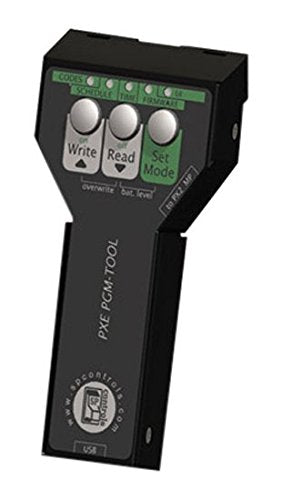
The Excellent Quality Programming Wand Pxe-Pgm-Tool - The Programming Wand Connects To The Pixieplus Controller Through Its Ir Interface And Allows For More Sophisticated Features, Such As Rs232 Control. There Is No Need To Remove The Controller From The Wall. The Programming Wand Connects To Your Pc With A Usb Connection And Contains An Application That Allows You To Perform More Complex Configurations, Including Specifying Rs232 Strings. The Programming Wand Simplifies Configuration And Cloning. Simply Plug The Programming Wand Into Your Pc, And The Application Will Start. Then, Specify The Codes To Be Sent For Each Button. Disconnect The Programming Wand And Take It To Any Other Pixieplus You Wish To Configure. Hold The Wand Up To The Pixieplus, Press The Trigger, And You'Re Done. Repeat For Each Room With The Same Configuration, Without Having To Carry Your Pc Around.
⚠️ WARNING (California Proposition 65): This product may contain chemicals known to the State of California to cause cancer, birth defects, or other reproductive harm. For more information, please visit www.P65Warnings.ca.gov.
Frequently Asked Questions
Q: What are the dimensions of the Epson ELPSP12 Programming Wand?A: The dimensions are approximately zero point nine one inches in length, one point seventy-five inches in width, and four point thirteen inches in height.
Q: What material is the Epson ELPSP12 Programming Wand made of?A: The material is unspecified, but it is a quality product designed by Epson.
Q: What is the model number for this programming wand?A: The model number is ELPSP12, specifically designed for use with the Pixie Plus Controller.
Q: How do I connect the Epson ELPSP12 to my PC?A: You connect the Epson ELPSP12 Programming Wand to your PC using a USB connection for configuration.
Q: Can I use the Programming Wand without removing the controller from the wall?A: Yes, the Programming Wand allows you to configure the Pixie Plus Controller without needing to remove it from the wall.
Q: How do I perform complex configurations with the Programming Wand?A: Simply plug the wand into your PC, run the application, and specify the codes to be sent for each button.
Q: What should I do if I want to configure multiple Pixie Plus Controllers?A: You can easily take the wand to any other Pixie Plus and configure it by holding the wand up and pressing the trigger.
Q: Is the Epson ELPSP12 Programming Wand suitable for beginners?A: Yes, it simplifies configuration, making it user-friendly for both beginners and advanced users.
Q: How do I clean the Epson ELPSP12 Programming Wand?A: Cleaning instructions are not specifically mentioned, but it is advisable to keep it dry and free from moisture.
Q: What is the warranty policy for the Epson ELPSP12?A: Warranty details are not specified, so it's best to check with the manufacturer for specific warranty information.
Q: What should I do if the Programming Wand arrives damaged?A: Contact the seller or Epson customer service immediately for assistance with returns or exchanges.
Q: Can the Programming Wand be used for different room configurations?A: Yes, you can use the Programming Wand to replicate configurations across multiple rooms easily.
Q: Is the Epson ELPSP12 safe to use with other devices?A: Yes, the wand is designed to work safely with the Pixie Plus Controller and other compatible devices.
Q: How portable is the Epson ELPSP12 Programming Wand?A: The wand is lightweight and compact, making it easy to carry to different locations for setup.
Q: Does the Epson ELPSP12 require special software to operate?A: Yes, it comes with an application that you will need to run on your PC for configuration.