Sold Out
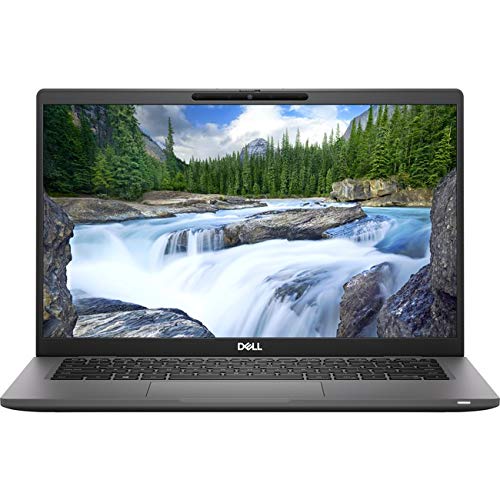
Dell Latitude 7420 I7 11 1185 G7
Free Standard Shipping Across USA
Couldn't load pickup availability
Refresh
Sold by Electroeshop, an authorized reseller.
Returns accepted within 30 days | support@electroeshop.com
Verified
Shipping Information
Free Standard Shipping — United States only
Processing Time: 3–5 business days
Estimated Delivery: 6–10 business days after dispatch
Double-boxed, fully insured & discreetly packaged
Tracking number sent via email once dispatched
Returns & Refund
Returns accepted within 30 days of delivery.
Damaged or Defective Item
Free return shipping + replacement or full refund
Wrong Item Received
Free return shipping + replacement or full refund
Change of Mind
Return shipping at customer's expense · 25% restocking fee applies
Return Authorization (RA) number before sending.
View Full Return & Refund Policy
Your Cart
Item(s):
Total: $25.41
Dell Latitude 7420 I7 11 1185 G7
$2,605.92
Sold Out
Expressresponse With Intel Adaptix Technology, Prioritize Your Most Important Apps, So They Open Faster And Perform Better. Expresssign-In Get To Work Fast With Our Pc Proximity Sensor Enabled By Intel Context Sensing Technology That Detects Your Presence To Instantly Wake And Log You In Via The Ir Camera And Windows Hello, All Without Lifting A Finger. It Locks When You Walk Away, So Your Work Stays Safer. Expresscharge Dell Optimizer Extends Runtime And Improves Battery Performance By Adapting To Your Patterns. Expresscharge Boost Delivers Up To 35% Charge In About 20 Minutes, Or Up To 80% Charge In An Hour With Expresscharge. Intelligent Audio Collaborate Like You'Re In The Same Room. Intelligent Audio Enhances Your Audio Quality And Reduces Background Noises, So You Can Hear And Be Heard, Creating A Better Conference Experience For All. Maximum Productivity In More Places Jump Into Work: Power On By Opening The Lid, Then Stay Synced Thanks To Modern Standby Capability. Log In Instantly With Expresssign-In Proximity Sensor Or Optional Fingerprint Reader In The Power Button.
⚠️ WARNING (California Proposition 65):www.P65Warnings.ca.gov .
Frequently Asked Questions
Q: What are the dimensions of the Dell Latitude 7420?
A: The dimensions are two point nine inches in height, thirteen point four inches in width, and fifteen point three one inches in length.
Q: What is the weight of the Dell Latitude 7420?
A: The weight is three point six pounds, making it a lightweight option for portability.
Q: What is the model number of this laptop?
A: The model number is seventy-seven T H eight, specifically designed for performance and efficiency.
Q: What technology enhances app performance on this laptop?
A: The laptop features ExpressResponse with Intel® Adaptix™ Technology, optimizing the performance of critical applications.
Q: What battery technology does the Dell Latitude 7420 use?
A: It uses lithium-ion batteries packed with equipment to ensure reliable power.
Q: Is the Dell Latitude 7420 suitable for business use?
A: Yes, it is designed with features that enhance productivity and collaboration, making it ideal for business environments.
Q: How does the ExpressSign-in feature work?
A: The ExpressSign-in feature uses a proximity sensor to detect your presence, waking the laptop and logging you in automatically.
Q: Can I charge the laptop quickly?
A: Yes, with ExpressCharge Boost, you can achieve up to thirty-five percent charge in about twenty minutes.
Q: What audio enhancements does this laptop offer?
A: It features Intelligent Audio, which enhances sound quality and reduces background noise for better conference calls.
Q: How do I keep the Dell Latitude 7420 in good condition?
A: Regularly clean the exterior and keyboard with a soft cloth and avoid exposure to extreme temperatures.
Q: What should I do if the laptop arrives damaged?
A: Contact customer support immediately to initiate a return or exchange process for the damaged product.
Q: Is there a warranty on the Dell Latitude 7420?
A: Yes, it typically comes with a standard warranty, but you should verify the specific terms at purchase.
Q: Can I use the laptop for gaming?
A: While it is not primarily designed for gaming, it can handle light gaming due to its Intel® Core™ i7 processor.
Q: What is the maximum battery runtime for this laptop?
A: The battery runtime can vary, but the Dell Optimizer helps extend it by adapting to your usage patterns.
Q: Is this laptop compatible with external monitors?
A: Yes, it typically supports multiple external displays via HDMI and USB-C ports.
Q: How do I perform a factory reset on the Dell Latitude 7420?
A: To perform a factory reset, go to Settings, select Update & Security, and then Recovery to reset the device.
<div class="dynamic-checkout__content" id="dynamic-checkout-cart" data-shopify="dynamic-checkout-cart"> <shopify-accelerated-checkout-cart wallet-configs="[{"supports_subs":true,"supports_def_opts":false,"name":"shop_pay","wallet_params":{"shopId":71498399780,"merchantName":"Electroeshop","personalized":true}},{"supports_subs":false,"supports_def_opts":false,"name":"amazon_pay","wallet_params":{"checkoutLanguage":"en_US","ledgerCurrency":"USD","placement":"Cart","sandbox":false,"merchantId":"A1D97EELABIYRS","productType":"PayAndShip","design":"C0002"}},{"supports_subs":true,"supports_def_opts":false,"name":"paypal","wallet_params":{"shopId":71498399780,"countryCode":"US","merchantName":"Electroeshop","phoneRequired":true,"companyRequired":false,"shippingType":"shipping","shopifyPaymentsEnabled":true,"hasManagedSellingPlanState":false,"requiresBillingAgreement":false,"gatewayType":"MANAGED","merchantId":"CTDG3UHVZNL4L","sdkUrl":"https://www.paypal.com/sdk/js?components=buttons\u0026commit=false\u0026currency=USD\u0026locale=en_US\u0026client-id=AbasDhzlU0HbpiStJiN1KRJ_cNJJ7xYBip7JJoMO0GQpLi8ePNgdbLXkC7_KMeyTg8tnAKW4WKrh9qmf\u0026merchant-id=CTDG3UHVZNL4L\u0026intent=authorize","serviceableCountryCodes":["AC","AD","AE","AF","AG","AI","AL","AM","AO","AR","AT","AU","AW","AX","AZ","BA","BB","BD","BE","BF","BG","BH","BI","BJ","BL","BM","BN","BO","BQ","BR","BS","BT","BW","BY","BZ","CA","CC","CD","CF","CG","CH","CI","CK","CL","CM","CN","CO","CR","CV","CW","CX","CY","CZ","DE","DJ","DK","DM","DO","DZ","EC","EE","EG","EH","ER","ES","ET","FI","FJ","FK","FO","FR","GA","GB","GD","GE","GF","GG","GH","GI","GL","GM","GN","GP","GQ","GR","GS","GT","GW","GY","HK","HN","HR","HT","HU","ID","IE","IL","IM","IN","IO","IQ","IS","IT","JE","JM","JO","JP","KE","KG","KH","KI","KM","KN","KR","KW","KY","KZ","LA","LB","LC","LI","LK","LR","LS","LT","LU","LV","LY","MA","MC","MD","ME","MF","MG","MK","ML","MM","MN","MO","MQ","MR","MS","MT","MU","MV","MW","MX","MY","MZ","NA","NC","NE","NF","NG","NI","NL","NO","NP","NR","NU","NZ","OM","PA","PE","PF","PG","PH","PK","PL","PM","PN","PS","PT","PY","QA","RE","RO","RS","RU","RW","SA","SB","SC","SD","SE","SG","SH","SI","SJ","SK","SL","SM","SN","SO","SR","SS","ST","SV","SX","SZ","TA","TC","TD","TF","TG","TH","TJ","TK","TL","TM","TN","TO","TR","TT","TV","TW","TZ","UA","UG","UM","US","UY","UZ","VA","VC","VE","VG","VN","VU","WF","WS","XK","YE","YT","ZA","ZM","ZW"]}},{"supports_subs":true,"supports_def_opts":false,"name":"google_pay","wallet_params":{"sdkUrl":"https://pay.google.com/gp/p/js/pay.js","paymentData":{"apiVersion":2,"apiVersionMinor":0,"shippingAddressParameters":{"allowedCountryCodes":["AC","AD","AE","AF","AG","AI","AL","AM","AO","AR","AT","AU","AW","AX","AZ","BA","BB","BD","BE","BF","BG","BH","BI","BJ","BL","BM","BN","BO","BQ","BR","BS","BT","BW","BY","BZ","CA","CC","CD","CF","CG","CH","CI","CK","CL","CM","CN","CO","CR","CV","CW","CX","CY","CZ","DE","DJ","DK","DM","DO","DZ","EC","EE","EG","EH","ER","ES","ET","FI","FJ","FK","FO","FR","GA","GB","GD","GE","GF","GG","GH","GI","GL","GM","GN","GP","GQ","GR","GS","GT","GW","GY","HK","HN","HR","HT","HU","ID","IE","IL","IM","IN","IO","IQ","IS","IT","JE","JM","JO","JP","KE","KG","KH","KI","KM","KN","KR","KW","KY","KZ","LA","LB","LC","LI","LK","LR","LS","LT","LU","LV","LY","MA","MC","MD","ME","MF","MG","MK","ML","MM","MN","MO","MQ","MR","MS","MT","MU","MV","MW","MX","MY","MZ","NA","NC","NE","NF","NG","NI","NL","NO","NP","NR","NU","NZ","OM","PA","PE","PF","PG","PH","PK","PL","PM","PN","PS","PT","PY","QA","RE","RO","RS","RU","RW","SA","SB","SC","SD","SE","SG","SH","SI","SJ","SK","SL","SM","SN","SO","SR","SS","ST","SV","SX","SZ","TA","TC","TD","TF","TG","TH","TJ","TK","TL","TM","TN","TO","TR","TT","TV","TW","TZ","UA","UG","UM","US","UY","UZ","VA","VC","VE","VG","VN","VU","WF","WS","XK","YE","YT","ZA","ZM","ZW"],"phoneNumberRequired":true,"format":"FULL-ISO3166"},"merchantInfo":{"merchantName":"Electroeshop","merchantId":"16708973830884969730","merchantOrigin":"electroeshop.com"},"allowedPaymentMethods":[{"type":"CARD","parameters":{"allowedCardNetworks":["VISA","MASTERCARD","DISCOVER","AMEX","JCB"],"allowedAuthMethods":["PAN_ONLY","CRYPTOGRAM_3DS"],"billingAddressRequired":true,"billingAddressParameters":{"format":"FULL-ISO3166","phoneNumberRequired":true}},"tokenizationSpecification":{"type":"PAYMENT_GATEWAY","parameters":{"gateway":"shopify","gatewayMerchantId":"71498399780"}}}],"emailRequired":true},"customerAccountEmail":null,"environment":"PRODUCTION","availablePresentmentCurrencies":["USD"],"auth":[{"jwt":"eyJ0eXAiOiJKV1QiLCJhbGciOiJFUzI1NiJ9.eyJtZXJjaGFudElkIjoiMTY3MDg5NzM4MzA4ODQ5Njk3MzAiLCJtZXJjaGFudE9yaWdpbiI6ImVsZWN0cm9lc2hvcC5jb20iLCJpYXQiOjE3OTE3NjMyMzF9.pNxCTApIoxQAZPMDRuw3ifkcbbQunLxnmO6LZfaS1w8lQ8dcisgz9z0HqFyGPTnNoQhQp7OSHcO6cke7XXIzRA","expiresAt":1791806431},{"jwt":"eyJ0eXAiOiJKV1QiLCJhbGciOiJFUzI1NiJ9.eyJtZXJjaGFudElkIjoiMTY3MDg5NzM4MzA4ODQ5Njk3MzAiLCJtZXJjaGFudE9yaWdpbiI6ImVsZWN0cm9lc2hvcC5jb20iLCJpYXQiOjE3OTE4MDY0MzF9.p-7npBI6N6_EmhQAE3-VmoF3IyuKVMxbtH4azfoRN_nsDwTc4eOqZYvgtV50IS20rCeB0c4FfdXTPhnesKPn5w","expiresAt":1791849631}],"cardsinkUrl":"https://checkout.pci.shopifyinc.com/sessions","cardsinkCallerIdentificationJwt":"eyJraWQiOiJ2MSIsInR5cCI6IkpXVCIsImFsZyI6IkhTMjU2In0.eyJjbGllbnRfaWQiOiIxMSIsImNsaWVudF9hY2NvdW50X2lkIjoiNzE0OTgzOTk3ODAiLCJ1bmlxdWVfaWQiOiIwMU00UFBIS0VZTTg4WkpNRDIzRTg4QlNTRCIsImlhdCI6MTc5MTc2MzIzMX0.BDBMCS2mPrjOmTvsP3tLLE4NmFzg_OwGjCHAh-rUdZg"}}]" access-token="ab31e70b5cc21a1ceee088fbb76625d8" buyer-country="US" buyer-locale="en" buyer-currency="USD" shop-id="71498399780" cart-id="hWNHrh2vXHTGuS5b4f6C7Z5t" enabled-flags="["1172c16a","a1d1f9a1","f5afabb3","370070f3"]" requires-shipping > <div class="wallet-button-wrapper"> <ul class='wallet-cart-grid wallet-cart-grid--skeleton' role="list" data-shopify-buttoncontainer="true"> <li data-testid='grid-cell' class='wallet-cart-button-container'><div class='wallet-cart-button wallet-cart-button__skeleton' role='button' disabled aria-hidden='true'> </div></li><li data-testid='grid-cell' class='wallet-cart-button-container'><div class='wallet-cart-button wallet-cart-button__skeleton' role='button' disabled aria-hidden='true'> </div></li><li data-testid='grid-cell' class='wallet-cart-button-container'><div class='wallet-cart-button wallet-cart-button__skeleton' role='button' disabled aria-hidden='true'> </div></li><li data-testid='grid-cell' class='wallet-cart-button-container'><div class='wallet-cart-button wallet-cart-button__skeleton' role='button' disabled aria-hidden='true'> </div></li> </ul> </div> </shopify-accelerated-checkout-cart> </div>