Sold Out
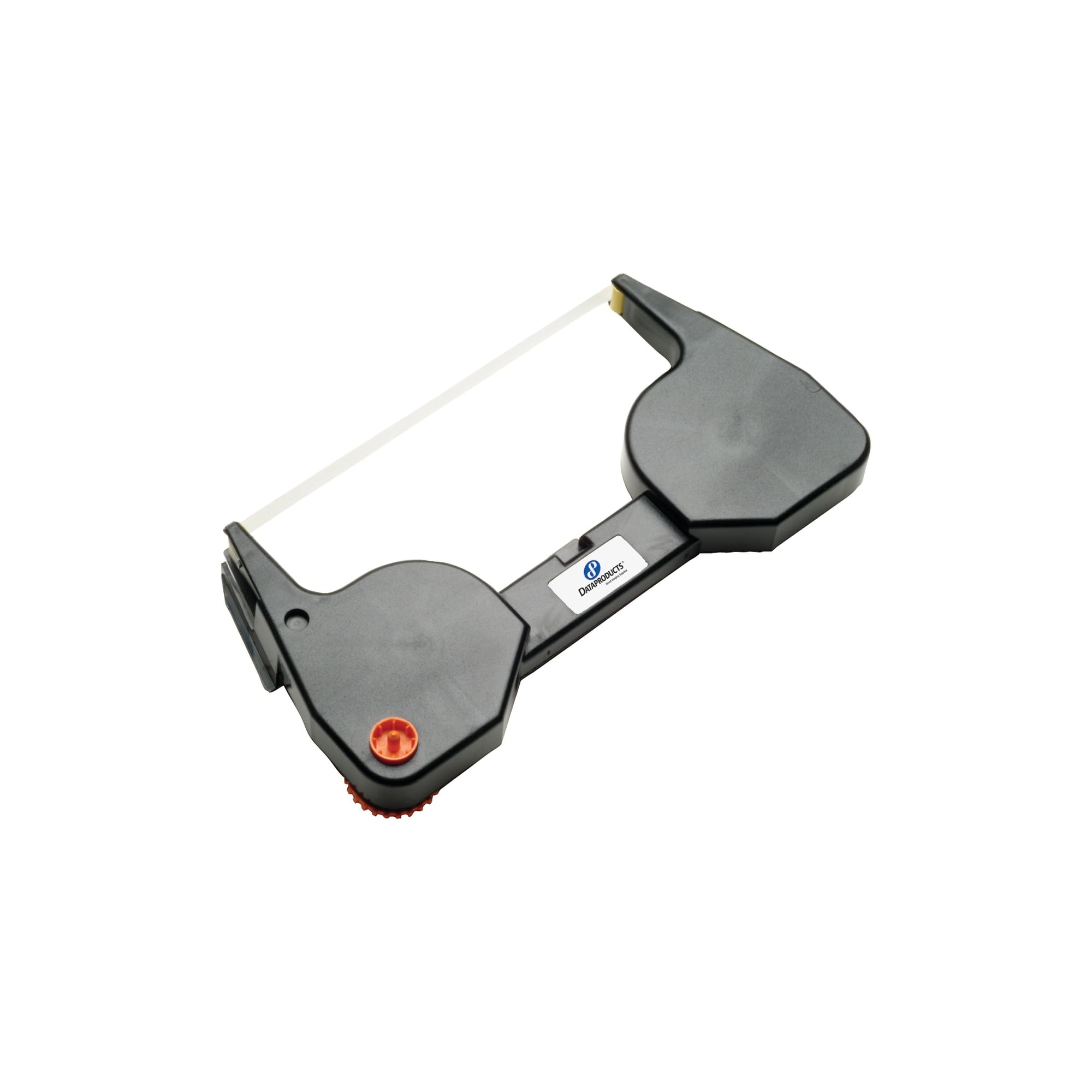
Dataproducts Clear Lift Off Tape Ribbon Non Oem
Free Standard Shipping Across USA
Couldn't load pickup availability
Refresh
Sold by Electroeshop, an authorized reseller.
Returns accepted within 30 days | support@electroeshop.com
Verified
Shipping Information
Free Standard Shipping — United States only
Processing Time: 3–5 business days
Estimated Delivery: 6–10 business days after dispatch
Double-boxed, fully insured & discreetly packaged
Tracking number sent via email once dispatched
Returns & Refund
Returns accepted within 30 days of delivery.
Damaged or Defective Item
Free return shipping + replacement or full refund
Wrong Item Received
Free return shipping + replacement or full refund
Change of Mind
Return shipping at customer's expense · 25% restocking fee applies
Return Authorization (RA) number before sending.
View Full Return & Refund Policy
Your Cart
Item(s):
Total: $1,272.83
Dataproducts Clear Lift Off Tape Ribbon Non Oem
$14.28
Sold Out
Compatible Ibm/Infoprint Models:Wheelwriter: 3, 5, 6, 6 Series Ii, 10 Series Ii, 15 Series Ii, 20, 25, 30, 30 Series Ii, 35, 40, 50, 50 Series Ii, 70, 70 Series Ii, 1000, 1500, 2000, 2500, 3000, 3500, 5000, 6783, 6784, 6787, 6788, 7000, Series Ii, Personal Wheelwriter 2, 5223, 6747, 6783, 6784, 6787, 6788, Easystrike, System 2000 Model 5216-Ii, Wheelprinter E, Wheelprinter E Model 1Compatible Lexmark Models:Personal Wheelwriter Ii, Wheelwriter 15 Series Ii, Wheelwriter 30 Series Ii, Wheelwriter 70 Plus Series Ii Recycling Solution - Designed To Encourage Recycling, Helping You Divert Materials From Landfill.
⚠️ WARNING (California Proposition 65):www.P65Warnings.ca.gov .
Frequently Asked Questions
Q: What are the dimensions of the Dataproducts R5111 Ribbon?
A: The Dataproducts R5111 Ribbon measures six point eight one inches in length, three point five inches in width, and one point three inches in height. These dimensions make it compact for easy storage and installation.
Q: What material is the Dataproducts R5111 Ribbon made of?
A: The Dataproducts R5111 Ribbon is made of polyethylene. This material is known for its durability and effectiveness in ribbon applications.
Q: Is the Dataproducts R5111 Ribbon compatible with other printers?
A: Yes, the Dataproducts R5111 Ribbon is compatible with IBM Wheelwriter models. This ensures optimal performance and quality when used with supported devices.
Q: How do I install the Dataproducts R5111 Ribbon?
A: To install the Dataproducts R5111 Ribbon, open the printer cover, remove the old ribbon, and insert the new ribbon following the guide arrows. Close the cover and perform a test print to ensure proper installation.
Q: Is the Dataproducts R5111 Ribbon suitable for all dot matrix printers?
A: No, the Dataproducts R5111 Ribbon is specifically designed for IBM Wheelwriter printers. Using it with unsupported models may cause printing issues.
Q: Can I use the Dataproducts R5111 Ribbon for printing on envelopes?
A: Yes, the Dataproducts R5111 Ribbon can be used to print on envelopes, as long as the printer settings are adjusted accordingly. This allows for clear and readable prints.
Q: How should I store the Dataproducts R5111 Ribbon?
A: Store the Dataproducts R5111 Ribbon in a cool, dry place away from direct sunlight. Proper storage helps maintain the ribbon's quality and extends its shelf life.
Q: Is the Dataproducts R5111 Ribbon hazardous?
A: No, the Dataproducts R5111 Ribbon is not classified as hazardous material. It is safe for regular use in printing applications.
Q: What should I do if the ribbon breaks during use?
A: If the Dataproducts R5111 Ribbon breaks, simply replace it with a new ribbon. Ensure the printer is powered off before attempting to replace the ribbon to avoid any damage.
Q: How do I clean the printer after using the Dataproducts R5111 Ribbon?
A: To clean the printer, use a soft, lint-free cloth to remove any dust or residue. Avoid using harsh chemicals that could damage the printer components.
Q: Can I return the Dataproducts R5111 Ribbon if I’m not satisfied?
A: Yes, you can return the Dataproducts R5111 Ribbon if you're not satisfied, provided it is within the return policy timeframe. Check with the retailer for specific return instructions.
Q: What if the ribbon does not print clearly?
A: If the Dataproducts R5111 Ribbon does not print clearly, check the printer settings, ensure the ribbon is installed correctly, and verify that the printer is functioning properly.
Q: Is the Dataproducts R5111 Ribbon easy to replace?
A: Yes, the Dataproducts R5111 Ribbon is designed for easy replacement. Follow the instructions in the printer manual for a hassle-free experience.
Q: How long does the Dataproducts R5111 Ribbon last?
A: The lifespan of the Dataproducts R5111 Ribbon can vary based on usage. Generally, it provides a sufficient number of prints for standard office tasks.
Q: Does the Dataproducts R5111 Ribbon come with a warranty?
A: Yes, the Dataproducts R5111 Ribbon typically comes with a manufacturer's warranty. Check the packaging or the retailer's website for warranty details.
Q: What is the color of the Dataproducts R5111 Ribbon?
A: The Dataproducts R5111 Ribbon is grey in color. This neutral color is standard for most dot matrix printing applications.
<div class="dynamic-checkout__content" id="dynamic-checkout-cart" data-shopify="dynamic-checkout-cart"> <shopify-accelerated-checkout-cart wallet-configs="[{"supports_subs":true,"supports_def_opts":false,"name":"shop_pay","wallet_params":{"shopId":71498399780,"merchantName":"Electroeshop","personalized":true}},{"supports_subs":false,"supports_def_opts":false,"name":"amazon_pay","wallet_params":{"checkoutLanguage":"en_US","ledgerCurrency":"USD","placement":"Cart","sandbox":false,"merchantId":"A1D97EELABIYRS","productType":"PayAndShip","design":"C0002"}},{"supports_subs":true,"supports_def_opts":false,"name":"paypal","wallet_params":{"shopId":71498399780,"countryCode":"US","merchantName":"Electroeshop","phoneRequired":true,"companyRequired":false,"shippingType":"shipping","shopifyPaymentsEnabled":true,"hasManagedSellingPlanState":false,"requiresBillingAgreement":false,"gatewayType":"MANAGED","merchantId":"CTDG3UHVZNL4L","sdkUrl":"https://www.paypal.com/sdk/js?components=buttons\u0026commit=false\u0026currency=USD\u0026locale=en_US\u0026client-id=AbasDhzlU0HbpiStJiN1KRJ_cNJJ7xYBip7JJoMO0GQpLi8ePNgdbLXkC7_KMeyTg8tnAKW4WKrh9qmf\u0026merchant-id=CTDG3UHVZNL4L\u0026intent=authorize","serviceableCountryCodes":["AC","AD","AE","AF","AG","AI","AL","AM","AO","AR","AT","AU","AW","AX","AZ","BA","BB","BD","BE","BF","BG","BH","BI","BJ","BL","BM","BN","BO","BQ","BR","BS","BT","BW","BY","BZ","CA","CC","CD","CF","CG","CH","CI","CK","CL","CM","CN","CO","CR","CV","CW","CX","CY","CZ","DE","DJ","DK","DM","DO","DZ","EC","EE","EG","EH","ER","ES","ET","FI","FJ","FK","FO","FR","GA","GB","GD","GE","GF","GG","GH","GI","GL","GM","GN","GP","GQ","GR","GS","GT","GW","GY","HK","HN","HR","HT","HU","ID","IE","IL","IM","IN","IO","IQ","IS","IT","JE","JM","JO","JP","KE","KG","KH","KI","KM","KN","KR","KW","KY","KZ","LA","LB","LC","LI","LK","LR","LS","LT","LU","LV","LY","MA","MC","MD","ME","MF","MG","MK","ML","MM","MN","MO","MQ","MR","MS","MT","MU","MV","MW","MX","MY","MZ","NA","NC","NE","NF","NG","NI","NL","NO","NP","NR","NU","NZ","OM","PA","PE","PF","PG","PH","PK","PL","PM","PN","PS","PT","PY","QA","RE","RO","RS","RU","RW","SA","SB","SC","SD","SE","SG","SH","SI","SJ","SK","SL","SM","SN","SO","SR","SS","ST","SV","SX","SZ","TA","TC","TD","TF","TG","TH","TJ","TK","TL","TM","TN","TO","TR","TT","TV","TW","TZ","UA","UG","UM","US","UY","UZ","VA","VC","VE","VG","VN","VU","WF","WS","XK","YE","YT","ZA","ZM","ZW"]}},{"supports_subs":true,"supports_def_opts":false,"name":"google_pay","wallet_params":{"sdkUrl":"https://pay.google.com/gp/p/js/pay.js","paymentData":{"apiVersion":2,"apiVersionMinor":0,"shippingAddressParameters":{"allowedCountryCodes":["AC","AD","AE","AF","AG","AI","AL","AM","AO","AR","AT","AU","AW","AX","AZ","BA","BB","BD","BE","BF","BG","BH","BI","BJ","BL","BM","BN","BO","BQ","BR","BS","BT","BW","BY","BZ","CA","CC","CD","CF","CG","CH","CI","CK","CL","CM","CN","CO","CR","CV","CW","CX","CY","CZ","DE","DJ","DK","DM","DO","DZ","EC","EE","EG","EH","ER","ES","ET","FI","FJ","FK","FO","FR","GA","GB","GD","GE","GF","GG","GH","GI","GL","GM","GN","GP","GQ","GR","GS","GT","GW","GY","HK","HN","HR","HT","HU","ID","IE","IL","IM","IN","IO","IQ","IS","IT","JE","JM","JO","JP","KE","KG","KH","KI","KM","KN","KR","KW","KY","KZ","LA","LB","LC","LI","LK","LR","LS","LT","LU","LV","LY","MA","MC","MD","ME","MF","MG","MK","ML","MM","MN","MO","MQ","MR","MS","MT","MU","MV","MW","MX","MY","MZ","NA","NC","NE","NF","NG","NI","NL","NO","NP","NR","NU","NZ","OM","PA","PE","PF","PG","PH","PK","PL","PM","PN","PS","PT","PY","QA","RE","RO","RS","RU","RW","SA","SB","SC","SD","SE","SG","SH","SI","SJ","SK","SL","SM","SN","SO","SR","SS","ST","SV","SX","SZ","TA","TC","TD","TF","TG","TH","TJ","TK","TL","TM","TN","TO","TR","TT","TV","TW","TZ","UA","UG","UM","US","UY","UZ","VA","VC","VE","VG","VN","VU","WF","WS","XK","YE","YT","ZA","ZM","ZW"],"phoneNumberRequired":true,"format":"FULL-ISO3166"},"merchantInfo":{"merchantName":"Electroeshop","merchantId":"16708973830884969730","merchantOrigin":"electroeshop.com"},"allowedPaymentMethods":[{"type":"CARD","parameters":{"allowedCardNetworks":["VISA","MASTERCARD","DISCOVER","AMEX","JCB"],"allowedAuthMethods":["PAN_ONLY","CRYPTOGRAM_3DS"],"billingAddressRequired":true,"billingAddressParameters":{"format":"FULL-ISO3166","phoneNumberRequired":true}},"tokenizationSpecification":{"type":"PAYMENT_GATEWAY","parameters":{"gateway":"shopify","gatewayMerchantId":"71498399780"}}}],"emailRequired":true},"customerAccountEmail":null,"environment":"PRODUCTION","availablePresentmentCurrencies":["USD"],"auth":[{"jwt":"eyJ0eXAiOiJKV1QiLCJhbGciOiJFUzI1NiJ9.eyJtZXJjaGFudElkIjoiMTY3MDg5NzM4MzA4ODQ5Njk3MzAiLCJtZXJjaGFudE9yaWdpbiI6ImVsZWN0cm9lc2hvcC5jb20iLCJpYXQiOjE3OTE2NTg3NzF9.FGd6EVLW96Vvu6G4vhUbJf2UyDck-LW3Uez-yM7pHEKviEZkzDID0N3sAIXPzXeB8I9dFJSXrZzp7q2Y1Ohtlw","expiresAt":1791701971},{"jwt":"eyJ0eXAiOiJKV1QiLCJhbGciOiJFUzI1NiJ9.eyJtZXJjaGFudElkIjoiMTY3MDg5NzM4MzA4ODQ5Njk3MzAiLCJtZXJjaGFudE9yaWdpbiI6ImVsZWN0cm9lc2hvcC5jb20iLCJpYXQiOjE3OTE3MDE5NzF9.6rvuOhQflImp4T8YYvxtFf247hcOvQCZDNgNUsqq9WO5nuyS9EZXGnbaIaEhUuMpDAdNt9mZ_PGe8ucot2X28Q","expiresAt":1791745171}],"cardsinkUrl":"https://checkout.pci.shopifyinc.com/sessions","cardsinkCallerIdentificationJwt":"eyJraWQiOiJ2MSIsInR5cCI6IkpXVCIsImFsZyI6IkhTMjU2In0.eyJjbGllbnRfaWQiOiIxMSIsImNsaWVudF9hY2NvdW50X2lkIjoiNzE0OTgzOTk3ODAiLCJ1bmlxdWVfaWQiOiIwMU00S0pZNkZZNE1RM1NUQUpUUzdIVEo2ViIsImlhdCI6MTc5MTY1ODc3MX0.bpeC5H5EApFxudT88ebKvnwixgCKY-4JYp5y-sDyJWU"}}]" access-token="ab31e70b5cc21a1ceee088fbb76625d8" buyer-country="US" buyer-locale="en" buyer-currency="USD" shop-id="71498399780" cart-id="hWNHoqd5EX6GYyvlORG6sS0X" enabled-flags="["1172c16a","a1d1f9a1","f5afabb3","370070f3"]" requires-shipping > <div class="wallet-button-wrapper"> <ul class='wallet-cart-grid wallet-cart-grid--skeleton' role="list" data-shopify-buttoncontainer="true"> <li data-testid='grid-cell' class='wallet-cart-button-container'><div class='wallet-cart-button wallet-cart-button__skeleton' role='button' disabled aria-hidden='true'> </div></li><li data-testid='grid-cell' class='wallet-cart-button-container'><div class='wallet-cart-button wallet-cart-button__skeleton' role='button' disabled aria-hidden='true'> </div></li><li data-testid='grid-cell' class='wallet-cart-button-container'><div class='wallet-cart-button wallet-cart-button__skeleton' role='button' disabled aria-hidden='true'> </div></li><li data-testid='grid-cell' class='wallet-cart-button-container'><div class='wallet-cart-button wallet-cart-button__skeleton' role='button' disabled aria-hidden='true'> </div></li> </ul> </div> </shopify-accelerated-checkout-cart> </div>