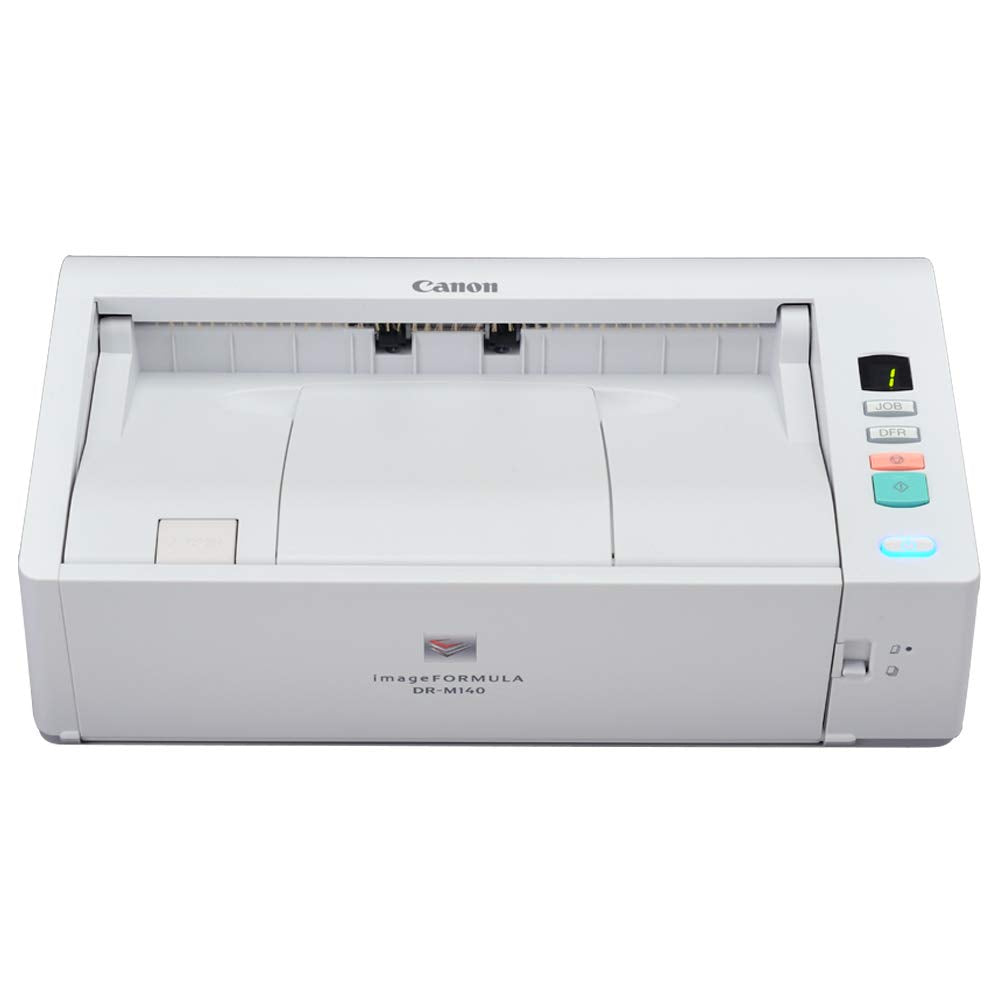
From The Manufacturerview Largerthe Canon Imageformula Dr-M140 Document Scanner Is A Compact And Versatile Solution To Help Reduce Paperwork And Improve Workflows. With An Out-Of-The-Box Design, Flexible Handling Features, And Advanced Image Quality Functions, The Dr-M140 Is A Performance-Driven Device That Provides The Basis For An Intelligent Document Capture System.A Wide Variety Of Applicationseach Day, Legal, Medical, Government, And Financial Staff Members Are Challenged With Overwhelming Amounts Of Paperwork. From Invoices To Letters And Contracts To Ekg Strips, Those In Paper-Based Businesses Require A Document Capture System That Helps Ensure Efficient Information Management-That System Starts With The Dr-M140 Scanner.Reliable And Versatileview Larger Reliable Pickup Feeding ''U-Turn'' Path Feeding For Typical Document Scanning Straight Path Feeding For Thick Documents And Even Plastic And Embossed Cards Long Document Mode (For Documents Up To 118'') Double Feed Release (Dfr) Button On The Scanner Body That Allows Users Tohandle Special Documents, Such As Envelopesconvenient And Effectiveview Larger Space-Saving: No Lengthy Feed Tray Or Eject Tray Needed Front-Feeding And Front Eject Control Panel To Select Scan Tasks Includes A Full Auto Mode, Through Which A Single Click Adjustsmultiple Feature Settings To Easily Deliver An Optimal Scanned Imageproductive And Capablemaximum Scanning Speed (In All Modes)-40 Ppm/80 Ipm Suggested Daily Volume-6,000 Scans Automatic Document Feeder That Holds 50 Sheetshigh Image Qualityimage Processing Features Increase Precision: Auto Color Detection, Character Emphasis, Background Smoothing, Auto Resolution Setting, Text Enhancement, Shadow Croppingcomprehensive Softwarecanon Captureontouch To Simplify Scanning Tasks Canon Captureperfect For Advanced Image Processing Features Kofax Vrs Nuance Ecopy Pdf Pro Office Bundled With Windows Isis/Twain Drivers For Easy Integration With Third-Party Enterprisecontent Management (Ecm) Software Route Scanned Images Directly To Cloud Applications Such As Microsoft Sharepointenvironment In Mindmeets Energy Star Guidelines Eu Rohs Compliant Eu Weee Compliantcustomer Carefor Investment Protection, Ecarepak Options Are Available On The Dr-M160 Scanner.Ecarepak Extends Service Beyond The Initial One-Year Advanced Exchange Warranty Period,Saving On Costs Associated With Post-Purchase Maintenance And Maximizing Uptime Throughout The Product Life.What'S In The Box?Main Unit Ac Adapter Power Cable Usb Cable Setup Disk Reference Guide Ecarepak Brochure Warranty Card Eppo Insert Kofax Vrs Insert Kofax Vrs Basic Cdproduct Descriptionthe Canon Image Formula Dr-M140 Document Scanner Is A Compact And Versatile Solution To Help Reduce Paperwork And Improve Workflows. With An Out-Of-The-Box Design, Reliable Handling, And Advanced Image Quality Functions, The Dr-M140 Is A Performance-Driven Device That Provides The Basis For An Intelligent Document Capture System.
⚠️ WARNING (California Proposition 65): This product may contain chemicals known to the State of California to cause cancer, birth defects, or other reproductive harm. For more information, please visit www.P65Warnings.ca.gov.
Frequently Asked Questions
Q: What are the dimensions of the Canon DR-M140 document scanner?A: The Canon DR-M140 measures eighteen point seventy-five inches in length, ten point five inches in width, and seven inches in height. Its compact design makes it suitable for desktop use in office environments.
Q: What type of documents can the Canon DR-M140 scan?A: The Canon DR-M140 can scan a wide variety of documents, including receipts, photos, business cards, contracts, and long documents. It is designed to handle both thick and thin materials efficiently.
Q: What features does the Canon DR-M140 have for image quality?A: The Canon DR-M140 includes advanced image processing features such as Auto Color Detection, Character Emphasis, and Background Smoothing. These functions enhance the quality and precision of scanned images.
Q: How do I use the Canon DR-M140 scanner?A: To use the Canon DR-M140, simply load your documents into the automatic document feeder and select your desired scan settings using the control panel. It supports both single and double-sided scanning.
Q: Is there an automatic document feeder in the Canon DR-M140?A: Yes, the Canon DR-M140 features a fifty-sheet automatic document feeder. This allows for efficient scanning of multiple documents in a single batch.
Q: Can I scan both sides of a document at once with the Canon DR-M140?A: Yes, the Canon DR-M140 can scan both sides of a document simultaneously. It operates at speeds of up to forty pages per minute, enhancing productivity.
Q: How should I maintain the Canon DR-M140 scanner?A: To maintain the Canon DR-M140, keep it clean by regularly dusting the exterior and cleaning the scanning surface with a soft cloth. Ensure the document feeder is free from jams and debris.
Q: What software is included with the Canon DR-M140?A: The Canon DR-M140 comes bundled with Canon CaptureOnTouch and CapturePerfect software. These tools simplify scanning tasks and enhance image processing capabilities.
Q: Is the Canon DR-M140 suitable for home use?A: Yes, the Canon DR-M140 is compact and versatile, making it suitable for both home and office use. It is ideal for individuals handling high volumes of paperwork.
Q: What warranty does the Canon DR-M140 offer?A: The Canon DR-M140 includes a one-year warranty that covers defects and malfunctions. Additionally, eCarePAK options are available for extended service coverage.
Q: Can the Canon DR-M140 connect to cloud applications?A: Yes, the Canon DR-M140 can route scanned images directly to cloud applications such as Microsoft SharePoint. This feature enhances workflow efficiency.
Q: What is the maximum scanning speed of the Canon DR-M140?A: The maximum scanning speed of the Canon DR-M140 is forty pages per minute and eighty images per minute. This speed applies to both color and black-and-white documents.
Q: Does the Canon DR-M140 comply with environmental standards?A: Yes, the Canon DR-M140 meets ENERGY STAR guidelines and is compliant with EU RoHS and WEEE standards. It is designed with environmentally friendly practices in mind.
Q: What types of materials can the Canon DR-M140 scan?A: The Canon DR-M140 can scan a variety of materials including paper, plastic, and embossed cards. It is equipped to handle both regular and specialty documents.
Q: What is the suggested daily volume for the Canon DR-M140?A: The suggested daily volume for the Canon DR-M140 is up to six thousand scans. This capacity makes it well-suited for high-volume scanning tasks.
Q: How does the Canon DR-M140 handle double feeds?A: The Canon DR-M140 is equipped with a Double Feed Release button that allows users to manage special documents like envelopes effectively, minimizing scanning errors.