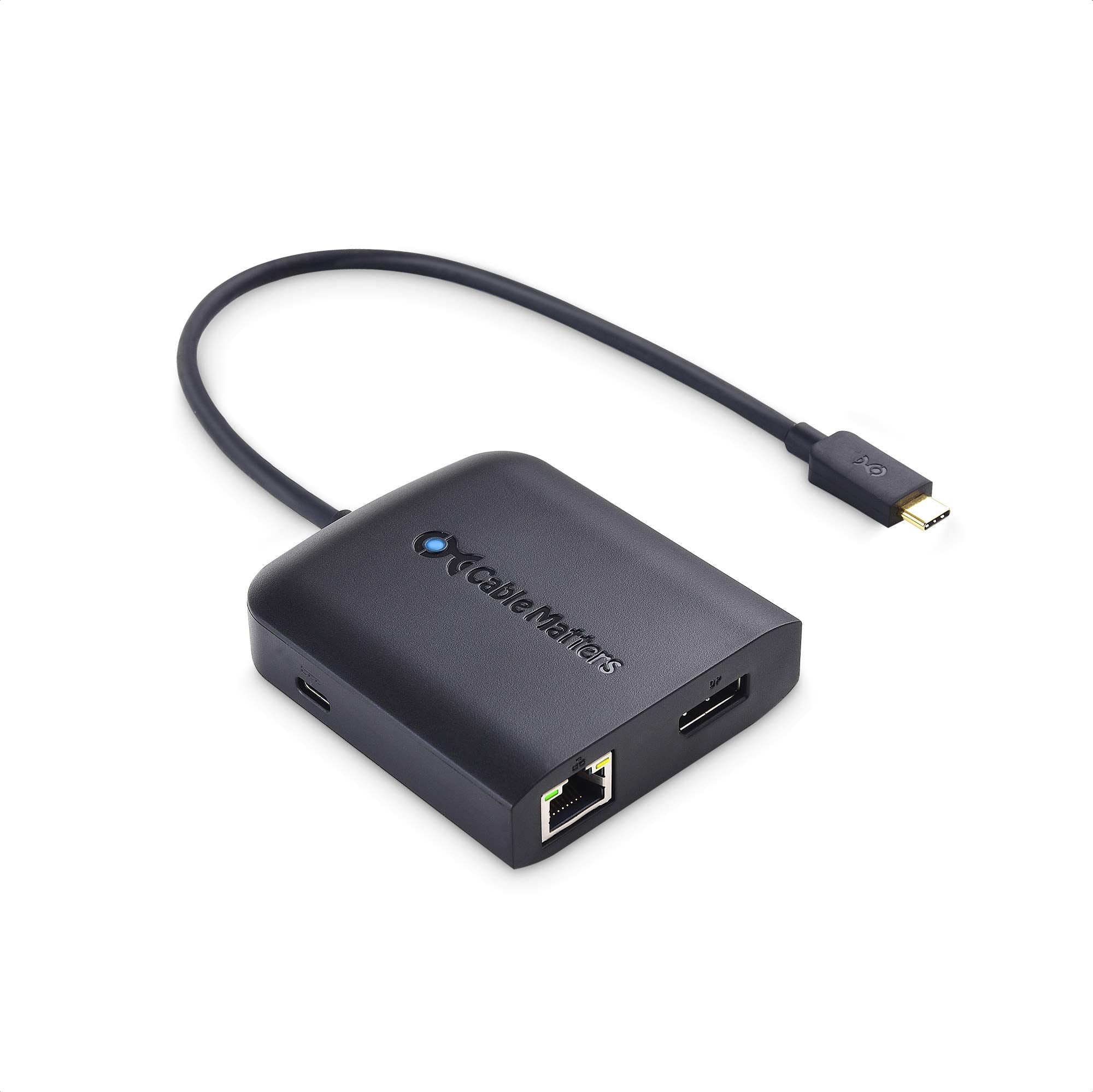
The Cable Matters USB C Multiport Adapter is an essential accessory for users seeking to expand their connectivity options. Designed for MacBook Pro and compatible devices, this USB C hub combines multiple functionalities into a single, compact solution for both office and travel environments.
This versatile USB C hub features a sleek black design and offers a range of connectivity options, including DisplayPort 1.4, two USB 2.0 ports, Ethernet, and 100W power delivery for charging your laptop. Its lightweight construction makes it easy to carry, while its robust performance ensures reliable connections for various tasks.
Key Features:
Multiport Connectivity: Connect multiple devices with the 5-in-1 USB C adapter, which includes DisplayPort, USB 2.0, and Ethernet ports.
High-Performance Display: Supports resolutions up to 8K (7680 x 4320) with High Dynamic Range (HDR) for stunning visuals.
Power Delivery: Provides up to 100W charging power through USB Type-C PD 3.0, allowing you to power your laptop while in use.
Plug-and-Play Design: No software installation is required; simply connect the hub to your device and start using it immediately.
Broad Device Compatibility: Works seamlessly with a variety of devices including MacBook models, Dell laptops, and other USB-C enabled machines.
Compact and Lightweight: Weighing less than 3 ounces, this adapter is portable and perfect for on-the-go professionals.
Stable Ethernet Connection: Ensures a reliable internet connection for online tasks, making it ideal for remote work or streaming.
The Cable Matters USB C Multiport Adapter is a perfect choice for students, professionals, and anyone requiring efficient connectivity solutions. Its combination of versatility, high performance, and compact design makes it a valuable addition to any tech setup, ensuring users can connect and charge their devices effectively in various environments.
⚠️ WARNING (California Proposition 65): This product may contain chemicals known to the State of California to cause cancer, birth defects, or other reproductive harm. For more information, please visit www.P65Warnings.ca.gov.
Frequently Asked Questions
Q: What are the dimensions of the Cable Matters USB C Hub?A: The dimensions are three point five inches in length, two point three inches in width, and zero point six inches in height. This compact size makes it easy to carry.
Q: What materials are used in this USB C Hub?A: The specific materials are not disclosed in the product details. However, it is designed for durability and functionality in a sleek black finish.
Q: What is the maximum charging power of this hub?A: The hub supports a maximum charging power of one hundred watts. This allows for efficient charging while using connected devices.
Q: How do I connect my laptop to this USB C Hub?A: You can connect your laptop by plugging the USB C Hub into a USB-C port on your laptop. It easily expands your connectivity options with additional ports.
Q: Can I use this hub to connect multiple devices at once?A: Yes, this hub allows you to connect multiple devices simultaneously. It features two USB ports, an Ethernet port, and a DisplayPort for versatile use.
Q: Is this USB C Hub compatible with MacBook Pro?A: Yes, it is compatible with MacBook Pro and other devices with Thunderbolt three or USB-C ports. It enhances your connectivity options seamlessly.
Q: How do I keep this USB C Hub clean and functioning?A: To keep it clean, gently wipe it with a soft, dry cloth. Avoid using liquids or abrasive materials that could damage the surface.
Q: Is this hub safe to use with my laptop?A: Yes, it is safe to use with your laptop. The hub is designed to support power delivery and maintains stable connections to devices.
Q: What is the warranty on the Cable Matters USB C Hub?A: The specific warranty details are not mentioned in the product description. It's advisable to check with the manufacturer for warranty information.
Q: What should I do if the hub doesn't work after I plug it in?A: If it doesn't work, ensure the USB C Hub is fully inserted into the port. Check if your device supports USB-C connections and try restarting your device.
Q: Can I use this hub with a Windows laptop?A: Yes, this hub is compatible with Windows laptops that have USB-C or Thunderbolt three ports. It enhances connectivity for various devices.
Q: What types of devices can I connect to this hub?A: You can connect devices such as monitors, keyboards, mice, and USB storage devices. It offers a versatile solution for expanding your workspace.
Q: Does this USB C Hub support high-resolution displays?A: Yes, it supports up to eight K resolution at seven thousand six hundred eighty by four thousand three hundred twenty pixels. Ideal for high-quality displays.
Q: Is there an Ethernet port on this USB C Hub?A: Yes, there is an Ethernet port that supports stable network connections. This feature is beneficial for reliable internet access while using the hub.
Q: What is the data transfer speed of the USB ports?A: The USB ports support data transfer speeds of four hundred eighty megabits per second. This allows for quick file transfers between devices.