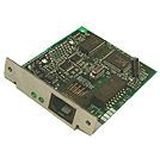
For An Office To Be Successful And Efficient, The Right Connections Are Essential. The Brother Nc-8000 Internal Network Card Provides That Connection, Enabling You To Make More Of Your Time And Resources. The Nc-8000 Is Truly A One-Stop Communications Center. It Allows You To Print Across Your Lan, Send/Receive Faxes Across The Internet, E-Mail Users On Your Lan Or Across The Internet, And Receive And Print E-Mail Directly To Your Fax Or Mfc.
⚠️ WARNING (California Proposition 65): This product may contain chemicals known to the State of California to cause cancer, birth defects, or other reproductive harm. For more information, please visit www.P65Warnings.ca.gov.
Frequently Asked Questions
Q: What are the dimensions of the Brother NC8000 Print Server?A: The Brother NC8000 Print Server measures six inches in length, two point five two inches in width, and eight point five inches in height. These dimensions make it compact and suitable for various office setups.
Q: What networking protocols does the Brother NC8000 support?A: The Brother NC8000 supports TCP/IP, IPX/SPX, and NetBEUI/NetBIOS transport protocols. This versatility allows for seamless communication across different network configurations.
Q: What is the data transfer rate of the Brother NC8000?A: The data transfer rate of the Brother NC8000 is ten megabits per second. This speed is adequate for efficient printing and faxing across a local area network.
Q: How do I install the Brother NC8000 Print Server?A: To install the Brother NC8000, insert it into an available expansion slot on your printer. Then, connect the printer to your local area network using an RJ45 cable.
Q: Can I use the Brother NC8000 with multiple printers?A: No, the Brother NC8000 is designed to be used with a single printer at a time. It enhances the connectivity of that specific printer to your network.
Q: Is the Brother NC8000 compatible with Mac systems?A: Yes, the Brother NC8000 is compatible with both Windows and Mac operating systems. This ensures it can be integrated into a mixed environment.
Q: How do I keep the Brother NC8000 in good condition?A: Keep the Brother NC8000 in a cool, dry place away from direct sunlight. Regularly check for dust and clean any accumulated dirt with a soft, dry cloth.
Q: Does the Brother NC8000 require any special maintenance?A: No, the Brother NC8000 does not require special maintenance. Just ensure it is clean and properly connected to the network for optimal performance.
Q: What is the warranty period for the Brother NC8000?A: The Brother NC8000 typically comes with a one-year limited warranty. This covers defects in materials and workmanship under normal use.
Q: What should I do if the Brother NC8000 stops working?A: If the Brother NC8000 stops working, first check all connections and restart the device. If the issue persists, consult the user manual or contact Brother customer support.
Q: Can I return the Brother NC8000 if it doesn't meet my needs?A: Yes, you can return the Brother NC8000 if it doesn’t meet your needs, provided it's within the retailer's return policy timeframe. Check the specific terms for details.
Q: Does the Brother NC8000 support wireless printing?A: No, the Brother NC8000 does not support wireless printing. It requires a wired connection to your network via an RJ45 cable.
Q: What type of printer is the Brother NC8000 compatible with?A: The Brother NC8000 is compatible with Brother printers that have an available expansion slot for network cards. Ensure to check the printer specifications.
Q: Is the Brother NC8000 a plug-and-play device?A: Yes, the Brother NC8000 is a plug-and-play device. Once installed, it automatically configures itself for basic connectivity.
Q: What is the form factor of the Brother NC8000?A: The Brother NC8000 has a plug-in module form factor. This allows for easy installation into compatible printers without additional tools.