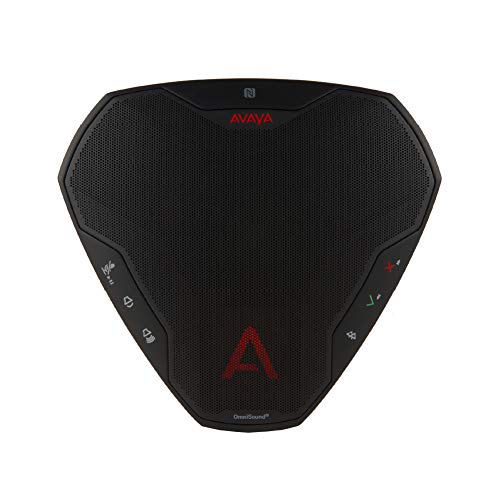
Avaya B109 Conference Phone Portable Usb And Bluetooth Connected Speaker And Microphone: Creates An Immersive Meeting Experience For Up To 6 Participants; Portable Speaker You Can Take Anywhere ; Usb Connectivity And Battery-Powered ; Bluetooth-Enabled With Nfc (Easy Pairing) ; Omnisound Audio For Reliable Collaboration ; Agnostic Platform Support.
⚠️ WARNING (California Proposition 65): This product may contain chemicals known to the State of California to cause cancer, birth defects, or other reproductive harm. For more information, please visit www.P65Warnings.ca.gov.
Frequently Asked Questions
Q: What are the dimensions of the Avaya B109 Conference Speaker?A: The Avaya B109 Conference Speaker measures six point six one inches in length, five point nine eight inches in width, and one point eight inches in height.
Q: What type of material is the Avaya B109 Conference Speaker made from?A: The Avaya B109 Conference Speaker is primarily made of electronic components and plastic, with no specific material details listed.
Q: What is the model number of the Avaya B109 Conference Speaker?A: The model number of the Avaya B109 Conference Speaker is seven zero zero five one four zero zero nine.
Q: How do I connect the Avaya B109 Conference Speaker to my device?A: You can connect the Avaya B109 Conference Speaker using either USB or Bluetooth. For Bluetooth, simply use NFC for easy pairing.
Q: Is the Avaya B109 Conference Speaker suitable for large meetings?A: No, the Avaya B109 Conference Speaker is designed for up to six participants, making it ideal for small to medium meetings.
Q: Can I use the Avaya B109 Conference Speaker for outdoor meetings?A: Yes, the Avaya B109 Conference Speaker is portable and battery-powered, making it suitable for outdoor use.
Q: How do I clean the Avaya B109 Conference Speaker?A: To clean the Avaya B109 Conference Speaker, use a soft, dry cloth to wipe the surface. Avoid using any liquids or abrasive materials.
Q: Does the Avaya B109 Conference Speaker require special battery care?A: Yes, as it contains lithium-ion batteries, it’s important to avoid exposing the speaker to extreme temperatures and to charge it regularly.
Q: What is the warranty for the Avaya B109 Conference Speaker?A: The warranty details for the Avaya B109 Conference Speaker are typically provided by the manufacturer, Avaya. Please check their official website for specifics.
Q: What should I do if the Avaya B109 Conference Speaker arrives damaged?A: If the Avaya B109 Conference Speaker arrives damaged, contact the retailer's customer service immediately to initiate a return or exchange.
Q: Is the Avaya B109 Conference Speaker compatible with all devices?A: Yes, the Avaya B109 Conference Speaker is agnostic and supports various platforms, making it compatible with most mobile phones, tablets, and PCs.
Q: What features enhance sound quality in the Avaya B109 Conference Speaker?A: The Avaya B109 Conference Speaker features OmniSound audio technology, providing crystal-clear sound and full duplex capabilities for better communication.
Q: Can I use the Avaya B109 Conference Speaker for video calls?A: Yes, the Avaya B109 Conference Speaker is ideal for video calls, delivering high-definition audio to enhance the meeting experience.
Q: How portable is the Avaya B109 Conference Speaker?A: The Avaya B109 Conference Speaker is highly portable, designed to be taken anywhere due to its lightweight and compact design.
Q: Does the Avaya B109 Conference Speaker have a display?A: Yes, the Avaya B109 Conference Speaker includes a clear LCD screen that displays enabled features for user convenience.