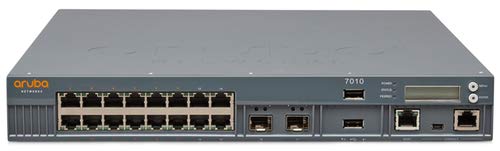
Aruba 7010 (Us) Fips/Taa 16P 150W Poe+ 10/100/1000Base-T 1Gbase-X Sfp 32 Ap And 2K Clnts Cntrlr Taa Sku'S Are Factory Direct Only Sku'S. No Backorders Allowed
⚠️ WARNING (California Proposition 65): This product may contain chemicals known to the State of California to cause cancer, birth defects, or other reproductive harm. For more information, please visit www.P65Warnings.ca.gov.
Frequently Asked Questions
Q: What are the dimensions of the Aruba 7010 US FIPS TAA Branch CTRL?A: The dimensions are four point five inches in length, fifteen point five one inches in width, and seventeen point two five inches in height.
Q: What is the model number of this network switch?A: The model number is JW703A, indicating it is part of the Aruba series.
Q: What category does the Aruba 7010 belong to?A: It belongs to the category of switches, designed for enterprise networking.
Q: How do I install the Aruba 7010 US FIPS TAA Branch CTRL?A: To install, connect the switch to your network via Ethernet cables and power it on. Follow the setup wizard for configuration.
Q: Is the Aruba 7010 suitable for small businesses?A: Yes, it is suitable for small to medium-sized businesses requiring reliable network management.
Q: Can I use the Aruba 7010 for advanced networking applications?A: Yes, this switch supports advanced networking applications, making it ideal for enterprise environments.
Q: How should I maintain the Aruba 7010 network switch?A: Regularly check for firmware updates and clean the device with a dry cloth to prevent dust buildup.
Q: What safety precautions should I take when using the switch?A: Always ensure proper ventilation, avoid exposure to moisture, and do not place heavy items on top of the switch.
Q: How should I store the Aruba 7010 when not in use?A: Store it in a cool, dry place, ideally in its original packaging to prevent damage.
Q: How does the Aruba 7010 compare to other switches?A: It offers robust features tailored for enterprise use, making it superior in performance compared to basic consumer switches.
Q: Is the Aruba 7010 a good choice for high traffic environments?A: Yes, it is designed to handle high traffic loads effectively, making it a reliable choice for busy networks.
Q: What should I do if the Aruba 7010 arrives damaged?A: Contact customer support immediately for return instructions and warranty coverage.
Q: Does the Aruba 7010 come with a warranty?A: Yes, it typically comes with a standard manufacturer's warranty, covering defects in materials and workmanship.
Q: What are common issues with the Aruba 7010?A: Common issues include connectivity problems and firmware setup errors, which can often be resolved through troubleshooting guides.
Q: Can I get technical support for the Aruba 7010?A: Yes, technical support is available through the manufacturer’s customer service channels.
Q: Is there a user manual available for the Aruba 7010?A: Yes, a user manual can be downloaded from the manufacturer's website for detailed instructions.