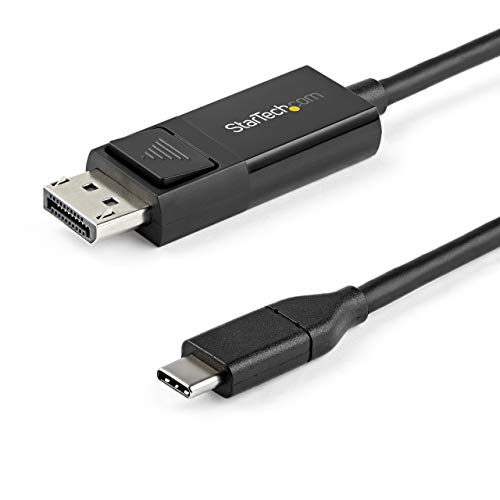
This Usb-C To Displayport 1.2 Cable Lets You Connect Your Usb Type-C (Or Thunderbolt 3) Device To A Displayport Display, Or A Dp Device To A Usb-C Display With Just One Cable. Easy & Clutter-Free Installation At 6.6 Ft. (2M) In Length, This Bidirectional Adapter Cable Delivers A Direct Connection That Eliminates Excess Adapters And Cabling, Ensuring A Tidy, Professional Installation. For Shorter Installations, We Also Offer A 3.3 Ft. (1M) Usb-C To Dp Cable, Enabling You To Choose The Right Cable Length For Your Custom Installation Needs. As Well, The Cable Works With Both Mac And Windows Devices And Allows For Plug-And-Play Installation, Removing The Need For Any Additional Software Or Drivers. Convenient, Bi-Directional Support Use This Usb-C To Displayport Adapter Cable To Output 4K Video And Audio To A Dp Display From The Usb Type-C (Or Thunderbolt 3) Port On Your Laptop Or Mobile Device. With Bi-Directional Capabilities, This Cable Can Also Connect Your Displayport-Enabled Devices To A Display Featuring Usb-C Input. Ultra Hd 4K Resolution At 60Hz This Usb-C To Dp 1.2 Adapter Cable Lets You Harness The Video Capabilities That Are Built Into Your Computers Usb Type-C (Or Displayport) Connection, To Deliver The Astonishing Quality Of Uhd To Your 4K Display. For Even Higher Resolution And Bandwidth Support, We Offer A Usb-C To Dp 1.4 Cable, Which Is The Perfect Accessory For Early Adopters Of 8K. Cdp2Dp2Mbd Is Backed By A Startech. Note: Your Usb 3.1 Type-C Device Must Support Dp Alt Mode To Work With This Cable.
⚠️ WARNING (California Proposition 65): This product may contain chemicals known to the State of California to cause cancer, birth defects, or other reproductive harm. For more information, please visit www.P65Warnings.ca.gov.
Frequently Asked Questions
Q: What is the length of the StarTech.com USB C to DisplayPort cable?A: The cable is six point six feet long. This length allows for flexible placement between devices without excessive clutter.
Q: What materials is the USB C to DisplayPort cable made of?A: The cable is made of plastic. This ensures durability while maintaining a lightweight design for easy handling.
Q: What resolutions does this cable support?A: The cable supports ultra high definition four K resolution at sixty hertz. This makes it ideal for high-quality video output.
Q: How do I connect my USB-C device to a DisplayPort display?A: Simply plug the USB-C end into your device and the DisplayPort end into the monitor. The cable supports plug-and-play installation.
Q: Can I use this cable with a Thunderbolt 3 device?A: Yes, this cable is compatible with Thunderbolt 3 devices. It allows for a direct connection to DisplayPort displays.
Q: Is the cable suitable for both Windows and Mac devices?A: Yes, it works with both Mac and Windows devices. This versatility makes it a great choice for various users.
Q: How should I store the USB C to DisplayPort cable?A: Store the cable in a cool, dry place to prevent damage. Avoid tight bends to maintain the integrity of the cable.
Q: Is this cable easy to install?A: Yes, it features a driverless setup for any operating system. This minimizes installation issues and ensures quick connectivity.
Q: What should I do if the cable does not work?A: First, check if your device supports DP Alt Mode. If it does, try reconnecting the cable or testing it with another device.
Q: Does this cable support HDR content?A: Yes, it supports high dynamic range content. This enhances visual quality for compatible displays.
Q: What is the maximum bandwidth of this cable?A: The cable supports a bandwidth of twenty-one point six gigabits per second. This ensures high-quality video transmission.
Q: Can this cable connect a DisplayPort device to a USB-C monitor?A: Yes, it has bi-directional capabilities. This allows users to connect DisplayPort devices to USB-C displays.
Q: What type of connection does this cable use?A: It uses a reversible USB-C connection. This feature simplifies the connection process without worrying about orientation.
Q: Is this cable compatible with ultrawide monitors?A: Yes, it supports USB-C ultrawide monitors from brands like LG and Dell. This makes it suitable for a variety of setups.
Q: What kind of warranty does this cable come with?A: The cable is backed by StarTech.com, which typically offers a limited warranty on its products. Check the specifics for details.
Q: Does this cable eliminate the need for additional adapters?A: Yes, it provides a direct connection that reduces clutter. This ensures a more organized and professional setup.
This USB-C to DP cable has been a fantastic addition to my gaming setup. The 6 ft length is perfect, and there’s no noticeable lag or loss of quality. My games look amazing now, and it was super easy to plug and play. Highly satisfied!
J
Jasmine Patel
Solid Cable for My Monitor
I bought this 6 ft USB-C to DisplayPort cable to connect my laptop to an external monitor. The picture quality is really sharp, and I love the length — it gives me some freedom to arrange my workspace. Definitely a good purchase if you're looking for a reliable connection!
E
Emily Rodriguez
Functional, but delivery was slow
The cable works fine for connecting my laptop to the monitor, but it took longer to arrive than expected. I was a bit frustrated with the wait, but once it got here, it did its job well. Just keep that in mind if you're in a hurry!
L
Liam O'Reilly
Poor Quality After Short Use
I have to give this cable a low rating because it stopped working after just a few weeks. Initially, the connection was great, but now it won't connect at all. Really disappointed, as I was hoping for something more durable.