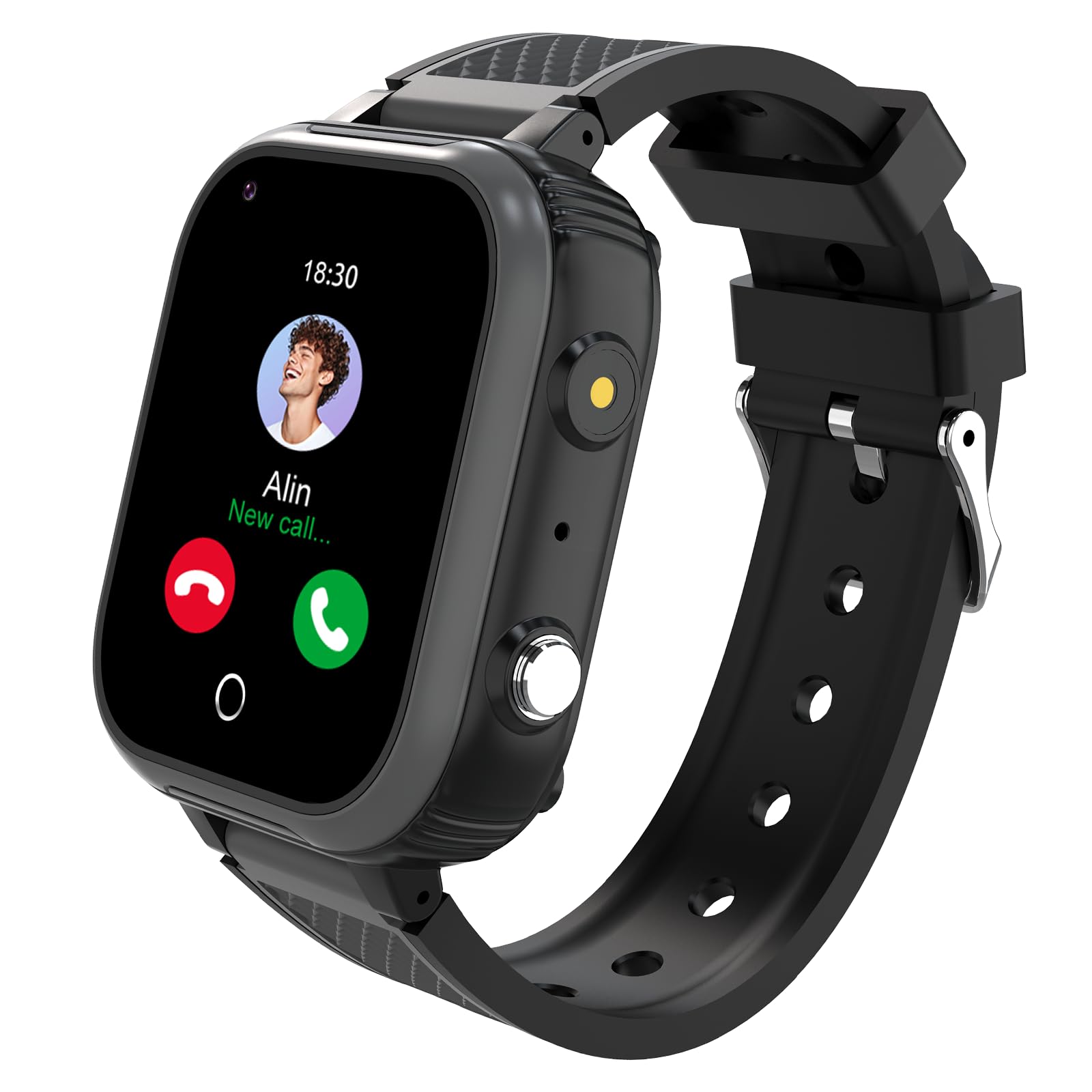
The 4G Smartwatch For Kids Offers An Ideal Balance Of Parental Peace Of Mind And Independence For Children, Making It A Perfect Birthday Gift Choice For Both Boys And Girls.&Nbsp; 4G Smart Watch Feature-Rich Device Combines Communication And Safety Functionalities, Including Gps Tracking, Video Calling Capabilities, And Voice/Text Messaging Through Popular Apps Like Whatsapp. The Sleek Black Design Features A Clear Display Screen And Comfortable Band Perfect For Daily Wear.&Nbsp; Kids Can Enjoy Multimedia Features Including Music Playback, Built-In Camera, And A Pedometer For Activity Tracking. The Watch Comes Equipped With Essential Safety Features Like An Sos Button For Emergencies And A Special Class Mode To Minimize Distractions During School Hours. With Wifi And Bluetooth Connectivity, This Smart Watch Provides Seamless Integration With Android Devices, Accessing Various Apps Through The Android App Store.&Nbsp; The Device Offers An Ideal Balance Of Parental Peace Of Mind And Independence For Children, Making It A Perfect Birthday Gift Choice For Both Boys And Girls. How Does It Work: (You Should Do These Steps One By One) : &Nbsp;Step 1: Make Sure Your Sim Card Is Activated, You Can Test It On Your Cell Phone.&Nbsp; Step 2: Turn Off The Watch First(Must Turn Off, Otherwise Unknown Error)&Nbsp; Step 3: Insert A Nano Sim Card(With Data Plan And Call Function) Inside The Sim Slot.&Nbsp; Step 4: Turn On The Watch And Wait For 5 Seconds. Find Qr Code In The Watch Menu And There Is A Registration Qr Code?&Nbsp; Step 5: Download The App (Setracker2) On Your Mobile, Scan The Qr Code On The User Guide To Download App, Register Your Account To Log In App.&Nbsp; Step 6: Realize All The Functions Via The App.&Nbsp;&Nbsp; &Nbsp;How To Activate The Card And Use It In The Smart Watch For Kids? 1.Please Make Sure The 4G Signals Cover Your Surrondings 2.Recommend Card: Speedtalk 4G Nano Sim Card(Frequency Band:B1/B2/B4/B5/B12/B17/B28A)&Nbsp; 3.The New Sim Card, You Need To Call The Coverage To Activate The Caller Id, Gps Data, Traffic, Internet Access And Call Function Of Your Card, And Make Sure That Your Nano Sim Card Has The Frequency Band Supported By The Watch&Nbsp; &Nbsp;(After The Sim Card Is Activated, It May Take 24 Hours For Datas To Be Synchronized And Updated With Your Smart Watch For Kids.&Nbsp; Before Inserting The Card To This Kids Smart Watch, You Can Insert It To Your Phone For Checking. Whether It Is A 4G Signal, And Whether It Can Normally Use Functions Such As Calling. If It Can Be Used Normally On Your Phone, Then You Can Call The Operator Of The Nano Sim Card To Consult The Frequency Band. As Long As It Belongs To The Above Frequency Band Supported By The Watch, Then Your Nano Sim Card Can Be Used On The Watch)&Nbsp; &Nbsp; - Network(We Recommend 4G):&Nbsp; - 2G:Gsm: 850 1900&Nbsp; - 3G:Wcdma: B1/2/5&Nbsp; -4G:Fdd-Lte: B1/2/4/5/7/12/17/28A&Nbsp; &Nbsp;
⚠️ WARNING (California Proposition 65): This product may contain chemicals known to the State of California to cause cancer, birth defects, or other reproductive harm. For more information, please visit www.P65Warnings.ca.gov.
Frequently Asked Questions
Q: What size is the 4G Smart Watch for Kids?A: The watch measures nine point eight inches in length, one point eight inches in width, and zero point six inches in height.
Q: What materials are used in the smartwatch?A: The smartwatch features a durable design, but specific materials are not disclosed in the product details.
Q: What is the battery capacity of the smartwatch?A: The smartwatch has an eight hundred milliamp-hour battery, allowing for long-lasting use.
Q: How do I set up the smartwatch for my child?A: To set up, first ensure the Nano SIM card is activated, then insert it into the watch and follow the app instructions.
Q: Is the smartwatch suitable for children aged four to twelve?A: Yes, this smartwatch is designed specifically for kids aged four to twelve, making it an ideal gift for this age group.
Q: Can I wear the smartwatch while swimming?A: No, while the smartwatch is IP67 waterproof, it is not recommended to soak it in water to prevent damage.
Q: How do I clean the smartwatch?A: To clean the smartwatch, use a soft, damp cloth to wipe the surface, avoiding harsh chemicals that could damage it.
Q: What should I do if the smartwatch is not charging?A: If the smartwatch is not charging, ensure the charging cable is securely connected and check if the outlet is functioning properly.
Q: Does the smartwatch support voice and video calling?A: Yes, the smartwatch supports both voice and video calling, allowing parents to stay connected with their children.
Q: What safety features does the smartwatch have?A: The smartwatch includes an SOS button that can call emergency contacts if the child is in danger.
Q: Can the smartwatch track my child's location?A: Yes, the smartwatch has GPS, WiFi, and LBS capabilities for accurate real-time location tracking.
Q: How do I activate the SIM card for use with the smartwatch?A: Activate the SIM card by calling the provider to enable caller ID, GPS, and internet access before inserting it into the watch.
Q: What is the warranty policy for the smartwatch?A: The warranty policy details are not provided, but you can contact customer support for information on issues or returns.
Q: Is there a specific SIM card recommended for this smartwatch?A: Yes, it is recommended to use a Speedtalk 4G Nano SIM card that supports the required frequency bands.
Q: What happens if the smartwatch is damaged during shipping?A: If the smartwatch arrives damaged, contact customer support for assistance with returns or exchanges.
Q: Does the smartwatch have a music playback feature?A: Yes, the smartwatch includes a music playback feature, allowing kids to enjoy their favorite songs.