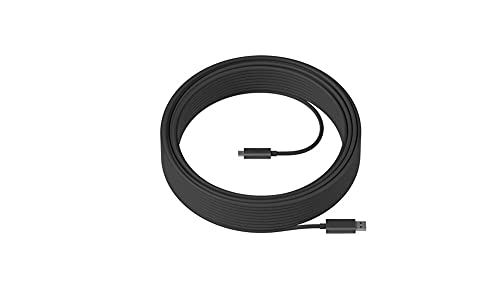
Manufacturer: Logitech. Manufacturer Part Number: 939-001805. Brand Name: Logitech. Product Name: Usb Data Transfer Cable. Product Type: Data Transfer Cable. [Technical Information] Cable Type: Usb. Cable Length: 147.64 Ft. Connector On First End: Usb 3.1 Usb. Connector On Second End: Usb 3.1 Usb. Device Supported: Pc. Peripheral Device. Data Transfer Rate: 10 Gbit/S. [Physical Characteristics] Color: Black.
⚠️ WARNING (California Proposition 65): This product may contain chemicals known to the State of California to cause cancer, birth defects, or other reproductive harm. For more information, please visit www.P65Warnings.ca.gov.
Frequently Asked Questions
Q: What is the length of the Logitech Strong USB cable?A: The Logitech Strong USB cable is forty-five meters long, which is approximately one hundred forty-seven point six feet. This length is ideal for connecting devices across large spaces like meeting rooms and open offices.
Q: What materials are used in the Logitech Strong USB cable?A: The Logitech Strong USB cable is made from iron, ensuring durability and strength. This material contributes to its high tensile strength and crush load capacity.
Q: What is the maximum data transfer speed of this USB cable?A: The Logitech Strong USB cable supports a maximum data transfer speed of ten gigabits per second. This speed is suitable for high-bandwidth devices, making it perfect for commercial applications.
Q: How do I install the Logitech Strong USB cable?A: To install the Logitech Strong USB cable, simply run it through walls or above ceilings as needed. Its plenum-rated design allows safe installation in various environments, including standard three-quarter inch conduit.
Q: Is the Logitech Strong USB cable compatible with older devices?A: Yes, the Logitech Strong USB cable is backward-compatible with self-powered USB two point zero and three point x devices. This ensures versatility in connecting both new and older peripherals.
Q: How do I use the Logitech Strong USB cable?A: To use the Logitech Strong USB cable, connect one end to your device and the other end to the host PC. Ensure both devices are powered for optimal performance.
Q: How should I maintain the Logitech Strong USB cable?A: To maintain the Logitech Strong USB cable, avoid bending or twisting it excessively. Store it in a cool, dry place when not in use to prevent damage.
Q: Can I run the Logitech Strong USB cable outdoors?A: No, the Logitech Strong USB cable is not designed for outdoor use. It is plenum-rated for indoor installations, which means it should be used in controlled environments.
Q: What is the crush load capacity of this USB cable?A: The Logitech Strong USB cable can withstand a crush load of one thousand kilograms. This makes it suitable for use in commercial environments where heavy equipment may be present.
Q: Is the Logitech Strong USB cable safe for installation in walls?A: Yes, the Logitech Strong USB cable is plenum-rated and Eca certified for safe installation in walls and ceilings. This certification ensures compliance with safety standards.
Q: What are the available lengths for this USB cable?A: The Logitech Strong USB cable is available in three lengths: ten meters, twenty-five meters, and forty-five meters. This variety allows users to choose the best length for their needs.
Q: What color is the Logitech Strong USB cable?A: The Logitech Strong USB cable is black in color. This neutral color blends well in various installation environments.
Q: What devices can I connect using the Logitech Strong USB cable?A: You can connect self-powered USB two point zero and three point x devices, including Logitech Tap, Rally Camera, and MeetUp. This makes it versatile for multiple applications.
Q: What should I do if my Logitech Strong USB cable arrives damaged?A: If your Logitech Strong USB cable arrives damaged, contact the retailer or Logitech support for assistance with returns or exchanges. They can guide you through the process.
Q: Does the Logitech Strong USB cable come with a warranty?A: Yes, the Logitech Strong USB cable typically comes with a warranty. Check the packaging or Logitech's website for specific warranty details and terms.
Unfortunately, the 45m length of this cable was more than I needed, and it feels like the quality wasn't great. It started to fray at one end after just a month. I guess I had high hopes for a stronger cable. Disappointed!
M
Marco Alvarez
Good cable, but a bit bulky
This USB 3.1 cable is definitely sturdy and reliable for data transfer, but I found it a bit bulky to manage. It's nice for long distances, but I wish it was a little easier to store when not in use. Still a decent buy!
E
Emma Chen
Solid performance for charging
I've been using this 45m USB 3.1 cable for a few weeks now. It's super strong and connects my devices without any hiccups. The length is perfect for reaching from my desk to the outlet across the room!