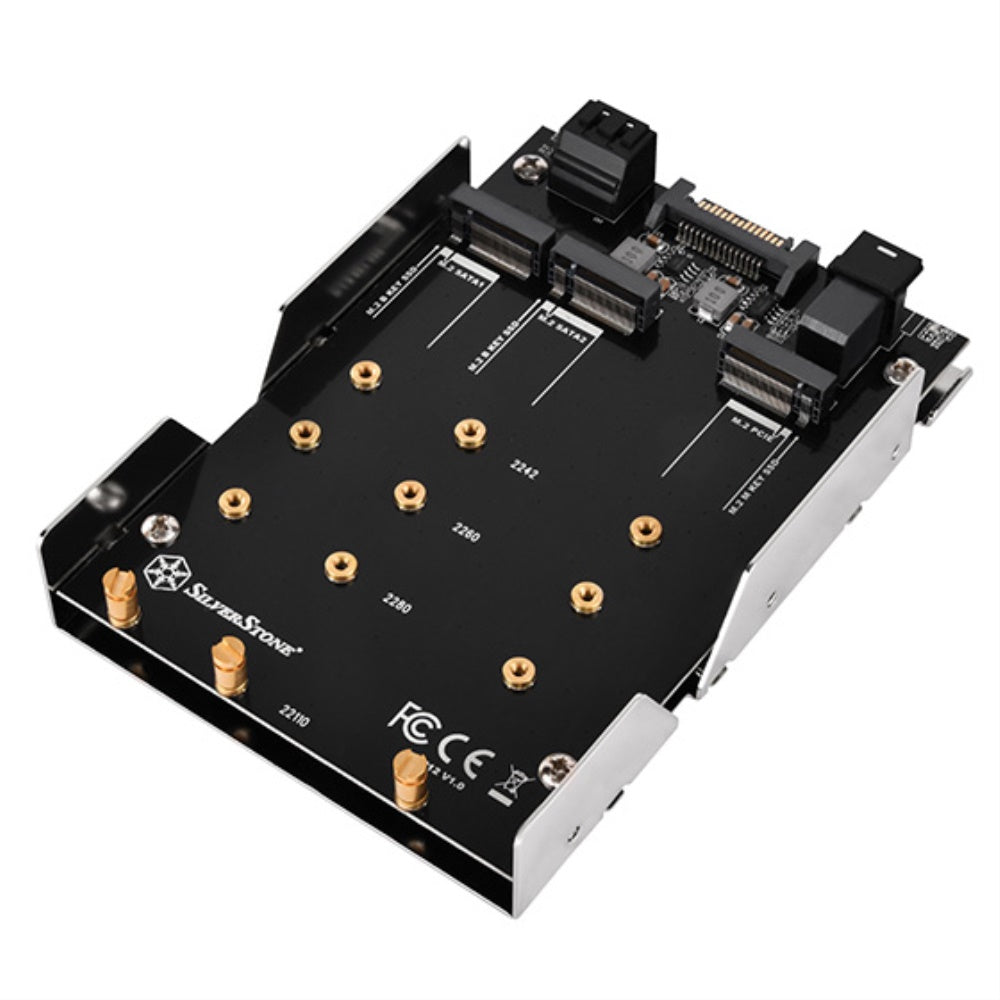
The SilverStone SDP12 is an innovative adapter designed for users who want to integrate high-speed M.2 devices, such as SSDs, into their existing desktop PC setup. This versatile drive bay converter maximizes space and enhances storage capabilities, making it an ideal solution for those seeking to upgrade their system performance with additional storage options.
Constructed with a focus on functionality, the SDP12 allows for the installation of dual M.2 devices (B key) alongside a PCIe NVMe SSD. This design not only optimizes space but also significantly improves data transfer rates. The adapter supports various drive lengths, accommodating a range of M.2 SSDs, and is engineered for straightforward installation, ensuring users can expand their storage with ease. The SilverStone SDP12 is a practical choice for anyone looking to enhance their desktop's storage without compromising on speed or efficiency.
Key Features:
Mounts two SATA M.2 SSDs and one NVMe M.2 SSD into a single 3.5” drive bay, maximizing storage capacity.
Compatible with multiple drive lengths: 42mm, 60mm, 80mm, and 110mm, providing flexibility in storage options.
Supports PCIe NVMe M.2 SSD widths up to 30.5mm, ensuring a wide range of drive compatibility.
Enhances system performance by replacing traditional platter drives with up to three M.2 SSDs, resulting in faster data access.
Features exclusive stud design for easy fixing on pre-drilled mounting holes, simplifying installation and removal.
Constructed by SilverStone Technology, a trusted brand known for high-quality computer components.
Compact design maximizes space efficiency while maintaining robust performance in any desktop environment.
The SilverStone SDP12 is an excellent choice for gamers, content creators, and professionals who demand high-speed, reliable storage solutions. Its intelligent design offers a seamless way to upgrade your desktop's storage capacity, allowing users to harness the full potential of M.2 SSD technology. Invest in the SDP12 today to experience enhanced performance and efficiency in your computing tasks.
⚠️ WARNING (California Proposition 65): This product may contain chemicals known to the State of California to cause cancer, birth defects, or other reproductive harm. For more information, please visit www.P65Warnings.ca.gov.
Frequently Asked Questions
Q: What are the dimensions of the SilverStone SDP12 adapter?A: The dimensions of the SilverStone SDP12 are four point zero two inches in length, zero point nine eight inches in width, and five point seven five inches in height.
Q: What type of materials is the SilverStone SDP12 made of?A: The specific materials of the SilverStone SDP12 are not mentioned, but it is designed to securely hold M.2 SSDs.
Q: How many drives can the SilverStone SDP12 support?A: The SilverStone SDP12 can support two SATA M.2 SSDs and one NVMe M.2 SSD, maximizing storage in a single drive bay.
Q: How do I install the SilverStone SDP12 adapter?A: To install the SilverStone SDP12, simply mount it into a three point five inch drive bay, then secure your M.2 SSDs using the provided studs.
Q: Is the SilverStone SDP12 compatible with all M.2 SSD sizes?A: Yes, the SilverStone SDP12 supports multiple drive lengths, including forty-two millimeters, sixty millimeters, eighty millimeters, and one hundred ten millimeters.
Q: Can I use the SilverStone SDP12 with my existing desktop computer?A: Yes, the SilverStone SDP12 is designed for use with existing desktop computers, allowing for speedy SSD installation.
Q: How should I clean the SilverStone SDP12 adapter?A: To clean the SilverStone SDP12, use a soft, dry cloth to wipe down the surface and avoid using any liquids.
Q: What precautions should I take when installing the SDP12?A: Ensure your computer is powered off and unplugged before installation, and handle the adapter by its edges to avoid static damage.
Q: How do I store the SilverStone SDP12 when not in use?A: When not in use, store the SilverStone SDP12 in a cool, dry place to prevent dust accumulation and potential damage.
Q: Is the SilverStone SDP12 suitable for beginners?A: Yes, the SilverStone SDP12 is user-friendly and suitable for beginners looking to install M.2 SSDs in their desktop.
Q: What is the warranty policy for the SilverStone SDP12?A: The warranty policy details for the SilverStone SDP12 can typically be found on the manufacturer's website or product packaging.
Q: What if my SilverStone SDP12 arrives damaged?A: If your SilverStone SDP12 arrives damaged, contact the retailer's customer service for return or exchange options.
Q: Can I use both SATA and NVMe SSDs at the same time?A: Yes, the SilverStone SDP12 allows you to use two SATA M.2 SSDs and one NVMe M.2 SSD simultaneously.
Q: Does the SilverStone SDP12 improve system performance?A: Yes, using the SilverStone SDP12 to replace a traditional platter drive with M.2 SSDs can significantly improve system performance.
Q: What is the maximum width for the PCIe NVMe SSD supported by the SDP12?A: The SilverStone SDP12 supports PCIe NVMe M.2 SSDs with a maximum width of thirty point five millimeters.
Q: Is the SilverStone SDP12 compatible with all desktop brands?A: Yes, as long as the desktop has a three point five inch drive bay, the SilverStone SDP12 should be compatible with most brands.