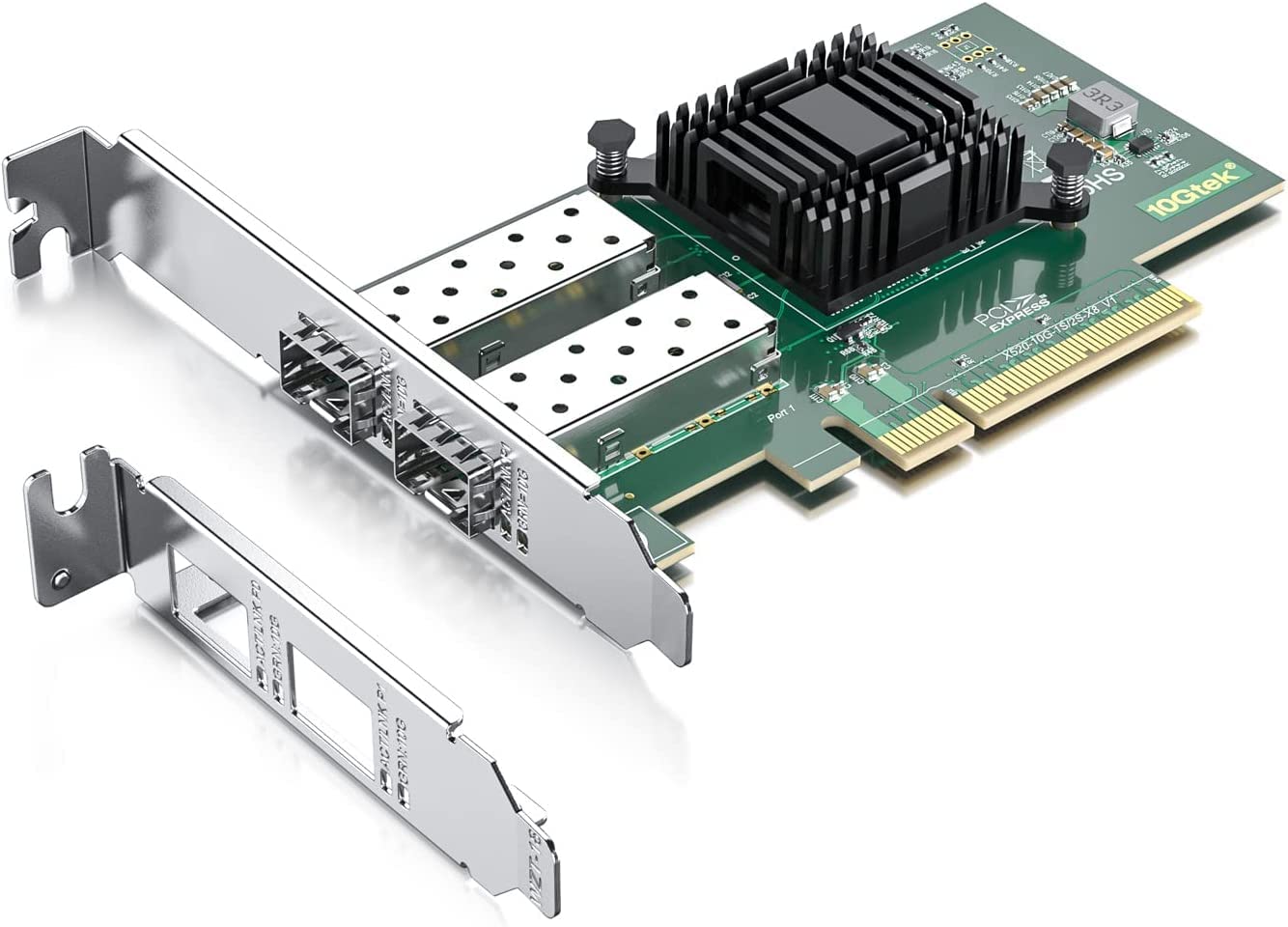
P/N: X520-10G-2S (Compare To Intel X520-Da2) Ethernet Controller(S): 10Gtek Controllerconnector & Cable Medium:Sfp+ Direct Attach Copper/Sfp+ Cabling Type: Sfp+ Direct Attached/Lc Fiber Cable Twin Axial Cabling Up To 10 M Ports: Dual Port Ethernet Converged Network And Server Adaptersconnectivity You Can Count Onreliable Performance? Broad Os Support ? Optimized For Intelg Architecture ? Low Latency Ethernet Best Choice For Virtualization? Leadership In Virtual System Scalability With Flexible, Port Partitioning (Fpp) And Intelligent Offload ? Broad Vm Support (Vmware Esxi*, Microsoft Hyper-V*,Kvm* And Xen*) Unified Networking? Full Line Of 10Gbe Converged Network Adapters (Cna) ? Fibre Channel Over Ethernet ? Iscsi With Trusted, Native Os Support ? Support For Data Center Bridging With Lossless Ethernet Platform Optimization? Integrated Pci Express* ? Direct Data I/O Technology
⚠️ WARNING (California Proposition 65): This product may contain chemicals known to the State of California to cause cancer, birth defects, or other reproductive harm. For more information, please visit www.P65Warnings.ca.gov.
Frequently Asked Questions
Q: What is the size of the 10Gtek X520-DA2 network card?A: The dimensions of the 10Gtek X520-DA2 network card are ten point thirty-five inches in length, six point forty-two inches in width, and two point seventeen inches in height.
Q: What type of controller does the 10Gtek X520-DA2 use?A: The 10Gtek X520-DA2 uses the Intel eight thousand two hundred fifty-nine ES controller, known for its reliability and performance in network tasks.
Q: What ports does the 10Gtek X520-DA2 have?A: The card features dual SFP+ ports, allowing connections to ten gigabit SFP+ modules, direct attach copper, or active optical cables.
Q: How do I install the 10Gtek X520-DA2 network card?A: To install the 10Gtek X520-DA2, insert it into a PCI Express X8 or X16 slot on your motherboard and secure it with the included low-profile bracket.
Q: Is the 10Gtek X520-DA2 compatible with VMware?A: Yes, the 10Gtek X520-DA2 is compatible with VMware ESXi, along with other virtualization platforms like Microsoft Hyper-V and KVM.
Q: Can I use the 10Gtek X520-DA2 with Windows 11?A: Yes, the 10Gtek X520-DA2 can work with Windows Eleven, but it requires correct driver installation for optimal performance.
Q: How do I maintain the 10Gtek X520-DA2 network card?A: To maintain the 10Gtek X520-DA2, keep it free of dust and ensure proper ventilation in your computer case to avoid overheating.
Q: Is the 10Gtek X520-DA2 safe for server environments?A: Yes, the 10Gtek X520-DA2 is designed for reliable performance in server environments, supporting features such as I/O virtualization.
Q: What warranty does the 10Gtek X520-DA2 come with?A: The 10Gtek X520-DA2 includes a three-year warranty and lifetime technical support, providing peace of mind for users.
Q: How does the 10Gtek X520-DA2 compare to the Intel X520-DA2?A: The 10Gtek X520-DA2 is a cost-effective alternative to the Intel X520-DA2, offering similar features and performance without the higher price tag.
Q: What should I do if my 10Gtek X520-DA2 arrives damaged?A: If your 10Gtek X520-DA2 arrives damaged, contact customer support for assistance with returns or exchanges as per their return policy.
Q: Can I use the 10Gtek X520-DA2 in a low-profile case?A: Yes, the 10Gtek X520-DA2 comes with a low-profile bracket, making it suitable for installation in small form factor or low-profile computer cases.
Q: What operating systems are compatible with the 10Gtek X520-DA2?A: The 10Gtek X520-DA2 is compatible with several operating systems, including Windows Server versions, Windows seven, eight, ten, and various Linux distributions.
Q: How does the 10Gtek X520-DA2 handle network traffic?A: The 10Gtek X520-DA2 is optimized for low latency Ethernet and supports features like Fiber Channel over Ethernet and iSCSI for efficient data handling.
Q: Does the 10Gtek X520-DA2 support hot swapping?A: No, the 10Gtek X520-DA2 does not support hot swapping, so it should be installed or removed only when the computer is powered off.
Q: What is the maximum cabling distance supported by the 10Gtek X520-DA2?A: The 10Gtek X520-DA2 supports cabling distances of up to ten meters when using SFP+ direct attach copper or LC fiber cables.