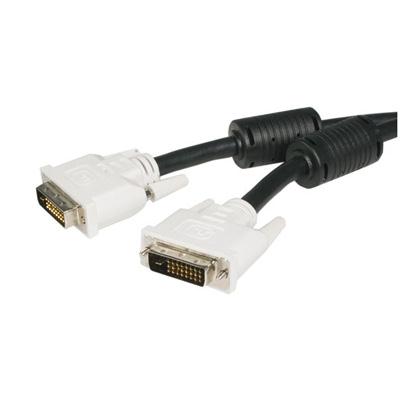
Provides A Highspeed Crystalclear Connection To Dvi Digital Devices Connect A Desktop Or Laptop Computer To A Dvid Dual Link Display Or Projector Highspeed Digital Transmission Rate Of Up To 9.9 Gbitssec Ferrite Core Eliminates Emi Interference Digital Monitor Cable 10Ft Dual Link Dvid Cable Will Support The Asus Vs228Hp Acer G246Hl Hp Pavillion C4D33Aa#Aba Viewsonic Va2446M At Their Max Resolutions As Well As Monitors With Resolutions Of Up To 2560X1600
⚠️ WARNING (California Proposition 65): This product may contain chemicals known to the State of California to cause cancer, birth defects, or other reproductive harm. For more information, please visit www.P65Warnings.ca.gov.
Frequently Asked Questions
Q: What is the length of the StarTech.com Dual Link DVI Cable?A: The length is ten feet. This provides ample distance for connecting devices without compromising signal quality.
Q: What type of connectors does this DVI cable have?A: It has two male twenty-four pin DVI-D connectors. This allows for a reliable digital connection between devices.
Q: What is the maximum supported resolution for this DVI cable?A: The maximum supported resolution is two thousand five hundred sixty by one thousand six hundred. This enables high-definition video quality.
Q: What materials are used in the construction of this DVI cable?A: The cable is made of copper conductors and features nickel plating on the connectors. This combination ensures durability and optimal signal transmission.
Q: What is the data transfer rate of the DVI cable?A: It has a data transfer rate of up to nine point nine gigabits per second. This high speed is ideal for transferring large video files.
Q: How do I connect the StarTech.com DVI cable to my devices?A: Simply plug the male connectors into the DVI ports of your desktop computer and monitor. Ensure both devices are powered off during setup.
Q: Is this DVI cable compatible with all monitors?A: Yes, it is compatible with all DVI-D monitors and projectors. This versatility makes it suitable for a wide range of display devices.
Q: Can I use this DVI cable for gaming?A: Yes, it is suitable for gaming. The high data transfer rate ensures smooth graphics and quick response times.
Q: Is this DVI cable suitable for professional use?A: Yes, it is ideal for professional settings. Its high resolution and data transfer capabilities meet the demands of graphic design and video editing.
Q: What certifications does this DVI cable have?A: It is compliant with DVI DDWG standards and has FCC certification. These certifications ensure quality and reliability.
Q: How do I clean and maintain this DVI cable?A: To clean, use a soft, dry cloth to wipe the connectors. Avoid using liquids that could damage the cable.
Q: What should I do if the cable does not work?A: Check the connections to ensure they are secure. If the issue persists, try using the cable with different devices.
Q: Does this DVI cable have a warranty?A: Yes, it comes with a lifetime warranty. This provides peace of mind regarding its durability and performance.
Q: Is this DVI cable environmentally friendly?A: Yes, it is environmentally friendly and complies with RoHS standards. This means it is safe for use without harmful materials.
Q: Can I use this cable for hot plugging displays?A: Yes, this cable supports hot plugging of DVI display devices. You can connect or disconnect the cable while the computer is running.