

Cart
0

Viewsonic 86(85.6) 20 Points Multi Pcap Touch, Vs18624 (Pcap Touch)
Free Standard Shipping Across USA
Vendor: Viewsonic
Type: Monitors & Displays
Sku: WBEEAB0B5PM4RFT
Availability: Sold Out
Couldn't load pickup availability
Guarantee safe checkout

Sold by Electroeshop, an authorized reseller.
Returns accepted within 30 days | support@electroeshop.com
Shipping Information
- Free Standard Shipping — United States only
- Processing Time: 3–5 business days
- Estimated Delivery: 6–10 business days after dispatch
- Double-boxed, fully insured & discreetly packaged
- Tracking number sent via email once dispatched
Returns & Refund
Returns accepted within 30 days of delivery.
Damaged or Defective Item
Free return shipping + replacement or full refund
Wrong Item Received
Free return shipping + replacement or full refund
Change of Mind
Return shipping at customer's expense · 25% restocking fee applies
All returns require a Return Authorization (RA) number before sending.
View Full Return & Refund Policy
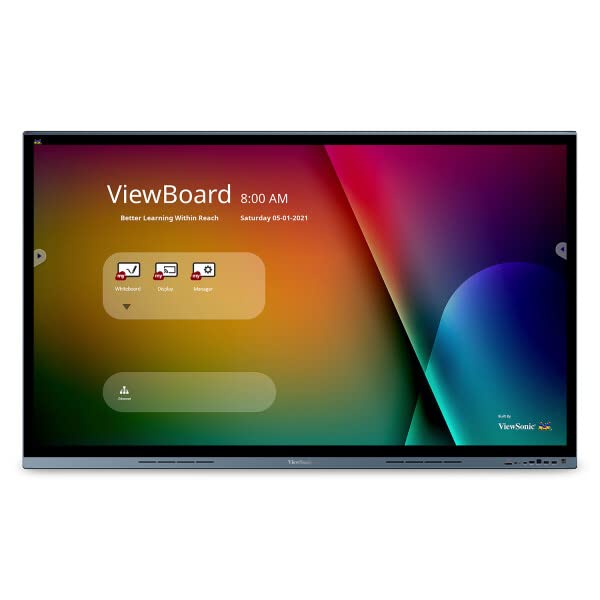
Viewsonic 86(85.6) 20 Points Multi Pcap Touch, Vs18624 (Pcap Touch)
$6,742.97

Frequently Asked Questions
- Q: What are the dimensions of the ViewSonic IFP8662 monitor? A: The ViewSonic IFP8662 features a large eighty-six inch display with an eighty-five point six inch viewable area. This provides ample screen space for presentations and collaborative work.
- Q: What type of touchscreen technology does the ViewSonic IFP8662 use? A: The ViewSonic IFP8662 utilizes projected capacitive technology for its touchscreen. This ensures precise and responsive touch interactions for users.
- Q: What is the resolution of the ViewSonic IFP8662 display? A: The display resolution is four thousand by two thousand one hundred sixty pixels, also known as 4K Ultra HD. This offers sharp and detailed visuals for various applications.
- Q: How many touch points does the ViewSonic IFP8662 support? A: The IFP8662 supports up to twenty touch points simultaneously. This allows multiple users to interact with the screen at the same time.
- Q: What connectivity options are available with the ViewSonic IFP8662? A: The ViewSonic IFP8662 offers versatile connectivity options including HDMI, VGA, and USB ports. These options facilitate easy connection to various devices.
- Q: Is the ViewSonic IFP8662 suitable for huddle spaces? A: Yes, the IFP8662 is ideal for interactive huddle spaces. Its large display and multi-touch capabilities promote collaboration among team members.
- Q: Can I use a stylus on the ViewSonic IFP8662 touchscreen? A: Yes, you can use both fingers and styluses on the touchscreen. This feature enhances the interactive experience for drawing and writing.
- Q: How can I connect my device to the ViewSonic IFP8662? A: You can connect your device to the IFP8662 using the convenient one-wire USB-C connection. This simplifies the setup process for meetings and presentations.
- Q: What is the best way to clean the ViewSonic IFP8662 screen? A: To clean the screen, use a microfiber cloth and a gentle screen cleaner. Avoid using harsh chemicals that could damage the touchscreen.
- Q: Is the ViewSonic IFP8662 good for digital signage? A: Yes, the IFP8662 is suitable for digital signage applications. Its high resolution and large size make it effective for displaying information and advertisements.
- Q: What should I do if the ViewSonic IFP8662 arrives damaged? A: If the IFP8662 arrives damaged, contact customer support immediately for assistance. They can guide you through the return or replacement process.
- Q: Does the ViewSonic IFP8662 come with a warranty? A: Yes, the ViewSonic IFP8662 typically comes with a limited warranty. Check the product documentation for specific warranty details and coverage.
- Q: What types of presentations is the ViewSonic IFP8662 best suited for? A: The IFP8662 is well-suited for interactive presentations, collaborative work, and educational settings. Its features enhance audience engagement and participation.
- Q: Can multiple users write on the ViewSonic IFP8662 at the same time? A: Yes, multiple users can write or draw on the IFP8662 screen simultaneously. This feature supports collaborative brainstorming sessions.
- Q: What is the ideal environment for using the ViewSonic IFP8662? A: The ideal environment for the IFP8662 includes executive boardrooms and collaborative workspaces. Its design promotes effective communication and idea sharing.